
Disclosure: This page may contain affiliate links. Prices were checked on the date shown and may change.
An introduction to Universal Audio Lexicon 224 Digital Reverb, based on information from the maker and distributors: what it does, how to use it and who it may suit. It is not scored.
From the moment it was unleashed in 1978, the Lexicon 224 Digital Reverb — with its tactile, slider-based controller and famously lush reverb tail — single-handedly defined the sound of an entire era.
— Universal Audio official site
What is Lexicon 224 Digital Reverb?
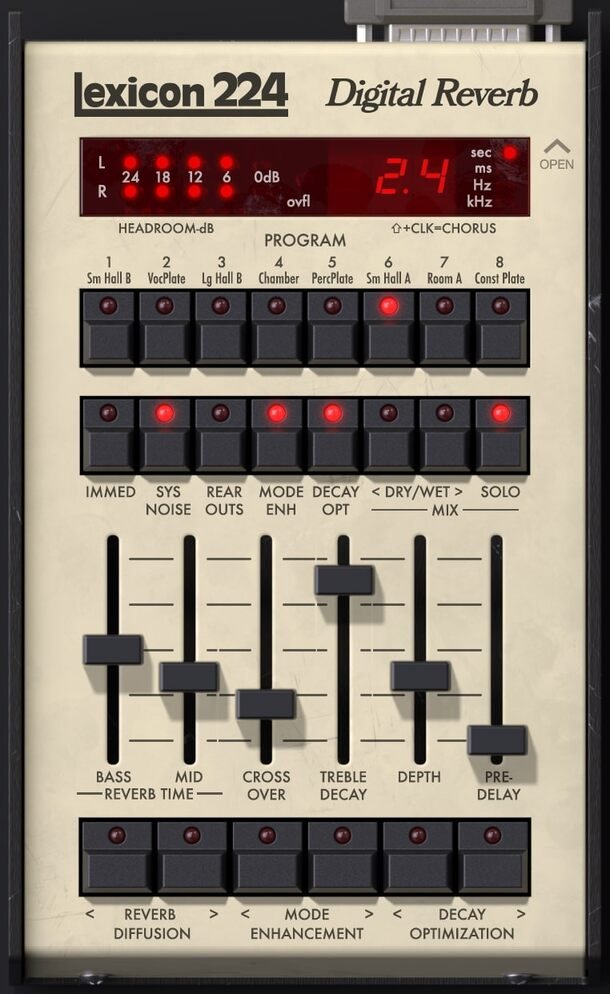
Lexicon 224 Digital Reverb is a reverb plug-in from Universal Audio (UA) that recreates the Lexicon 224 hardware digital reverb released in 1978, including its distinctive slider-based control surface.
It uses the same algorithms and control-processor code as the original hardware, based on the final firmware version 4.4, and includes eight reverb programs plus one chorus program. The original input transformers and early 12-bit gain-stepping converters are modeled as well.
Every parameter of the original is exposed as a dedicated slider or button, including the Bass/Mid split decay, Crossover, Treble Decay, Depth, Predelay and Diffusion.
Both the UAD Native and the Apollo Realtime / UAD-2 versions are included. The Native version runs on a Mac or Windows computer without UA hardware, and can be used on drums, vocals, guitars and more.
Key features
Eight reverbs and a chorus
Eight reverb programs and one chorus program are included. UA points to the Plate and Concert programs for vintage 80s-style sounds.
Firmware 4.4 code
It is based on the final, hard-to-find firmware version 4.4, which is useful when you want behavior that follows the original design.
Split decay
Bass and mid decay times are set separately, with a Crossover control to move the split point and Treble Decay to roll off highs, which shapes how bright or heavy the tail feels.
System Noise and hidden controls
The System Noise control turns the original's dynamic noise (gain stepping, parameter zippering, quiescent noise) on or off. Clicking Open reveals input/output gain, Pitch Shift and a Bug Fix mode for the Hall B and Chorus programs.
Presets by well-known users
Presets from Chuck Zwicky (Prince), Kevin Killen (Peter Gabriel) and others are included, which gives you a starting point close to a finished sound.
Native and Apollo versions
UAD Native runs without UA hardware, and the Apollo Realtime / UAD-2 version runs on Apollo interfaces and UAD-2 hardware, so you can match it to your setup.
Specifications
| Item | Details |
|---|---|
| Formats | VST3 / AU / AAX |
| OS | macOS 11 to 26 (Tahoe), Windows 10 / 11 (64-bit) |
| Requirements | Free iLok account, UA Connect app (internet connection for authorization) |
| Versions | UAD Native, Apollo Realtime / UAD-2 |
What is included and system requirements
- UAD Native version
- Apollo Realtime / UAD-2 version
- Eight reverb programs and one chorus program
- Presets by well-known engineers
- Formats: VST3 / AU / AAX; Intel, AMD and Apple silicon
How to use it
- Create a free iLok account and install the UA Connect app.
- Install Lexicon 224 from UA Connect and authorize it over the internet.
- Load the plug-in on an aux/send track for vocals or drums in your DAW.
- Pick a close preset, then choose the reverb program.
- Set Predelay for the gap between dry sound and reverb, and Depth for distance.
- Adjust the Bass/Mid Decay and Treble Decay to shape weight and brightness.
- To check the original's behavior, toggle System Noise.
Where it may come in handy
Vocal space
Using the Plate or Concert program with a little predelay may add depth while keeping lyrics clear.
Drum ambience
A shorter program on the snare or whole kit may suit an 80s-style sound.
Synths and guitars
A long Hall on sustained sounds, plus the chorus program for movement, may be a fit.
Who it may suit
- People who want to try the 1978 digital reverb workflow
- People without Apollo hardware who want a UA reverb
- People who want 80s-style space in their tracks
Good to know before you buy
- A free iLok account and an internet connection are needed for authorization (an iLok USB is not required).
- Supported OS: macOS 11 to Tahoe 26, Windows 10 / 11.
- UA's site also mentions availability through subscriptions such as UAD Spark Studio.
How it differs from similar products
We do not pick a winner; the official figures are placed side by side.
Relab Development LX480 Essentials
Lexicon 224 recreates the 1978 hardware with eight reverbs and one chorus, while LX480 Essentials takes four algorithms (Plate, Hall, Ambience, Room) from the 1986 480L.
Price
$149 (Plugin Boutique, checked 2026-10-27). Prices can vary by region and promotion, so check the official page before buying.
See Lexicon 224 Digital Reverb on the product page
More of the same kind
We have introduced 112 reverbs. Here are some of the others.
- sonible pure:verb
- Nomad Factory 80s Spaces
- Pulsar Audio Pulsar Primavera
- AudioThing miniVerb
- Waves IR1 Convolution Reverb
- Leit Audio Places
We have introduced 46 other products from Universal Audio.
- Universal Audio EMT 140 Classic Plate Reverberator
- Universal Audio Ocean Way Studios Deluxe
- Universal Audio Hitsville Reverb Chambers
- Universal Audio Galaxy Tape Echo
- Universal Audio EMT 250 Classic Electronic Reverb
For a side-by-side comparison scored on the same criteria, see our comparison of reverbs.
See the full list in Product database: Effects.
Sources: uaudio.com pluginboutique.com (checked 2026-10-27)










Comments