
Disclosure: This page may contain affiliate links. Prices were checked on the date shown and may change.
An introduction to Minimal Audio Cluster Delay, based on information from the maker and distributors: what it does, how to use it and who it may suit. It is not scored.
Introducing Cluster Delay, a delay plugin with a personality. Create unique musical effects that blend seamlessly into your tracks.
— Minimal Audio official site
What is Cluster Delay?
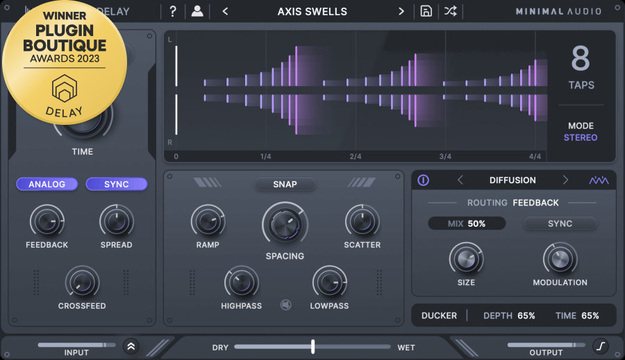
Cluster Delay is a tap-sequence delay from Minimal Audio. Its central feature is up to eight taps placed in time that can be ramped, spaced and scattered.
The display shows the taps, so you can see how the sound will evolve over time. Macro controls help build rhythmic patterns quickly.
Inside the delay line there are six effects (wobble, diffusion, chorus, flanger, phaser and frequency shifting), and you can choose where each sits. Ducking, filters and mid-side control are included.
There are 100 presets ranging from retro tape-style delays to modern soundscapes. An analog modeling mode adds modeled feedback.
Key features
Multi-tap sequencer
Up to eight taps can be arranged into rhythms. It may help when looking for off-beat or irregular delays.
Multi-tap display
The taps are shown on screen. It may be useful for understanding what happens.
Six integrated effects
Wobble, diffusion, chorus, flanger, phaser and frequency shifting can be placed in the delay line.
Analog modeling mode
Analog-modeled feedback is applied. It may suit warm delays.
Automatic ducking
The delay ducks with the dry input. It may help keep delay from covering a vocal.
Stereo features
Mid-side, cross-feedback and diffusion build wide spaces.
Tooltips and 100 presets
Built-in tooltips help you learn, and 100 presets provide starting points.
Specifications
| Item | Details |
|---|---|
| Type | Multi-tap delay |
| Taps | Up to 8 |
| Built-in effects | 6 |
| Presets | 100 |
| Formats | AU / VST / VST3 / AAX (64-bit) |
| OS | macOS 10.9 or later, Windows 10 or later |
| Activation | Online (internet required) |
What is included and system requirements
- Cluster Delay plugin
- 100 presets
- Formats: AU / VST / VST3 / AAX (64-bit)
- User manual
How to use it
- Create a Minimal Audio account and enter the redemption code.
- Get the installer from the Downloads section.
- Install and rescan plugins in your DAW.
- Open the plugin and log in to your account.
- Choose a preset close to what you want.
- Adjust tap spacing and ramping.
- Choose where effects sit and use ducking to refine.
Where it may come in handy
Rhythmic delays
Placing taps may add rhythmic delay to guitars and synths.
Vocal echoes
Ducking may let echoes appear only in the gaps of a vocal.
Dub-style sends
Send mode may let you try dub-style automation.
Who it may suit
- People who want rhythmic delays
- People who want effects layered into a delay
- People who prefer plenty of presets
Good to know before you buy
- An internet connection is required for activation.
- This is based on Plugin Boutique's listing.
Price
$49 (Plugin Boutique, checked 2026-10-27). Prices can vary by region and promotion, so check the official page before buying.
See Cluster Delay on the product page
More of the same kind
We have introduced 62 delays. Here are some of the others.
- Native Instruments Psyche Delay
- Klevgrand Modley
- Waves Lofi Space
- Moog Moogerfooger MF-104S Analog Delay
- AudioThing Wires
- Antelope Audio Halo
We have introduced 8 other products from Minimal Audio.
- Minimal Audio Ripple Phaser
- Minimal Audio Poly Flanger
- Minimal Audio Morph EQ
- Minimal Audio Swarm Reverb
- Minimal Audio Fuse Compressor
For a side-by-side comparison scored on the same criteria, see our comparison of delays.
See the full list in Product database: Effects.
Sources: pluginboutique.com (checked 2026-10-27)










Comments