
Disclosure: This page may contain affiliate links. Prices were checked on the date shown and may change.
An introduction to Minimal Audio Swarm Reverb, based on information from the maker and distributors: what it does, how to use it and who it may suit. It is not scored.
Swarm Reverb offers a flexible and fun approach to reverb that is perfect for crafting expansive ambience, pumping spaces, and lush creative effects.
— Minimal Audio official site
What is Swarm Reverb?
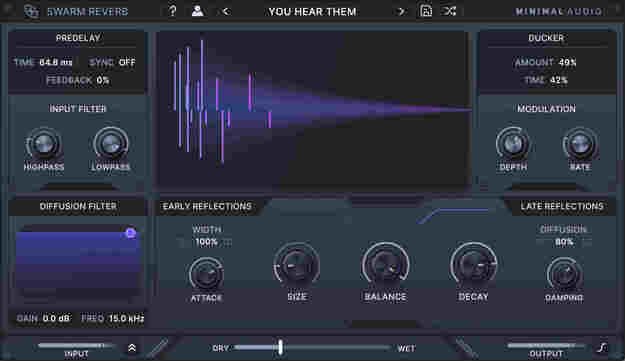
Swarm Reverb from Minimal Audio is a dual-stage reverb with separate early and late reflection algorithms whose balance you adjust.
It can create anything from room ambience to endless decays, aimed at expansive ambience, pumping spaces and lush creative effects.
Built-in ducking, tempo-synced pre-delay, stereo width and separate input and diffusion filtering help it fit into a track.
Pre-delay feedback and real-time size changes make it useful for sound design too.
Key features
Early and late reflection algorithms
The balance of two algorithms sets the space's character, from short rooms to long decays.
Precision display
You can see how the algorithm taps respond to parameter settings.
Attack control
A dedicated attack control changes the onset of the reverb.
Synced and feedback pre-delay
Tempo sync is available, and feedback can turn it into an echo-like effect.
Input filters and diffusion
These shape lush, thin, warm or digital spaces.
Ducking and real-time modulation
Ducking cleans the mix without automation, and modulation can be changed on the fly without artifacts. Two soft-clip limiter flavors are also included.
Specifications
| Item | Details |
|---|---|
| Type | Dual-stage reverb |
| Formats | AU, VST, VST3, AAX (64-bit) |
| OS | macOS 10.9 or higher / Windows 10 or higher |
| Activation | Internet connection required |
What is included and system requirements
- Swarm Reverb plug-in
- AU / VST / VST3 / AAX (64-bit)
How to use it
- After purchase, activate the licence through your Minimal Audio account.
- Install it and load it in your DAW.
- Insert it on a track or send.
- Set the balance of early and late reflections.
- Sync the pre-delay to tempo.
- Shape texture with input filters and diffusion.
- Use ducking to balance against the dry signal.
- Use the soft-clip if needed.
Where it may come in handy
Ambient spaces
Long decays could create expansive ambience.
Pumping reverb
Ducking might create reverb that moves with the rhythm.
Sound design
Pre-delay feedback and size changes could produce special effects.
Vocal and drum rooms
Short room ambience is also possible.
Who it may suit
- People wanting a reverb that also works creatively
- Those who want ducking and tempo sync in one plug-in
- Ambient sound designers
Good to know before you buy
- Internet is required for activation.
Price
$49 (Plugin Boutique, checked 2026-10-27). Prices can vary by region and promotion, so check the official page before buying.
See Swarm Reverb on the product page
More of the same kind
We have introduced 112 reverbs. Here are some of the others.
- Waves Atlas Reverb
- Eventide ShimmerVerb
- Leit Audio Places
- Arturia Rev OCEAN
- LiquidSonics Seventh Heaven Professional
- Accentize DeRoom Pro
We have introduced 8 other products from Minimal Audio.
- Minimal Audio Minimal Audio Hybrid Filter
- Minimal Audio Cluster Delay
- Minimal Audio Current
- Minimal Audio Ripple Phaser
- Minimal Audio Fuse Compressor
For a side-by-side comparison scored on the same criteria, see our comparison of reverbs.
See the full list in Product database: Effects.
Sources: pluginboutique.com (checked 2026-10-27)










Comments