
Disclosure: This page may contain affiliate links. Prices were checked on the date shown and may change.
An introduction to Antelope Audio Halo, based on information from the maker and distributors: what it does, how to use it and who it may suit. It is not scored.
Halo is a versatile multitap delay plugin designed to go beyond conventional echo effects.
— Antelope Audio official site
What is Halo?
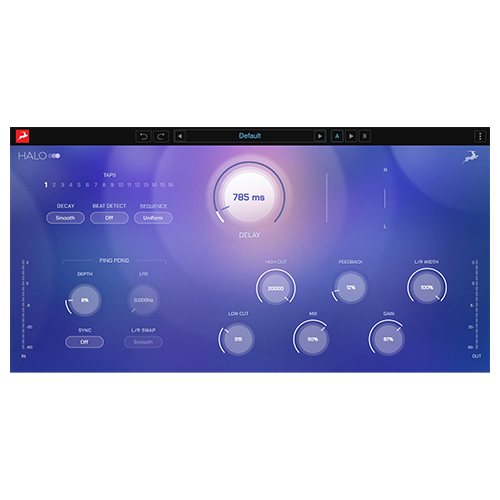
Halo is a multitap delay plug-in from Antelope Audio. It creates up to 16 delay taps so you can design rhythm and space in detail.
The decay of the taps can be set to slow, smooth or fast, which changes the feel from dense rhythmic echoes to ambient tails.
Delay time can sync to the DAW's BPM with note values including dotted and triplet, or be set freely in milliseconds.
It also has expanded Ping-Pong modes, high-cut and low-cut filters, and feedback and gain controls. It is a native plug-in.
Key features
Up to 16 taps
Layer sequential taps for rhythmic echoes or dense textures.
Three decay curves
Choose slow, smooth or fast decay.
Tempo sync and milliseconds
Use note values including dotted and triplet, or set times in milliseconds.
Expanded Ping-Pong
Two L/R swap modes plus Depth and L/R Width controls shape the stereo movement.
High and low cut
Trim low-end build-up or soften highs on the delays.
Feedback and Gain
Set the intensity and tone of the repeats, from clean echoes to evolving textures.
Specifications
| Item | Details |
|---|---|
| Type | Multitap delay |
| Taps | Up to 16 |
| Decay curves | slow / smooth / fast |
| Delay time | BPM sync (incl. dotted/triplet) / milliseconds |
| Filters | High cut / Low cut |
| Format | Native (macOS / Windows) |
| Availability | Part of Antelope Cosmos (75+ native plug-ins), 14-day free trial |
What is included and system requirements
- Native plug-in (macOS / Windows)
How to use it
- Create an Antelope Audio account and buy or start the 14-day trial.
- Install the plug-in through Antelope's software.
- Restart your DAW and insert Halo on a send or track.
- Set the number of taps.
- Choose a decay curve (slow / smooth / fast).
- Select BPM sync or milliseconds and set the spacing.
- Finish with Ping-Pong, filters and feedback.
Where it may come in handy
Rhythm emphasis
Sixteen regular taps may support a beat.
Ambient tails
The slow decay curve may suit long echoes.
Sound design
Expanded Ping-Pong and feedback may be useful for effects.
Who it may suit
- People who want to design multiple taps in detail
- People who want rhythmic echoes locked to BPM
- People who want to explore Antelope's plug-in collection
Good to know before you buy
- The maker says joining Antelope Cosmos unlocks 75+ native plug-ins.
- The single-purchase price shown is the one confirmed at Plugin Boutique.
- System requirements are linked from the maker's page.
How it differs from similar products
We do not pick a winner; the official figures are placed side by side.
Tape Delay
Halo is a multitap delay with up to 16 taps, while Tape Delay has four tape types. At Plugin Boutique, Halo is $119 and Tape Delay is $159.
Price
$119 (Plugin Boutique, checked 2026-10-27). Prices can vary by region and promotion, so check the official page before buying.
Also available as part of Antelope Cosmos, which unlocks 75+ native plug-ins (check the maker's page for pricing).
More of the same kind
We have introduced 62 delays. Here are some of the others.
- Native Instruments REPLIKA XT
- MeldaProduction MeldaProduction MDelayMB
- Soundtoys Little MicroShift
- Sound Particles inDelay
- Moog Moogerfooger MF-104S Analog Delay
- UJAM UFX Delay
We have introduced 54 other products from Antelope Audio.
- Antelope Audio Tape Delay
- Antelope Audio VEQ-STU 169
- Antelope Audio Antelope Audio VP Brainiac II
- Antelope Audio Liverpool
- Antelope Audio VEQ-4K BROWN
For a side-by-side comparison scored on the same criteria, see our comparison of delays.
See the full list in Product database: Effects.
Sources: en.antelopeaudio.com pluginboutique.com (checked 2026-10-27)










Comments