
Disclosure: This page may contain affiliate links. Prices were checked on the date shown and may change.
An introduction to LANDR VoxVerb, based on information from the maker and distributors: what it does, how to use it and who it may suit. It is not scored.
VoxVerb makes it easy to craft clean, immersive reverb that adds depth and dimension while retaining your vocal performance.
— LANDR official site
What is VoxVerb?
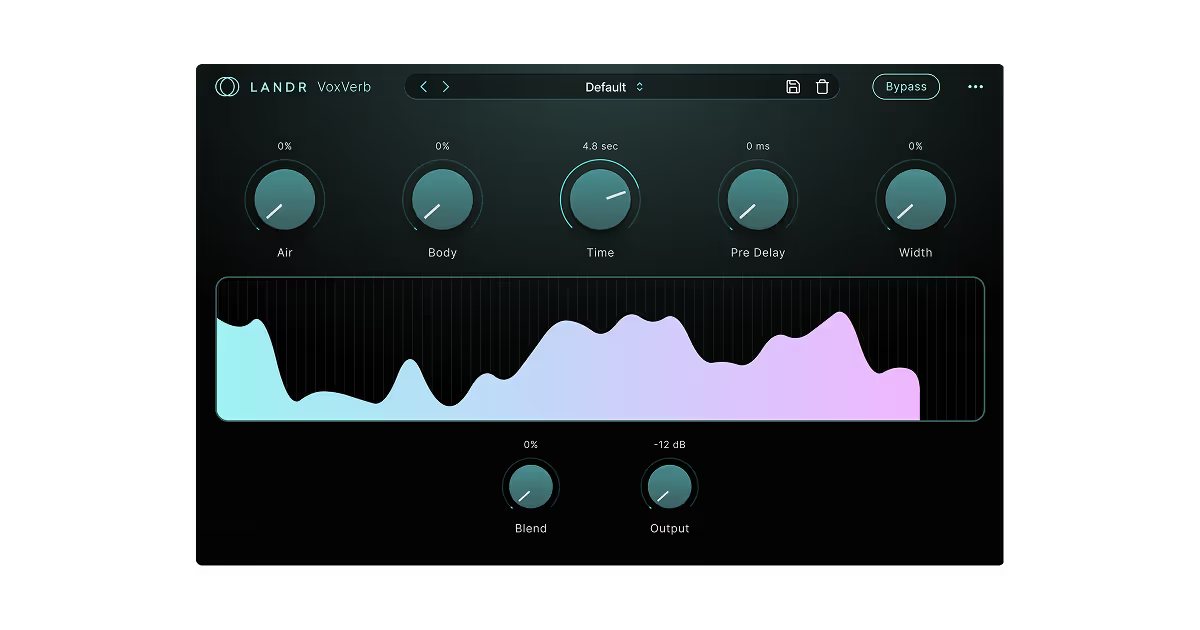
LANDR VoxVerb is a reverb plug-in built for vocals. It aims to add depth and dimension while keeping the vocal performance present.
It offers hall and room reverb presets and a pre-delay control so the vocal stays crisp before the reverb begins.
Controls for warmth and brightness (Body and Air) help it sit in a mix. Stereo width, reverb length and the balance with the direct sound can also be adjusted.
It is included with a LANDR Studio subscription and can also be bought on its own. It forms the Vocal Plugin Bundle with VoxTune, VoxDeEss and VoxChain.
Key features
Keeps vocals forward
Controlled reverb is meant to keep the vocal front and centre without muddying the mix.
Body and Air
Quickly adjusts warmth and brightness, helping match the reverb tone to the vocal.
Hall and room presets
Hall and room reverb presets are included.
Pre-delay
Adjusts the time before the reverb starts so the attack of the vocal stays crisp.
Length and stereo width
Reverb length can be set from tight rooms to lush tails, and the stereo image can be widened.
Mix balance
A control balances ambience against the direct sound.
Specifications
| Item | Details |
|---|---|
| Type | Vocal reverb |
| macOS | macOS 11+ (Apple Silicon / Intel): VST3, AU, AAX |
| Windows | Windows 10 (64-bit) or higher: VST3, AAX |
| Availability | Standalone purchase or included with LANDR Studio |
What is included and system requirements
- VoxVerb plug-in (macOS / Windows)
- Included with LANDR Studio
How to use it
- Buy from LANDR or sign up for LANDR Studio.
- Log in with your LANDR account and install.
- Rescan plug-ins in your DAW.
- Load VoxVerb on a vocal send.
- Choose a hall or room preset.
- Adjust pre-delay and length.
- Set warmth and brightness with Body and Air.
- Decide the balance with the direct sound using the mix control.
Where it may come in handy
Vocal recording
It may suit adding depth while keeping vocal clarity.
Vocal send
On a send it could place several vocals in one space.
Narration and streaming
It could add light ambience to a voice.
Who it may suit
- People who want to set vocal reverb quickly
- LANDR Studio users
- Those assembling a vocal plug-in set
Good to know before you buy
- LANDR's official page does not show a USD price, so the price is from Plugin Boutique.
- LANDR Studio is a monthly subscription.
How it differs from similar products
We do not pick a winner; the official figures are placed side by side.
Antelope Audio SonaVerb
VoxVerb is vocal-focused with hall and room presets, while SonaVerb targets sources in general and centers on Room Size, Reverb Time and Color.
Price
$39 (Plugin Boutique, checked 2026-10-27). Prices can vary by region and promotion, so check the official page before buying.
Also included with LANDR Studio (monthly subscription).
See VoxVerb on the product page
More of the same kind
We have introduced 112 reverbs. Here are some of the others.
- Wave Arts MasterVerb 7
- Klevgrand Kleverb
- AudioThing Environments
- UJAM UFX Reverb 2
- Inspired Acoustics INSPIRATA
- AudioThing Springs
We have introduced 10 other products from LANDR.
- LANDR LANDR FX Electric
- LANDR Horizon
- LANDR LANDR FX Acoustic
- LANDR LANDR Ultimate Bundle
- LANDR LANDR FX Voice
For a side-by-side comparison scored on the same criteria, see our comparison of reverbs.
See the full list in Product database: Effects.
Sources: landr.com pluginboutique.com (checked 2026-10-27)










Comments