
Disclosure: This page may contain affiliate links. Prices were checked on the date shown and may change.
An introduction to Lese Eigen, based on information from the maker and distributors: what it does, how to use it and who it may suit. It is not scored.
Eigen is a reflection processing multitool.
— Lese official site
What is Eigen?
Eigen is a space-simulation plug-in from Lese. The official page calls it a reflection processing multitool: rather than adding a pre-made reverb, it calculates reflections from a room's dimensions and materials.
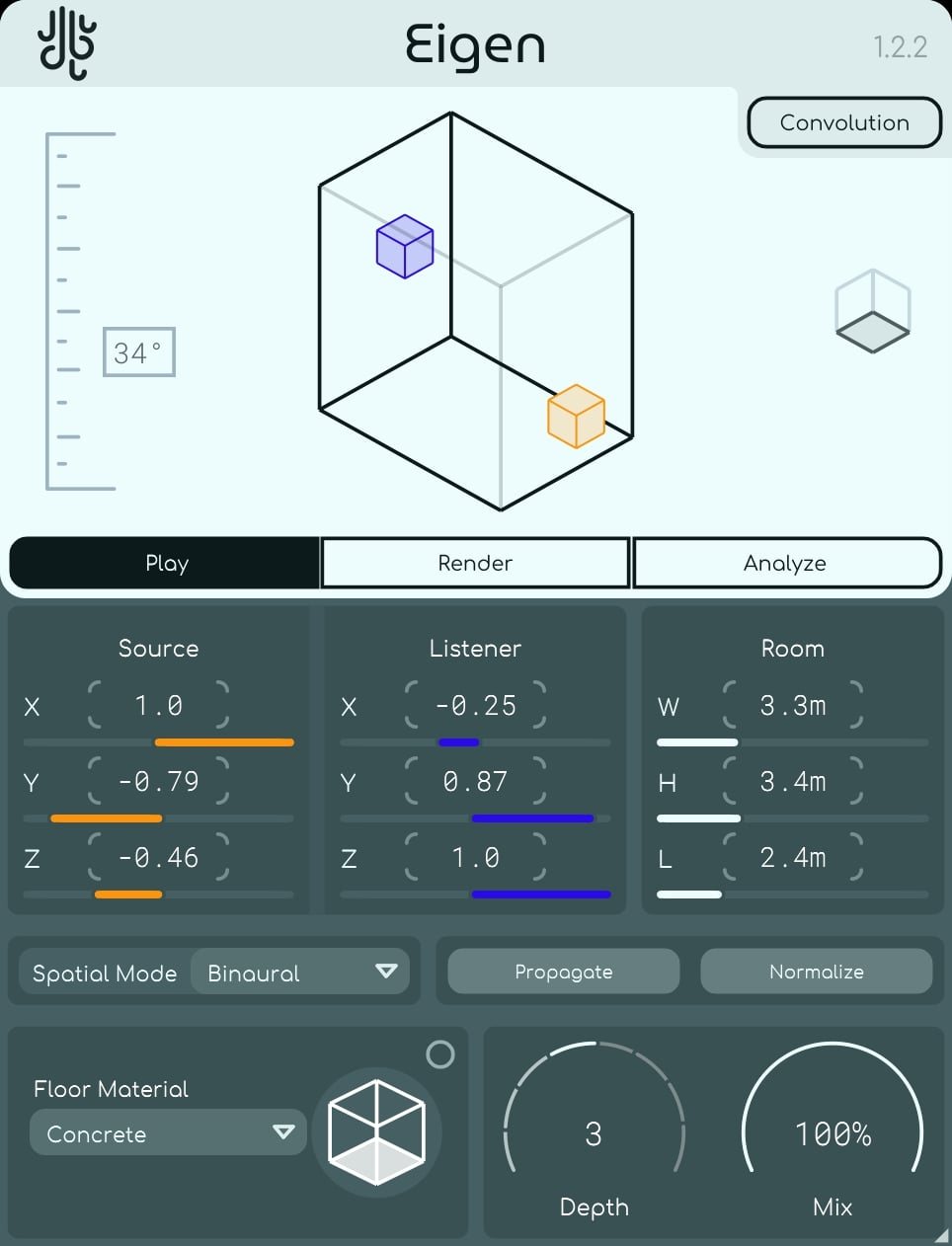
It has three modes: Play, Render and Analyze. Play processes early reflections in real time, Render computes impulse responses for convolution reverbs, and Analyze checks how a room resonates at low frequencies.
In Play mode you can move the sound source and listener with a 3D object positioner. Mono, stereo and ambisonic (low and high quality) settings are supported, so it can be used in spatial audio work as well.
IRs created in Render can be saved for external convolution reverbs or previewed inside Eigen. Using it as a room-analysis tool as well as a reverb is what sets it apart from ordinary reverbs.
Key features
Play: real-time early reflections
A knob sets reflection depth, and a 3D positioner or sliders set the positions of the source and listener. Reflections up to seven deep are simulated.
Render: offline impulse responses
Build high-quality reverb IRs from room dimensions and materials. Reflection depth can go up to 40 bounces, with accurate late reflections added, and the saved IR can be loaded into external convolution reverbs.
Analyze: room mode analysis
Analyze shows how a room with the Play settings would resonate at low frequencies. With a real room's dimensions it can serve as a starting point for analyzing a real space.
Acoustic materials
Different materials can be assigned to each room surface. With high-quality materials, each reflection is split into ten frequency bands and processed according to measured material responses.
Mono, stereo and ambisonic support
Play mode supports mono, stereo and ambisonic (low/high quality) settings, so you can choose high-fidelity spatial audio or a simpler background effect.
IR preview and saving
The Convolution button previews the IR inside the plug-in, and saved IRs can be used in external plug-ins. A sound-propagation toggle can remove the initial delay.
Specifications
| Item | Details |
|---|---|
| Type | Space simulator (reflection processing / IR creation / room-mode analysis) |
| Modes | Play / Render / Analyze |
| Maximum reflections | Play: 7 / Render: 40 |
| Formats (Windows) | VST3 / AAX |
| Formats (Mac Intel/ARM) | VST3 / AU / AAX |
| Interface | Vectorized, resizable |
| Licensing | One-time purchase; no dongle, valid on up to 6 computers, offline activation available |
| Price (official) | $65 |
| Trial | A trial download is available on the official site |
What is included and system requirements
- Eigen plug-in (Play / Render / Analyze)
- Windows: VST3 / AAX; Mac: VST3 / AU / AAX
- Impulse response saving
- One-time purchase license (no dongle, up to 6 computers)
- A trial is available on the official site
How to use it
- Buy the product on Lese's site or download the trial, then install it.
- Load Eigen on a track in your DAW and choose Play mode.
- Set room dimensions (length, width, height) with the 3D positioner or sliders.
- Move the source and listener positions and set the amount of early reflections with the depth knob.
- Set materials, and enable high-quality materials if needed.
- Switch to Render, choose a reflection depth and render an IR.
- Preview the IR with the Convolution button, then save it.
- Use Analyze to check how the room resonates at low frequencies.
Where it may come in handy
Adding a natural room feel to dry recordings
Early reflections from Play mode could give close-mic home recordings the feel of being in a room.
Creating original IRs
Render lets you build IRs with different room sizes and materials to load into the convolution reverb you already use.
Getting a rough idea of room resonance
Entering your own room's dimensions in Analyze may give a clue about how low-frequency resonance behaves.
Spatial audio work
Ambisonic support may be useful for spatial audio experiments.
Who it may suit
- People who want to design reflections from room size and materials
- Users who want to make their own IRs for convolution reverbs
- Those interested in ambisonics and spatial audio
- Anyone who wants a starting point for thinking about room resonance
Good to know before you buy
- Render is an offline process that takes time to calculate; real-time use is through Play mode.
- Eigen centers on early-reflection processing and IR creation rather than producing long real-time reverb tails like a typical reverb.
- The license needs no dongle and is valid on up to 6 computers.
How it differs from similar products
We do not pick a winner; the official figures are placed side by side.
IK Multimedia CSR Inverse Reverb
Eigen calculates early reflections from room dimensions and materials and can also render IRs, at $65. CSR Inverse Reverb is a dedicated module that applies an envelope to early reflections for a reversed-style ambience, at $49.99 on Plugin Boutique.
Price
$65 (Lese official site, checked 2026-10-27). Prices can vary by region and promotion, so check the official page before buying.
More of the same kind
Other introduction articles of the same kind.
- Slate Digital MetaPitch
- Zynaptiq ADAPTIVERB
- Universal Audio Fairchild Tube Limiter Collection
- MeldaProduction MAmp
- NUGEN Audio Aligner
- Metric Halo / Make Believe MB TMPC
We have introduced 2 other products from Lese.
See the full list in Product database: Effects.
Sources: lese.io pluginboutique.com ikmultimedia.com (checked 2026-10-27)










Comments