
Disclosure: This page may contain affiliate links. Prices were checked on the date shown and may change.
An introduction to UJAM UFX Reverb 2, based on information from the maker and distributors: what it does, how to use it and who it may suit. It is not scored.
UFX Reverb 2 is a significant evolution, based on feedback from ujam's users.
— UJAM official site
What is UFX Reverb 2?
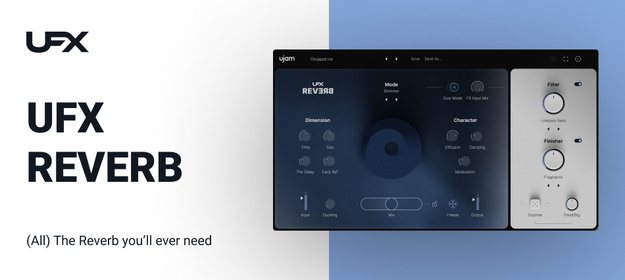
UFX Reverb 2 is the second version of UJAM's reverb plug-in UFX Reverb. Plugin Boutique describes it as a significant evolution based on user feedback.
It offers 20 reverb models, adjusted with easy-to-grasp controls such as room size, density, damper and modulation in the Ambience and Character sections.
New in version 2: a Dual Mode for fuller, denser reverb, Early Reflections, 10 additional reverb modes, 15 new filters, 40 new finishers and 100 new presets.
Filters and Finishers (gaters, delay and modulation effects, cinematic and sequenced soundscapes) can be layered on the reverb, so it covers sound-design uses as well as ordinary ambience.
Key features
20 reverb models
Models such as Basic, Room, Hall, Plate, Spring, Digital and 80s can be switched. Version 2 adds Drum Room, Scoring Stage, Shimmer and more, so you can pick a space that fits the song first.
Dual Mode
It layers reverb for a fuller, denser sound quickly. It may be worth trying when a space feels thin.
Early Reflections
Adds early reflections to give the space clearer definition, which may help when a tail feels vague.
Ducking and Freeze
Ducking lowers the reverb while the dry signal is present to keep the mix clear. Freeze holds the current reverb state for ambient textures or resampling.
Multimode Filter
From lowpass and highpass to comb, plus megaphone and EQ curves, many shapes are available to change the reverb's character.
Finishers and Surprise
Finishers come in four categories, from gaters to cinematic effects. Surprise generates new settings at a click.
Specifications
| Item | Details |
|---|---|
| Reverb models | 20 |
| Formats | VST2, VST3, AU 2, AAX |
| OS | Windows 10-11 / macOS Catalina (10.15) to Sequoia (15), Intel and Apple silicon |
| Requirements | 8 GB RAM, 300 MB free disk space, 1280×768 display, internet connection |
What is included and system requirements
- UFX Reverb 2 plug-in
- Presets (100 new in version 2, existing ones upgraded)
- Formats: VST2 / VST3 / AU 2 / AAX
How to use it
- After purchase, get the installer and serial through your UJAM account.
- Install it and let your DAW scan the plug-in.
- Insert it on a track or send.
- Choose a reverb model first.
- Adjust room size, density and damper in Ambience and Character.
- Try Dual Mode or Early Reflections if needed.
- Add a filter or finisher to change the character.
- Use ducking to balance the reverb against the dry signal.
Where it may come in handy
Space for vocals and guitars
Plate or Room with ducking may give a reverb that stays out of the vocal's way.
Drum ambience
Drum Room or Gated could be tried for drum-specific tails.
Ambient and effect use
Freeze and Shimmer might suit sustained, cloud-like textures.
Idea generation
Surprise could produce settings one after another and spark ideas.
Who it may suit
- People who want an easy-to-understand reverb
- Those who like layering filters and effects on a reverb
- Users who prefer to work quickly from presets
Good to know before you buy
- Requirements are 8 GB RAM, 300 MB free disk space, a 1280×768 display and an internet connection.
- It may work on earlier OS versions, but UJAM does not support them.
Price
$49 (Plugin Boutique, checked 2026-10-27). Prices can vary by region and promotion, so check the official page before buying.
See UFX Reverb 2 on the product page
More of the same kind
We have introduced 112 reverbs. Here are some of the others.
- D16 Group Spacerek
- NUGEN Audio Paragon ST
- Relab Development LX480 Dual-Engine Reverb V4
- Acon Digital Verberate 2
- MeldaProduction MReverbMB
- Universal Audio Galaxy Tape Echo
We have introduced 32 other products from UJAM.
- UJAM UFX Filter
- UJAM Finisher DYNAMO
- UJAM RETROCRAFT
- UJAM Symphonic Elements STRIIIINGS
- UJAM Finisher FLUXX
For a side-by-side comparison scored on the same criteria, see our comparison of reverbs.
See the full list in Product database: Effects.
Sources: pluginboutique.com (checked 2026-10-27)










Comments