
Disclosure: This page may contain affiliate links. Prices were checked on the date shown and may change.
An introduction to Mellowmuse IR1A Convolver, based on information from the maker and distributors: what it does, how to use it and who it may suit. It is not scored.
IR1A Convolver is a convolution plugin that let you apply the sonic characteristics of one sound to another in real time, using an impulse response file.
— Mellowmuse official site
What is IR1A Convolver?
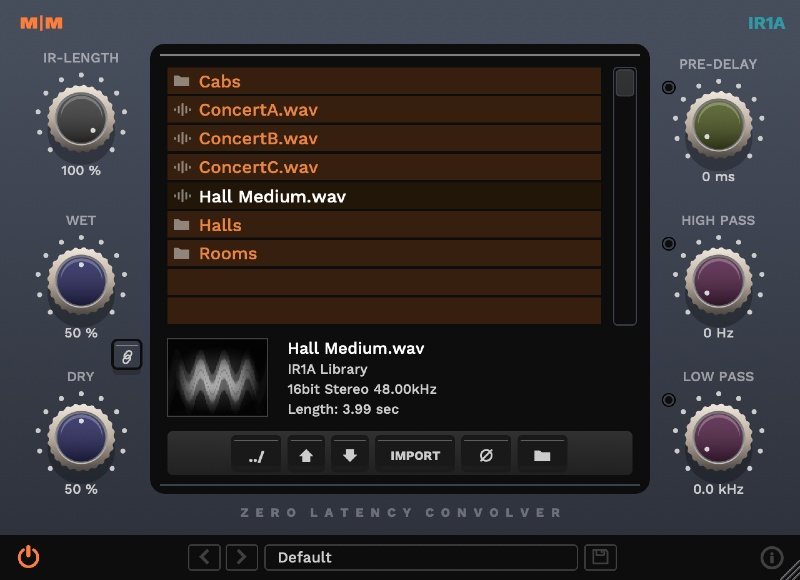
IR1A Convolver is a convolution plugin from Mellowmuse. It loads impulse response (IR) files and imprints the character of one sound onto another.
Depending on the IR, it can reproduce guitar cabinets, natural reverbs or special effects. It features a zero-latency, CPU-efficient engine.
You can set IR length, high-pass and low-pass filtering and pre-delay from 0 to 250 ms. A built-in file browser also lets you import your own IRs.
It loads standard mono or stereo AIFF and WAV files and ships with a starter library of presets, a setup that suits learning how convolution works.
Key features
Zero-latency convolution
A zero-latency engine that can also be used while tracking or monitoring.
IRs up to 10 seconds
WAV and AIFF IRs up to 10 seconds can be loaded, including long hall tails.
External IR browser
Find and load IRs from the built-in browser, including your own libraries.
Pre-delay and filters
Pre-delay of 0 to 250 ms plus high- and low-pass filters shape onset and brightness.
Phase switch
Invert phase to adjust how it combines with other sources.
32/64-bit float IR and 64-bit processing
Supports 32- and 64-bit float IRs with internal 64-bit processing.
Specifications
| Item | Details |
|---|---|
| IR length | Up to 10 seconds |
| Pre-delay | 0 to 250 ms |
| IR formats | WAV, AIFF (mono/stereo, 32/64-bit float) |
| Filters | High-pass and low-pass |
| OS | Windows 10+, macOS (OS X 10.9+), 64-bit only |
| Formats | VST, VST3, AU, AAX |
| Latest version | 5.2 |
What is included and system requirements
- IR1A Convolver plugin
- Starter preset library
- VST, VST3, AU and AAX formats (64-bit)
How to use it
- Get the installer from the Mellowmuse site and install it.
- Load IR1A on a track or send in your DAW.
- Choose an IR in the built-in browser (external WAV or AIFF files also load).
- Adjust IR length to shape the reverb length.
- Use pre-delay and filters for onset and brightness.
- Balance wet and dry and save as a preset if needed.
Where it may come in handy
Using your own IRs
If you own IR libraries, you can adjust length and filters instead of simply loading them.
Guitar cabinet IRs
Cabinet IRs can be loaded for shaping an amp output.
Reverb as a send
Hall or room IRs can serve as a send reverb.
Who it may suit
- People who own IR libraries
- Those who want a simple convolver
- Users who want low CPU load
Good to know before you buy
- IR files themselves are not bundled beyond the starter presets.
- Mono or stereo files are supported.
- It runs on 64-bit environments only.
How it differs from similar products
We do not pick a winner; the official figures are placed side by side.
MeldaProduction MConvolutionMB
IR1A is single-path with IRs up to 10 seconds in WAV/AIFF. MConvolutionMB is multiband (1 to 6 bands) and loads WAV, FLAC and MP3.
Price
$39 (Mellowmuse official site, checked 2026-10-27). Prices can vary by region and promotion, so check the official page before buying.
See IR1A Convolver on the product page
More of the same kind
Other introduction articles of the same kind.
- Waves Clarity Vx DeReverb
- Waves Sub Align
- NUGEN Audio NUGEN Audio Monofilter Elements
- Waves Maserati GRP
- Acon Digital Remix
- Wave Arts Panorama 7
We have introduced 7 other products from Mellowmuse.
- Mellowmuse CS1V Console Channel
- Mellowmuse Mellowmuse ATA Auto Time Adjuster
- Mellowmuse Mellowmuse CP2V
- Mellowmuse Mellowmuse EQ3V
- Mellowmuse Mellowmuse EQ2V
See the full list in Product database: Effects.
Sources: mellowmuse.com pluginboutique.com (checked 2026-10-27)










Comments