
Disclosure: This page may contain affiliate links. Prices were checked on the date shown and may change.
An introduction to Waves Maserati GRP, based on information from the maker and distributors: what it does, how to use it and who it may suit. It is not scored.
Maserati GRP addresses the crucial need to bring out the best in group channels: "glue" sounds together to turn individual tracks into a cohesive whole.
— Waves official site
What is Maserati GRP?
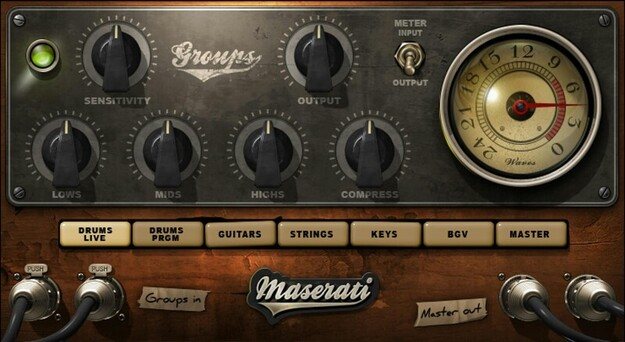
Maserati GRP is a plugin for group (bus) channels that Waves created together with Grammy-winning mixer Tony Maserati. It aims to give cohesion to a combined sound rather than to individual tracks.
Intended sources include backing vocals, drums, layered guitars and strings. Loops and stems (exported groups of tracks) are also said to benefit from being treated as a single entity, and EQ and compression settings are curated in advance.
According to the description, it is positioned as a final touch of EQ and subtle compression rather than a major effect. Examples given include adding sheen to backing vocals, compressing a drum kit together and adding air.
Separate modes are provided for use as an insert and as a send effect, so you can choose according to how you build the mix. Low, mid and high controls shape the tone of the group.
Key features
Subtle group compression
The compression is described as gluing rather than squashing. It may be worth trying on a bus that combines several tracks when you want to even out movement.
Dedicated settings by source
There are dedicated settings for backing vocals, drums, keys, strings and masters. You can start by picking the setting closest to the type of source.
Master mode
A master mode works on full mixes and stems. It may help when you want to add light cohesion to a whole song or an exported stem.
PRGM mode for drums
A PRGM mode is provided to breathe life into programmed drums. It may be worth trying when you want to adjust the mechanical feel of drums made in a DAW.
Low, mid and high tone controls
Low, mid and high controls tailor the tone of the group. They suit cases where you want to tilt the overall balance slightly without opening a full EQ.
Insert and send modes
Separate modes exist for insert and send use. You can use either on the bus directly or via a send, depending on your mixing workflow.
13 presets
13 presets for background vocals, drums, guitars and more are included as starting points.
Specifications
| Item | Details |
|---|---|
| Maker | Waves |
| Type | EQ and compressor for groups |
| Source settings | Backing vocals, drums, keys, strings, masters |
| Special modes | Master mode, PRGM mode for drums |
| Presets | 13 |
| Formats (Mac) | VST / AU / AAX |
| Formats (Windows) | VST / AAX |
| OS (Mac) | macOS Monterey 12, Ventura 13, Sonoma 14, Sequoia 15 |
| OS (Windows) | Windows 10 or later |
What is included and system requirements
- Maserati GRP plugin
- 13 presets
- Mac: VST / AU / AAX (macOS Monterey 12 to Sequoia 15)
- Windows: VST / AAX (Windows 10 or later)
- The license is registered to a Waves account
How to use it
- Create a Waves account, activate it with the e-mail link and log in.
- In 'Register New Products', register the serial number shown in your Plugin Boutique account.
- Download and install Waves Central, then log in.
- On the 'Install Products' tab choose Maserati GRP and click 'Install & Activate'.
- In your DAW, insert Maserati GRP on a bus that combines drums, backing vocals or similar tracks.
- Choose the setting closest to the source, such as drums or backing vocals.
- Move the Low, Mid and High controls little by little and set the tilt while listening.
- Choose insert or send mode and check how well the group holds together.
Where it may come in handy
Backing vocal bus
When several choir parts are layered, you may use the dedicated setting to bring them together. It may be worth trying when you want to add a light sheen.
Finishing programmed drums
The PRGM mode could add cohesion to drums made in a DAW. It suits processing a kit as a group.
String and keyboard groups
You could collect several tracks on one bus and use the source-specific setting to tidy the cohesion.
Final adjustment of stems and loops
Master mode may be used on exported stems or loop material for light EQ and compression.
Who it may suit
- Home-recording and music production users who want to process group buses quickly
- Those who want to tidy drums made in a DAW as a group
- Those who prefer subtle EQ and compression over big effects
- Those who work with stems and loop material
Good to know before you buy
- You need a Waves account, and installation and activation go through Waves Central.
- Supported OS: macOS Monterey 12 to Sequoia 15 on Mac and Windows 10 or later on Windows.
- Formats: VST / AU / AAX on Mac and VST / AAX on Windows.
- Prices change; please check the latest display on Plugin Boutique before purchase.
How it differs from similar products
We do not pick a winner; the official figures are placed side by side.
Waves CLA Guitars
Maserati GRP targets groups of tracks and has source-specific settings and 13 presets. CLA Guitars is focused on guitars, with 6 effects and 3 modes.
Price
Please check the official page for the price.
See Maserati GRP on the product page
More of the same kind
Other introduction articles of the same kind.
- Pitch Innovations Fluid Pitch
- Klevgrand Parrot
- Cockos ReaFIR ReaPlugs
- McDSP 6034 Ultimate Multi-band Native v7
- NivanT Labs NT-U GLOSS
- Slate Digital Fresh Air
We have introduced 215 other products from Waves.
See the full list in Product database: Effects.
Sources: pluginboutique.com (checked 2026-10-27)










Comments