
Disclosure: This page may contain affiliate links. Prices were checked on the date shown and may change.
An introduction to NUGEN Audio NUGEN Audio Paragon, based on information from the maker and distributors: what it does, how to use it and who it may suit. It is not scored.
Paragon is a true convolution reverb with the flexibility and control of a classic algorithmic reverb, giving you the sound of real spaces, now with unprecedented tweakability.
— NUGEN Audio official site
What is NUGEN Audio Paragon?
Paragon, from NUGEN Audio, is a convolution reverb that supports surround and immersive formats such as Dolby Atmos. A convolution reverb creates reverb from recordings of real spaces, known as impulse responses.
A typical convolution reverb uses a fixed recording, but Paragon analyzes and decomposes 3D impulse responses and re-synthesizes them. The maker says this lets you change decay time, room size and brightness without the artifacts of time-stretching.
The idea is that instead of keeping recordings of 30 differently sized churches, you adjust the characteristics of one church in detail, so many spaces are possible from a modest IR library. You can also EQ the impulse response itself and change the decay rate per frequency.
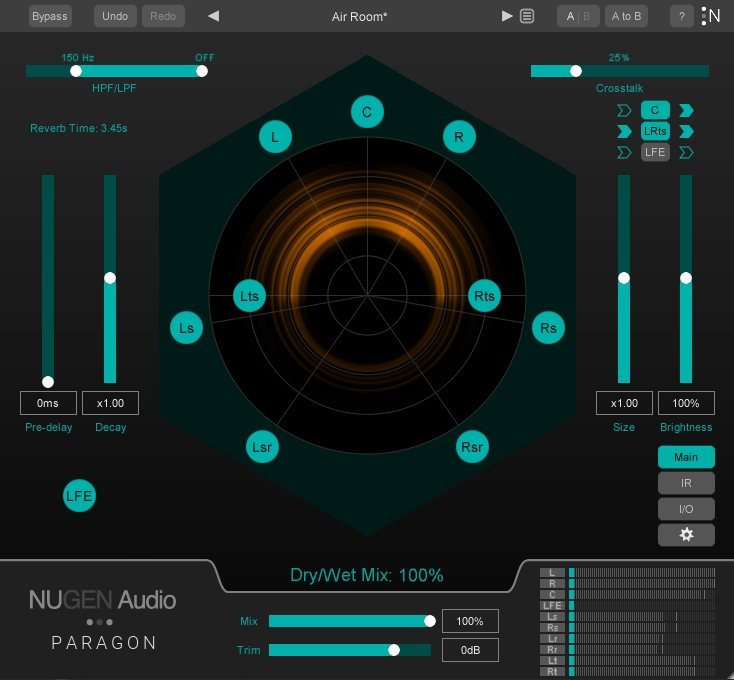
It works with up to 7.1.4 channels, with crosstalk and high-pass/low-pass filters configurable per channel, and the LFE can be switched. It is positioned for building the space of Dolby Atmos bed tracks in film and broadcast.
Key features
Re-synthesis of impulse responses
3D IRs are analyzed, decomposed and re-synthesized so that decay, room size and brightness can be changed widely. The maker says shorter, smaller, longer or larger settings avoid the artifacts of stretching.
Frequency shaping in the IR panel
EQ the reverb model itself and change the decay rate per frequency to modify the frequency response of real spaces.
Up to 7.1.4 channels
It supports surround and immersive audio including Dolby Atmos with up to 7.1.4 channels, and can create surround reverb even from mono or stereo sources.
Per-channel crosstalk
The interaction between channels can be set. For example, you can remove reverb from the center channel to improve dialogue intelligibility while sending the dry center signal to the other channels’ reverb to keep a sense of space.
Per-channel HPF/LPF and switchable LFE
Each channel has its own high-pass and low-pass filters, and the LFE can be switched on or off.
Spectral analysis and compact mode
There is a spectral analysis function and a compact mode that reduces the size of the window.
Specifications
| Item | Details |
|---|---|
| Type | Convolution reverb (re-synthesis) |
| Channels | Up to 7.1.4 |
| Formats | AAX, VST3, AU, AudioSuite (64-bit only) |
| Minimum requirements | Mac OS X 10.9 / Windows 7 (or later), 512 MB RAM |
| Technology | Developed with Dr. Jez Wells of the University of York |
| Price | USD 599 (maker) |
What is included and system requirements
- Paragon itself
- Formats: AAX, VST3, AU, AudioSuite (64-bit only)
- Minimum requirements: Mac OS X 10.9 / Windows 7, 512 MB RAM
- Also included in NUGEN Post, a bundle of 13 audio post-production plug-ins
How to use it
- Create a NUGEN Audio account and register the license code from your purchase.
- Complete the license through the link in the registration email.
- Download and run the installer.
- In your DAW, load it on a track whose channel layout matches (stereo, 5.1, 7.1.4 and so on).
- Choose an IR and adjust decay time and room size.
- Use the IR panel for EQ and per-frequency decay.
- Set crosstalk, HPF/LPF and LFE per channel.
- Set the dry/wet balance and check the overall result.
Where it may come in handy
Dolby Atmos bed tracks
With support for 7.1.4 channels, it may suit building space in Atmos mixes for film and games.
Dialogue and effects in video
Removing reverb from the center channel, for example, may add space while keeping dialogue easy to understand.
Trying different spaces
Changing size and decay of a single IR may let you portray rooms of different size from scene to scene.
Stereo work too
It also works in stereo, so it may be used for natural spaces in music production.
Who it may suit
- People working in surround or Atmos
- People in film and broadcast post-production
- People who want to adjust IRs to build their own spaces
- People who want to adjust the sound of real spaces in detail
Good to know before you buy
- For music production without surround, the company also offers Paragon ST, a stereo version.
- A free demo is offered on the maker’s page.
- It is also included in the NUGEN Post bundle.
How it differs from similar products
We do not pick a winner; the official figures are placed side by side.
Paragon ST
According to the maker, Paragon ST has the same features as Paragon minus the surround and immersive functionality, and is suggested for music production.
Price
$599 (NUGEN Audio official site, checked 2026-10-27). Prices can vary by region and promotion, so check the official page before buying.
See NUGEN Audio Paragon on the product page
More of the same kind
We have introduced 112 reverbs. Here are some of the others.
- Solid State Logic SSL SpringVerb
- IK Multimedia CSR Plate Reverb
- Waves Magma Springs
- Waves Manny Marroquin Reverb
- MNTRA BOREALIS
- Relab Development REV6000 Essentials
We have introduced 30 other products from NUGEN Audio.
- NUGEN Audio Paragon ST
- NUGEN Audio Aligner
- NUGEN Audio SigMod
- NUGEN Audio NUGEN Audio SEQ-S
- NUGEN Audio Focus
For a side-by-side comparison scored on the same criteria, see our comparison of reverbs.
See the full list in Product database: Effects.
Sources: nugenaudio.com pluginboutique.com (checked 2026-10-27)










Comments