
Disclosure: This page may contain affiliate links. Prices were checked on the date shown and may change.
An introduction to NUGEN Audio NUGEN Audio SEQ-S, based on information from the maker and distributors: what it does, how to use it and who it may suit. It is not scored.
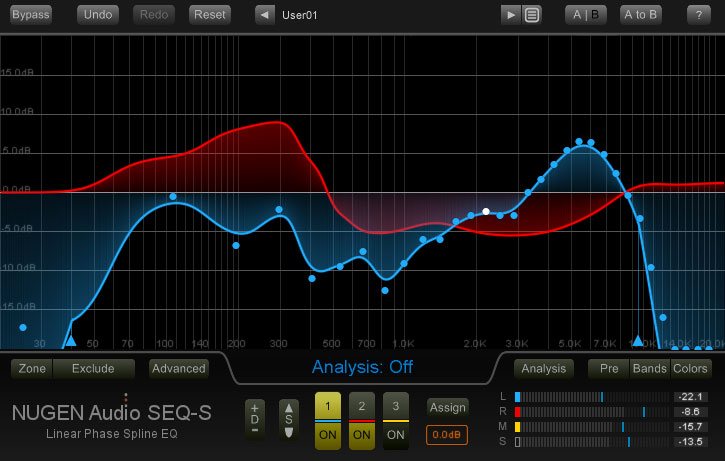
The resizable direct-draw interface makes it easy to quickly fine-tune your audio.
— NUGEN Audio official site
What is NUGEN Audio SEQ-S?
SEQ-S is a spline EQ from NUGEN Audio with a direct-draw interface, where you shape the frequency response by drawing the curve on screen. Instead of adding bands one at a time as on a conventional parametric EQ, you work on the curve itself.
It has three independent EQ curves that can be assigned per channel across stereo, mid/side, 5.1 and 7.1 surround. NUGEN presents SEQ-S for post and film work with surround up to 7.1, and SEQ-ST for mono and stereo music production.
It runs as a linear-phase EQ with no phase smearing, and offers curve scaling and smoothing, frequency node locking and psychoacoustic banding. The interface zooms and resizes so small changes stay visible.
It also offers EQ matching (capturing the character of one source and matching another to it), fluid filter morphing and dynamic EQ morphs. NUGEN describes corrective work and gentle mastering polish for music, and making room for dialogue in post.
Key features
Direct-draw spline EQ
You draw the response curve directly, which may suit corrections with fine detail that are awkward to build from stacked bands.
Three independent curves and surround
Separate curves can go to channels across L/R, mid/side, 5.1 and 7.1, and L/R and M/S settings can be split within one instance.
Linear-phase processing
NUGEN says there is no phase smearing, which could be worth considering for corrections where phase change is unwanted and for mastering-style work.
EQ matching
Capture the character of a reference and bring other material closer to it. NUGEN mentions evening out different takes and mic positions.
Inverted match for room
Inverting the match curve can open space for dialogue or vocals in a busy mix, as an alternative to heavy EQ or ducking.
Morphing and dynamic EQ
Filters can morph smoothly and lock to tempo, which NUGEN suggests for scene transitions and creative sound design.
Specifications
| Item | Details |
|---|---|
| EQ type | Linear-phase spline EQ |
| Curves | 3 (independent) |
| Channels | Stereo / M-S / 5.1 / 7.1 |
| Formats (Mac) | AAX / VST3 / AU / AudioSuite (64-bit) |
| Formats (Windows) | AAX / VST3 / AudioSuite (64-bit) |
| Supported OS | Mac OS X 10.9+ / Windows Vista+ |
| RAM | 512 MB |
What is included and system requirements
- SEQ-S plug-in
- Formats: AAX / VST3 / AU (Mac only) / AudioSuite
- Requirements: Mac OS X 10.9+ / Windows Vista+, 64-bit only, 512 MB RAM
How to use it
- After installing, insert SEQ-S on a track in your DAW.
- Choose the channel layout (stereo, M/S or surround).
- Draw the curve and place nodes to shape it.
- Zoom in on details and adjust smoothing as needed.
- To match a reference, capture its character with EQ matching.
- Invert the match to open room for dialogue or vocals.
- NUGEN offers a free demo to try before deciding.
Where it may come in handy
Fixing a music mix
Where L/R and M/S need different corrections, drawing the curve directly may fit.
Gentle mastering polish
The linear-phase behavior may suit gentle adjustments that avoid phase change.
Fitting dialogue over music
In video or streaming, inverting the match on background music might open space for speech.
Who it may suit
- People who want to try drawing EQ curves
- Those who need separate EQ per channel (surround, M/S)
- Users matching material to a reference
- Video or streaming creators balancing dialogue and music
Good to know before you buy
- SEQ-ST is the mono/stereo version for music; SEQ-S adds surround support.
- AU is available on Mac but not on Windows.
- NUGEN offers a free demo.
Price
$249 (NUGEN Audio official site, checked 2026-10-27). Prices can vary by region and promotion, so check the official page before buying.
See NUGEN Audio SEQ-S on the product page
More of the same kind
Other introduction articles of the same kind.
- TAL Software TAL-DAC
- Waves Nx Ocean Way Nashville
- Eventide Eventide Rotary Mod
- Rhodes Vari-Amp
- AudioThing Arguments
- Fiedler Audio armada
We have introduced 30 other products from NUGEN Audio.
- NUGEN Audio Halo Upmix
- NUGEN Audio Stereoplacer
- NUGEN Audio Halo Downmix
- NUGEN Audio Aligner
- NUGEN Audio Jotter
See the full list in Product database: Effects.
Sources: nugenaudio.com pluginboutique.com (checked 2026-10-27)










Comments