
Disclosure: This page may contain affiliate links. Prices were checked on the date shown and may change.
An introduction to UJAM UFX Delay, based on information from the maker and distributors: what it does, how to use it and who it may suit. It is not scored.
Although UFX DELAY is a powerful delay plus 2 multi-FX sections, it is incredibly easy to use.
— UJAM official site
What is UFX Delay?
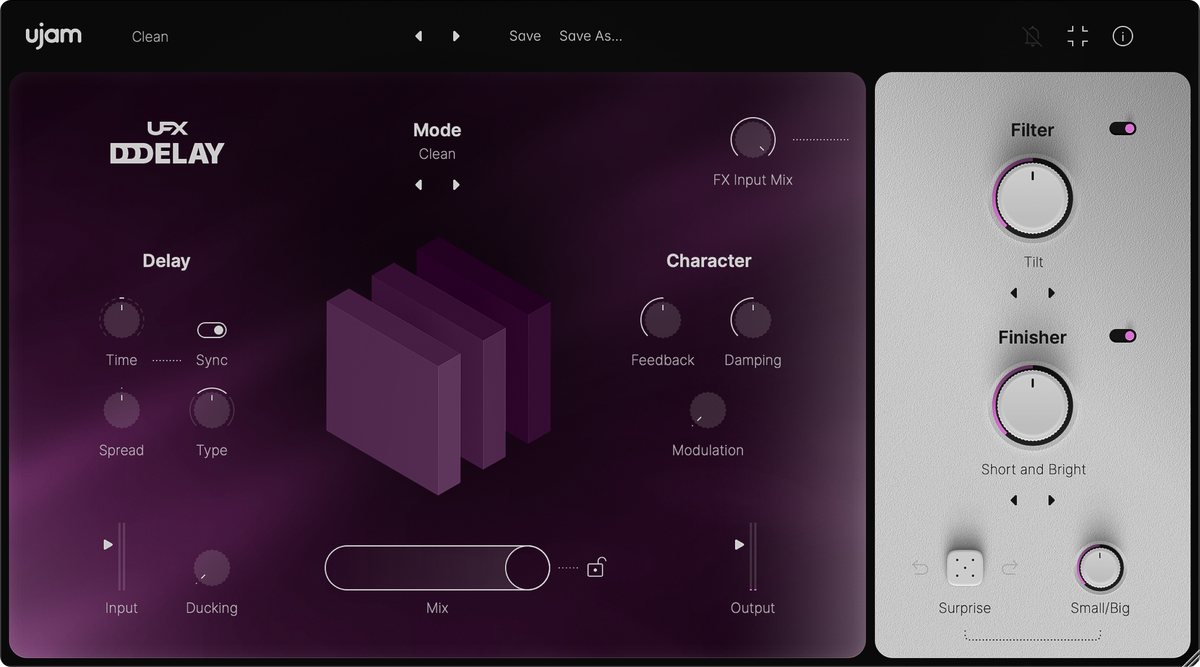
UFX Delay is a delay plug-in from UJAM of Germany. It offers 20 delay modes, from clean and tape-style delays to granular and rhythmic patterns, together with two multi-effect sections called Filter and Finisher.
The workflow is to pick a mode and adjust time, spread and modulation. The official page emphasizes that you do not have to program complex delay setups yourself, because musical delay types are ready to choose from.
The Filter section has 40 filters, including synth-style ones, and the Finisher section has 50 effects ranging from chorus to grain clouds and rhythmic transformation. Both the delay signal and the input signal can be sent into them.
It also includes an intelligent randomization function that varies or invents delays at the press of a button, plus more than 150 presets. It suits people who want atmospheric echoes quickly rather than building every detail by hand.
Key features
20 delay modes
Modes include straight delay, detuned doubling, digital, saturated, tape, lo-fi, granular, pitch-shifting and rhythmic patterns. You can choose the type that fits the mood of the song.
Ducking
Ducking lowers the delay signal while the input is loud and lets it return when the input gets quiet. It helps keep drum hits or guitar attacks clear while using more echo.
Filter and Finisher sections
The Filter section has 40 effects and the Finisher has 50. Because the input signal can be routed there too, you can shape the texture without leaving the plug-in.
Intelligent randomization
A Small/Big control sets how far the settings move when you press the button, from subtle variations to entirely new delays, so you can get candidates without programming them.
150+ presets
The official page lists more than 150 presets. You can start from a preset and adjust only the modes or settings you are curious about.
Time, spread and modulation controls
Delay time type, stereo spread and modulation amount can be adjusted for each delay, which is useful for fine-tuning after choosing a mode.
Specifications
| Item | Details |
|---|---|
| Delay modes | 20 |
| Filter / Finisher | 40 filters / 50 finishers |
| Presets | 150+ |
| Formats | VST2 / VST3 / AU / AAX |
| Supported OS | Windows 10-11 / macOS Catalina (10.15) to macOS Sequoia (15); Intel and Apple silicon Macs (Rosetta and native) |
| Minimum requirements | 8 GB RAM, 300 MB free disk space, 1280×768 display, internet connection |
| Note | UJAM does not support or fully qualify earlier OS versions |
What is included and system requirements
- UFX Delay plug-in with 20 delay modes
- Filter (40) and Finisher (50) effects
- 150+ presets
- Formats: VST2 / VST3 / AU / AAX
- Windows 10-11 and macOS 10.15-15 supported
- 8 GB RAM, 300 MB free space and an internet connection required
- UJAM recommends an SSD if you move the .blob data file to an external drive
How to use it
- Get the product through your UJAM account and install UFX Delay with the installer.
- Load UFX Delay on a track or send in your DAW.
- Switch through presets first to hear what kinds of delay are available.
- Pick a mode in the direction you like, then adjust time, spread and modulation.
- If the echoes crowd the source, use Ducking to pull the delay back.
- Add Filter or Finisher effects as needed to change the texture of the delay.
- Try the randomize button with the Small/Big control for unexpected delay ideas.
- Finally set the mix balance and judge how the delay sits in the track.
Where it may come in handy
Vocal echoes
Clean or Tape modes may add echoes to a vocal, with Ducking keeping lines clear while the singer is active. It is also easy to push the delay harder in a chorus.
Guitar and synth space
Moving modes such as Filter Up and Grain may add motion to arpeggios and leads, and the Finisher can change the texture further.
Seasoning drums and beats
Rhythmic modes such as Flam, Ricochet and Staccato Boost could add irregular repeats to drums and percussion.
Sound design and transitions
Randomized settings can be used as they are or adjusted slightly to build effects for intros and transitions.
Who it may suit
- People who would rather pick a mode than program delay settings
- Users who want filters or chorus added alongside the delay
- Those who like to start from presets or randomization
- Anyone who wants clear vocals or instruments with ducked echoes
Good to know before you buy
- UJAM supports Windows 10-11 and macOS 10.15-15; earlier OS versions are not supported.
- An internet connection is listed as required.
- If you move the data file to an external drive, UJAM recommends an SSD to prevent dropouts.
- The product is part of UJAM's UFX series.
How it differs from similar products
We do not pick a winner; the official figures are placed side by side.
AudioThing miniVerb
UFX Delay has 20 delay modes, 40 filters, 50 finishers and more than 150 presets. miniVerb is a chiptune-style space effect with a single or double echo, vibrato and crusher, and has 45 presets.
Price
$49 (UJAM official site, checked 2026-10-27). Prices can vary by region and promotion, so check the official page before buying.
See UFX Delay on the product page
More of the same kind
We have introduced 62 delays. Here are some of the others.
- W. A. Production Delay Rings
- Solid State Logic SSL X-Delay
- McDSP EC-300 Echo Collection
- Klevgrand Røverb
- United Plugins Continuum
- Nomad Factory ECHOES
We have introduced 32 other products from UJAM.
For a side-by-side comparison scored on the same criteria, see our comparison of delays.
See the full list in Product database: Effects.
Sources: ujam.com pluginboutique.com audiothing.net (checked 2026-10-27)










Comments