
Disclosure: This page may contain affiliate links. Prices were checked on the date shown and may change.
An introduction to UJAM Finisher NEO, based on information from the maker and distributors: what it does, how to use it and who it may suit. It is not scored.
Finisher NEO comes with 50 carefully sound-designed effect configurations built from 27 different algorithms – from Grain Pitch to Multiband Distortion, from simple Stereo Delays to Convolution.
— UJAM official site
What is Finisher NEO?
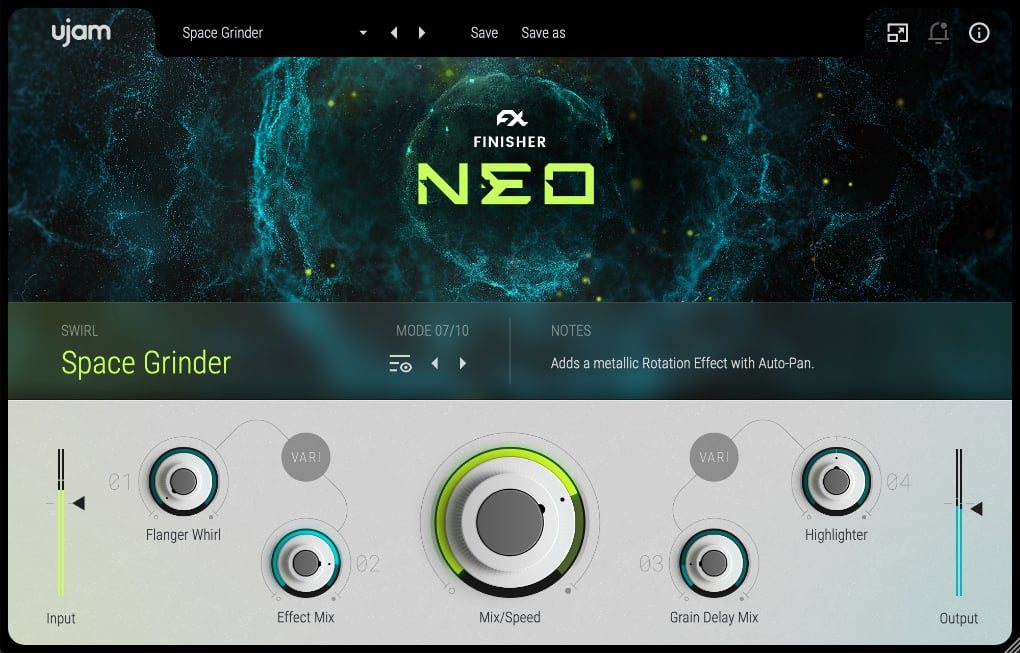
Finisher NEO is a creative effect plug-in from UJAM for musicians and producers. Multi-effect chains put together by sound designers are called up from a single, simple interface.
It contains 50 effect configurations (Modes) built from 27 algorithms, ranging from granular pitch and multiband distortion to stereo delays and convolution. Version 1.1.0 added 50 presets and two variation knobs.
Three macro knobs sit at the center: Effect, Variation and Ambience. Automating Effect changes the sound strongly, Variation moves delay times, EQ characteristics and distortion curves at once, and Ambience changes the mix and length of the matching space.
UJAM puts weight on letting you focus on the music instead of detailed settings. It may be a candidate for people who are not familiar with building effect chains but want to explore changes by switching Modes.
Key features
27 algorithms
The Modes are built on 27 processes, including granular pitch, multiband distortion, delays and convolution. Because they are combined differently in each Mode, you can try changes in many directions.
50 Modes
Effect chains crafted by sound designers are provided as 50 Modes. The complicated internal routing is hidden, so you can switch while listening and choose.
Effect knob
The central knob of each Mode produces large changes in the sound when moved. Automating it to follow the development of a song is suggested on the official page.
Variation knob
A knob that switches delay times, EQ characteristics and distortion curves of the current Mode at once. You can look for another expression in the same direction without changing the Mode.
Ambience knob
Most effects come with a matching ambience, and this knob changes its mix, length and character. It can be used to decide how the sound sits in the track.
Additions in version 1.1.0
According to the product page, version 1.1.0 added 50 new presets and two variation knobs. Together with the 80 original presets, there are more starting points.
Specifications
| Item | Details |
|---|---|
| Maker | UJAM |
| Type | Creative multi-effect |
| Plug-in formats | VST2 / VST3 / AAX / AU2 (64-bit only) |
| OS | Windows 10 to 11, macOS Catalina (10.15) to macOS Tahoe (26) (Intel and Apple silicon) |
| Requirements | 4 GB RAM, about 0.09 GB disk space, 1280×768 px display, internet connection |
| Authorization | UJAM App, or enter email and password in the plug-in |
What is included and system requirements
- 80 presets plus 50 new presets added in version 1.1.0
- 27 algorithms and 50 effect Modes
- 3 macro knobs (Effect, Variation, Ambience)
- MIDI supported
- Installation through the UJAM App or a downloadable installer
- Example DAWs: Ableton Live, Logic Pro, Pro Tools, FL Studio, Cubase, Studio One, Bitwig, Reaper, Reason
How to use it
- Create a UJAM account and register the license you purchased.
- Install the plug-in with the UJAM App or the installer and authorize it.
- Load Finisher NEO as an insert on a track or bus in your DAW.
- Switch through the Modes (effect combinations) to find one close to the sound you want.
- Move the main Finish (Effect) knob to set the depth of the effect.
- Add small changes and space with Variation and Ambience (or Shape).
- Write the knob moves as automation so they follow the development of the song.
- Compare with the original sound and check that the effect is not too strong.
Where it may come in handy
Changing the texture of synths and loops
Automating Effect on a synth or loop that feels static may be worth trying to add movement.
Ideas for vocals and instruments
When you want a special change on a voice or instrument, you could explore directions while switching Modes.
Building arrangements (build-ups and breaks)
Moving the knobs to create points where the sound changes strongly in the arrangement may be possible.
Processing podcasts and sound effects
There may be room to try Modes on sound effects whose texture you want to change.
Who it may suit
- People who want to create tonal changes quickly with few knobs
- People who want to enjoy sound design without building effect chains themselves
- People who want to add movement to material that feels static
- People who want to try directions quickly in the idea stage
Good to know before you buy
- Authorization with a UJAM account and an internet connection are required after purchase.
- If you move the sample content (.blob files) to an external drive, UJAM recommends an SSD to prevent dropouts.
- VST, AAX and AU formats are 64-bit only.
How it differs from similar products
We do not pick a winner; the official figures are placed side by side.
UJAM Finisher FLUXX
NEO offers 50 Modes built from 27 algorithms, while FLUXX is described as having more than 50 Modes and 4 variation controls. Both are listed at $59 on the official site.
Price
$59 (UJAM official site, checked 2026-10-27). Prices can vary by region and promotion, so check the official page before buying.
See Finisher NEO on the product page
More of the same kind
Other introduction articles of the same kind.
- Thenatan Audio TRIO
- AudioThing Lines
- Wave Arts MultiDynamics 7
- Eventide H3000 Factory Mk II
- Blue Cat Audio Blue Cat's StereoScope Pro
- Serato Hex FX
We have introduced 32 other products from UJAM.
See the full list in Product database: Effects.
Sources: ujam.com pluginboutique.com (checked 2026-10-27)










Comments