
Disclosure: This page may contain affiliate links. Prices were checked on the date shown and may change.
An introduction to UJAM Finisher DYNAMO, based on information from the maker and distributors: what it does, how to use it and who it may suit. It is not scored.
Finisher DYNAMO comes with 50 carefully designed audio effect configurations built from 27 different algorithms
— UJAM official site
What is Finisher DYNAMO?
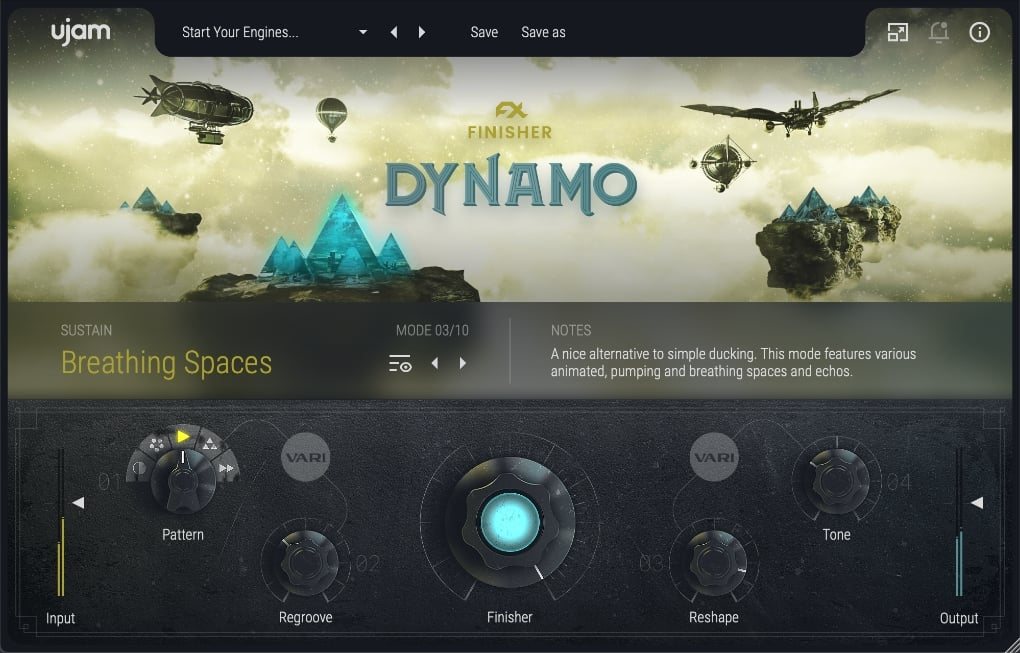
Finisher DYNAMO is a creative effect in UJAM's Finisher series meant for animating and re-grooving sounds. Stacks of effects are recalled as modes, and one large knob sets how strongly they apply.
It holds 50 configurations (modes) built from 27 algorithms, from step filters and multiband distortion to delays and convolution reverb. More than 290 categorized presets are included.
Modes fall into five categories: Remix for full tracks and mixes, Solo for bass and other single-voice sounds, Rhythm for drums and percussion, Sustain for pads and rhythmically static sounds, and Vocal for making chops and glitches from your own vocals.
Controls include a selector for five rhythmic patterns, a tone control, two Vari knobs and the Finisher knob. Many processors run underneath, but the interface stays simple. It supports Windows and macOS, and a free demo is offered.
Key features
50 modes from 27 algorithms
Combinations of step filters, multiband distortion, delay, convolution reverb and more form 50 configurations. Connections are hidden, so modes can be compared by switching.
290+ presets
More than 290 categorized presets are included, so a user can pick from a category and fine-tune.
Five mode categories
Remix, Solo, Rhythm, Sustain and Vocal let a user choose by source type. Vocal is aimed at generating chops and glitches from your own vocals.
Finisher knob
One knob controls many processors. Because the effect changes strongly, automating it along the arrangement is one possible use.
Rhythm pattern selector
Choose from five patterns that fit the production. It is a central control for moving sounds.
Vari knobs
They adjust modulation rates, EQ characteristics, distortion curves and similar aspects of the current mode together. The page mentions four Vari knobs.
Specifications
| Item | Details |
|---|---|
| Maker | UJAM |
| Type | Creative multi-effect |
| Modes | 50 (built from 27 algorithms) |
| Presets | 290+ |
| Windows | Windows 10 to 11 (64-bit only) |
| macOS | macOS Catalina (10.15) to macOS Tahoe (26), Intel and Apple silicon |
| Formats | VST 2, VST 3, AAX, AU 2 (64-bit only) |
| Requirements | 8 GB RAM, 0.9 GB disk, 1280×768 display, internet connection |
| Authorization | UJAM App or email and password in the plug-in |
What is included and system requirements
- 50 modes (27 algorithms) and 290+ presets
- Five-pattern rhythm selector, tone control and two variation knobs
- Installation via the UJAM App or an installer file
- A free demo is offered on the manufacturer page
How to use it
- Create a UJAM account and buy the product or get the demo.
- Install and authorize with the UJAM App (or with email and password in the plug-in).
- Insert it on a track in the DAW.
- Pick a preset from the Remix, Solo, Rhythm, Sustain or Vocal category to suit the source.
- Choose a rhythm pattern and set the amount with the Finisher knob.
- Adjust direction with the Vari knobs and tone.
- Automate the Finisher knob if desired.
Where it may come in handy
Remix-style treatment of a full mix
The Remix category may help create material for remix-style ideas.
Adding movement to bass
The Solo category on bass or single-note synths may add rhythmic motion.
Re-grooving drums and percussion
The Rhythm category on drums may help explore a different groove.
Making chops from vocals
The Vocal category can be used to create chop or glitch-style material from your own vocal.
Who it may suit
- People who want to try movement effects with few controls
- People who prefer mode categories for drums, bass, pads and vocals
- People who want to automate changes along the arrangement
- People who want to choose among UJAM's Finisher series products
Good to know before you buy
- VST 2 and AU 2 are listed as supported on Intel Macs and Apple silicon (Rosetta and native).
- An internet connection is needed for installation and authorization.
- If the sample content (.blob file) is moved to an external drive, an SSD is recommended.
How it differs from similar products
We do not pick a winner; the official figures are placed side by side.
Finisher NEO
Both are in UJAM's Finisher series and share the description of 50 modes from 27 algorithms. DYNAMO centres on movement, re-grooving and five mode categories (Remix, Solo, Rhythm, Sustain, Vocal), while NEO centres on three macro knobs: Effect, Variation and Ambience.
Price
$59 (UJAM official site, checked 2026-10-27). Prices can vary by region and promotion, so check the official page before buying.
See Finisher DYNAMO on the product page
More of the same kind
Other introduction articles of the same kind.
- MeldaProduction MMatcher
- Waves Greg Wells PianoCentric
- United Plugins FireCobra
- Wave Arts Panorama 7
- Rob Papen MasterMagic
- Kuassa Amplifikation VVV
We have introduced 32 other products from UJAM.
See the full list in Product database: Effects.
Sources: ujam.com pluginboutique.com (checked 2026-10-27)










Comments