
Disclosure: This page may contain affiliate links. Prices were checked on the date shown and may change.
An introduction to Antelope Audio Stages, based on information from the maker and distributors: what it does, how to use it and who it may suit. It is not scored.
Stages is a streamlined reverb plugin designed for speed, simplicity, and professional sound.
— Antelope Audio official site
What is Stages?
Stages is a reverb plugin from Antelope Audio, better known for audio interfaces. The company describes it as built for speed and simplicity, and it runs natively inside a DAW on macOS and Windows.
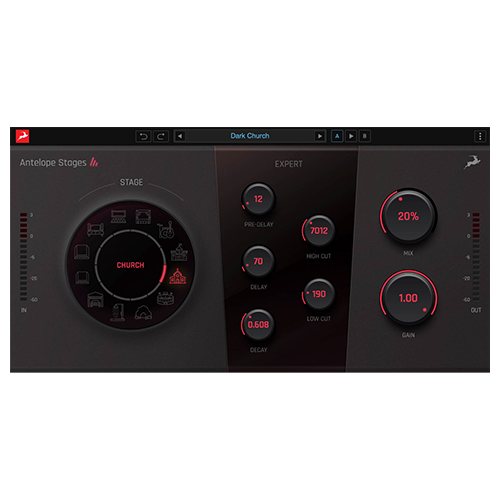
It comes with twelve pre-made spaces, from small rooms and studios up to concert halls, cathedrals and stadiums. A central rotary dial steps through spaces such as Chamber, Castle and Concert Hall.
Adjustable parameters are room size, reverb length, tone, intensity and mix level. It is meant to be loaded, dialled in and left, with little time spent on detail. The Plugin Boutique page also mentions an Expert Section with pre-delay, decay and delay amounts, plus low-cut and high-cut filters.
Stages is also part of the Antelope Cosmos subscription, which gives access to more than 75 native plugins, so there is a route beyond buying it on its own.
Key features
Twelve spaces on one dial
A rotary selector switches among twelve spaces, from small rooms to large halls, without menu diving, which may suit quick comparisons.
Five controls
Size, length, tone, intensity and mix are the only main adjustments, so the layout may be easy to approach for people new to reverb settings.
Expert Section
Per the Plugin Boutique page, pre-delay, decay and delay amounts can be tuned and low and high cut filters shape the frequency content of the reverb.
Natural-sounding aim
Antelope says each algorithm is tuned for clarity and realism, with vocals and instruments as the intended sources.
Included in Antelope Cosmos
Antelope Cosmos is a subscription covering more than 75 native plugins, and Stages is one of them. A 14-day free trial is advertised.
Specifications
| Item | Details |
|---|---|
| Spaces (algorithms) | 12 |
| Controls | Size / length / tone / intensity / mix (official) |
| Expert Section | Pre-delay, decay, delay amounts, low cut, high cut (as listed on Plugin Boutique) |
| Operation | Native plugin running inside the DAW (macOS / Windows) |
| Subscription | Antelope Cosmos (75+ native plugins) |
What is included and system requirements
- Stages native plugin
- Twelve reverb spaces
- macOS and Windows (see the system requirements on the official site for details)
How to use it
- Create an Antelope account and get Stages by purchase or the Cosmos free trial.
- Install it and let your DAW scan the plugin.
- Load it on a track or on a send.
- Turn the central dial to pick the space closest to what you want.
- Adjust size and length so the tail suits the song's tempo.
- Set tone and mix for brightness and amount.
Where it may come in handy
Finishing a vocal track
A light send on a vocal could add background space, which may help when you prefer not to dig into detailed settings.
Drums and instruments
A small room on a snare or acoustic instrument could help glue the part into the mix.
Video and voiceover
Cathedral or large hall settings might add a fitting sense of place to a scene.
Who it may suit
- People who feel lost with reverbs that have many settings
- Users who want to settle on a space quickly
- Owners of Antelope interfaces or plugins
Good to know before you buy
- The price on the official page is shown in euros.
- Detailed system requirements are on the official View System Requirements link.
- The Expert Section details come from the Plugin Boutique description rather than the official page.
How it differs from similar products
We do not pick a winner; the official figures are placed side by side.
iZotope Equinox
Stages has twelve spaces and five controls for quick use. Equinox offers more than 1,250 presets, a Balance tab for surround formats and adaptive unmasking.
Price
about $145 (converted from €129.00) (Antelope Audio official site, checked 2026-10-27). Prices can vary by region and promotion, so check the official page before buying.
See Stages on the product page
More of the same kind
We have introduced 112 reverbs. Here are some of the others.
- PSP Audioware PSP PianoVerb2
- Abletunes Space KnobAbletunes Knobs
- NUGEN Audio Paragon ST
- Boz Digital Labs ReCoil
- AudioThing Environments
- D16 Group Toraverb 2
We have introduced 54 other products from Antelope Audio.
- Antelope Audio Antelope Audio Springer
- Antelope Audio Shimmer
- Antelope Audio SonaVerb
- Antelope Audio NEU-W495
- Antelope Audio Antelope Audio Gyratec XIV
For a side-by-side comparison scored on the same criteria, see our comparison of reverbs.
See the full list in Product database: Effects.
Sources: en.antelopeaudio.com pluginboutique.com (checked 2026-10-27)










Comments