
Disclosure: This page may contain affiliate links. Prices were checked on the date shown and may change.
An introduction to Antelope Audio Antelope Audio Springer, based on information from the maker and distributors: what it does, how to use it and who it may suit. It is not scored.
Springer captures the vintage charm of analog spring tanks while giving you deep control over every detail of the reverb’s behavior.
— Antelope Audio official site
What is Antelope Audio Springer?
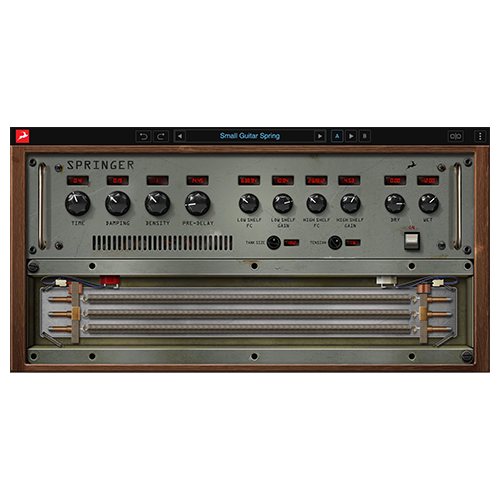
Antelope Audio Springer is a reverb plug-in for your DAW that recreates the character of analog spring reverb, in which a mechanical metal spring produces the reverb. The maker positions it for surf-rock and lo-fi textures.
It reproduces the metallic resonance and natural movement of a spring tank, while also letting you control things a real unit does not allow. You can directly adjust tank size, spring tension and density, from short, bouncy reflections to wide, irregular trails.
Tone is shaped with damping and tone controls. You can darken or brighten the tail and keep resonance from building up, so it can sit with clean or saturated sources. Pre-delay and stereo depth set the position and distance of the reverb.
Springer is also included in Antelope Cosmos, a subscription that unlocks over 75 of Antelope’s native plug-ins. A 14-day free trial is offered as well as the one-time purchase.
Key features
Spring tank character
The maker says it emulates the resonance, metallic overtones and natural modulation of mechanical spring tanks. It is an option for adding vintage-style color to guitars, vocals, keys and more.
Tank size, tension and density
You can directly control the size of the tank, the tension of the springs and their density. This gives physical-style differences such as tight, bouncy reflections or wide, chaotic trails.
Damping and tone
Darken or brighten the tail and control resonance build-up. The controls are meant to let you tune it for both clean and saturated mixes.
Pre-delay and depth
Pre-delay and stereo depth help separate the source from the reverb, create rhythmic space or give a cinematic ambience.
Quick, intuitive workflow
The interface is described as intuitive for quick results while still offering deep control, aimed at both fans of classic reverb and experimental producers.
Included in Antelope Cosmos
It is part of the Antelope Cosmos subscription, which covers more than 75 native plug-ins. Anyone wanting to try several plug-ins can weigh it against buying this one alone.
Specifications
| Item | Details |
|---|---|
| Type | Spring reverb |
| Format | Native (runs on macOS and Windows) |
| Main controls | Tank size, tension, density, damping, tone, pre-delay, depth |
| Availability | One-time purchase, or included in Antelope Cosmos (subscription) |
| Trial | 14-day free trial (Cosmos) |
What is included and system requirements
- The spring reverb plug-in (native version)
- Platforms: macOS and Windows (see the System Requirements on the maker’s page for details)
- Included in Antelope Cosmos, which covers more than 75 native plug-ins
How to use it
- Create an Antelope Audio account, then buy the plug-in or start the Cosmos free trial.
- Install the plug-in and refresh your DAW’s plug-in list.
- Load it on a send/aux track, or as an insert on a track.
- Start with tank size and tension to set the length and bounce of the reflections.
- Use density to adjust how fine the reflections are.
- Use damping and tone to shape the brightness of the tail and the resonance.
- Set pre-delay and depth to give distance from the dry source.
- Check how it sounds in the whole mix, then set the amount of reverb.
Where it may come in handy
Guitar and surf-style tones
Spring reverb has long been paired with guitar. It may add spring-style bounce to surf-rock or vintage-style guitar parts.
Lo-fi vocals and drums
Darkening the tail with damping and tone may help create the space for lo-fi style vocals or snares.
Space for keys and synths
Wider tank size and density settings may add an irregular, spread-out tail to keys and synths.
Experimental sound design
You may also push the parameters past what a real spring tank allows to search for unusual textures.
Who it may suit
- People who want a spring reverb texture
- People making lo-fi, surf or vintage-style music
- People who want to adjust the physical character of a reverb in a single plug-in
- People who also want to try Antelope’s other plug-ins
Good to know before you buy
- It can also be used through Antelope Cosmos (a subscription), so check the maker’s page for how that differs from buying it alone.
- Detailed operating system requirements are listed behind View System Requirements on the maker’s page.
How it differs from similar products
We do not pick a winner; the official figures are placed side by side.
SSL SpringVerb
Antelope Springer is built around direct control of tank size, tension and density. SSL SpringVerb offers three spring models (A, B, C) and one to three springs, plus drive and ducking.
Price
$129 (Antelope Audio official site, checked 2026-10-27). Prices can vary by region and promotion, so check the official page before buying.
See Antelope Audio Springer on the product page
More of the same kind
We have introduced 112 reverbs. Here are some of the others.
- IK Multimedia CSR Inverse Reverb
- FLUX:: Ircam Verb
- Waves Manny Marroquin Reverb
- Polyverse Music Comet
- Waves TrueVerb
- IK Multimedia CSR Hall Reverb
We have introduced 54 other products from Antelope Audio.
- Antelope Audio Stages
- Antelope Audio Shimmer
- Antelope Audio SonaVerb
- Antelope Audio NEU-473A
- Antelope Audio DRM-60
For a side-by-side comparison scored on the same criteria, see our comparison of reverbs.
See the full list in Product database: Effects.
Sources: en.antelopeaudio.com pluginboutique.com solidstatelogic.com (checked 2026-10-27)










Comments