
Disclosure: This page may contain affiliate links. Prices were checked on the date shown and may change.
An introduction to Boz Digital Labs ReCoil, based on information from the maker and distributors: what it does, how to use it and who it may suit. It is not scored.
ReCoil gives you the authentic sound of real spring reverbs without the hassle, noise or limitations.
— Boz Digital Labs official site
What is ReCoil?
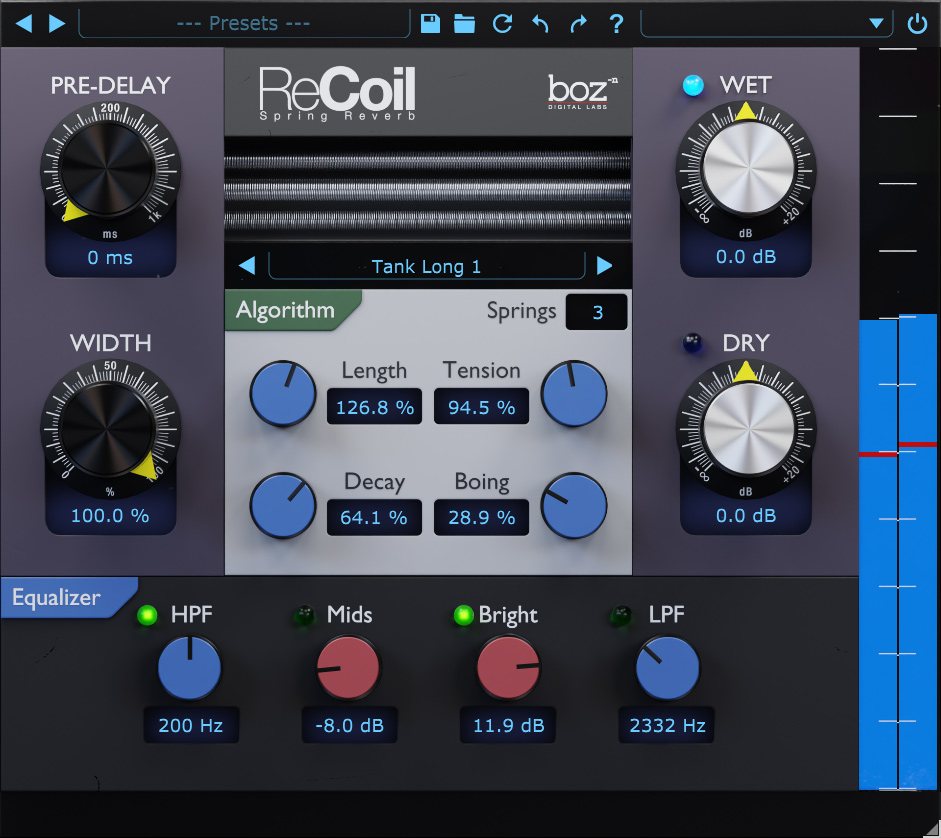
ReCoil is a spring reverb plugin from Boz Digital Labs. It aims to give you the characteristic sound of spring reverbs without the noise, delicacy and limits of hardware tanks.
You can choose the spring model and also how many springs to use, from one to three. The official text says the team added slinkies, door stops and other spring-like objects alongside traditional tanks.
There are two ways to build the sound: algorithmic reverbs for control, and impulse-based reverbs for realism. You decide whether flexibility or realism matters more for the job.
Spring reverbs are usually close to mono, but ReCoil lets you pan each spring separately for a wide stereo image. It is suited to adding a vintage feel to guitars, keys and other sources.
Key features
Spring count
Each spring model lets you pick one to three springs, changing density and character.
Variety of springs
Besides standard tanks, it includes unusual springs such as slinkies and door stops, useful when you want something beyond the usual.
Algorithmic and impulse models
It has both highly tweakable algorithmic models and impulse-based models for realism.
Full spring control
You can adjust spring settings extensively, addressing the fixed nature of hardware.
Stereo spreading
Each spring can be panned separately for a naturally wide spring reverb.
Instant vintage vibe
The maker describes it as an easy way to give any instrument a vintage vibe.
Specifications
| Item | Details |
|---|---|
| Type | Spring reverb (algorithmic and impulse) |
| Springs | 1 to 3 per model |
| OS | Mac: OS X 10.11 or later, Windows: 7 or later |
| Formats | 64-bit VST2.4, VST3, AU, AAX |
| Trial | Listed on Plugin Boutique |
What is included and system requirements
- The ReCoil plugin
- Algorithmic and impulse-based spring models
- VST2.4, VST3, AU and AAX formats
How to use it
- After purchase, register the product in your Boz Digital Labs account.
- Run the installer and choose the plugin formats.
- Load it in your DAW and authorize with your username and serial code.
- Choose a spring model, then one to three springs.
- Pick algorithmic or impulse to set the direction of the sound.
- Pan each spring to adjust the stereo width.
Where it may come in handy
Guitars and keys
It may suit cases where you want a texture reminiscent of an amp's spring reverb.
Vocal accents
A short spring tail on selected phrases could create a retro mood.
Drums and percussion
You may try it on snares for an older-record feel.
Who it may suit
- Those who want spring reverb without hardware
- People looking for a stereo spring reverb
- Users curious about unusual spring sounds
Good to know before you buy
- Only 64-bit hosts are supported.
- A Boz Digital Labs account is needed for authorization.
- The price is as shown on the standard product page.
Price
$99 (Boz Digital Labs official site, checked 2026-10-27). Prices can vary by region and promotion, so check the official page before buying.
See ReCoil on the product page
More of the same kind
We have introduced 112 reverbs. Here are some of the others.
- Acon Digital Verberate 2
- D16 Group Toraverb 2
- IK Multimedia CSR Plate Reverb
- MeldaProduction MReverbMB
- Leit Audio Places
- Universal Audio EMT 250 Classic Electronic Reverb
We have introduced 9 other products from Boz Digital Labs.
- Boz Digital Labs Imperial Delay
- Boz Digital Labs ProVocative
- Boz Digital Labs Little Foot
- Boz Digital Labs Panther Stereo Manipulation
- Boz Digital Labs Mongoose 2
For a side-by-side comparison scored on the same criteria, see our comparison of reverbs.
See the full list in Product database: Effects.
Sources: bozdigitallabs.com pluginboutique.com (checked 2026-10-27)










Comments