
Disclosure: This page may contain affiliate links. Prices were checked on the date shown and may change.
An introduction to McDSP Classic Pack v7, based on information from the maker and distributors: what it does, how to use it and who it may suit. It is not scored.
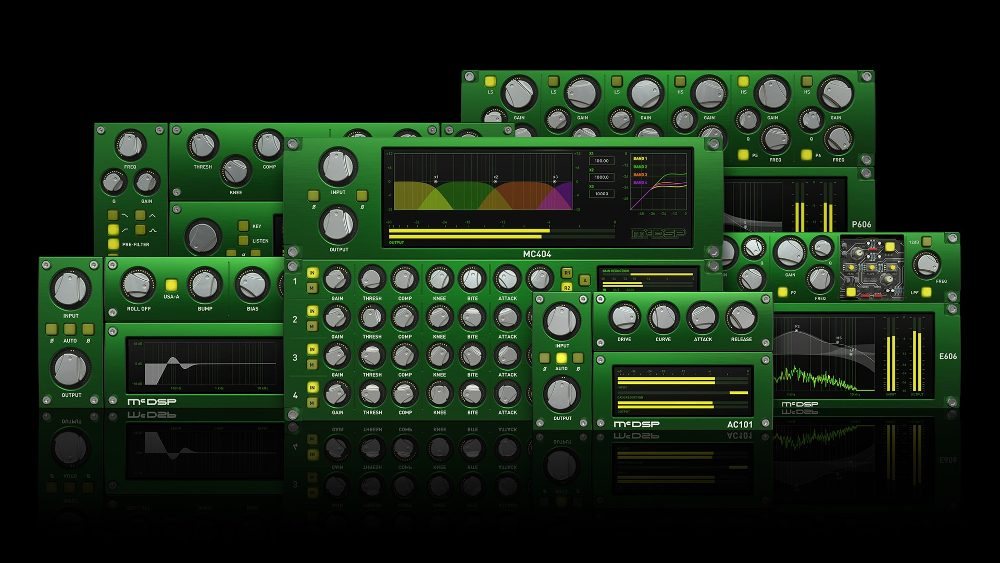
McDSP's legendary emulations of vintage equalizers, compressors, tape machines and channel amplifiers are available together in the Classic Pack bundle.
— McDSP official site
What is Classic Pack v7?
Classic Pack is a plug-in bundle from the American developer McDSP. The maker describes it as a collection of emulations of vintage equalizers, compressors, tape machines and channel amplifiers.
It contains FilterBank, CompressorBank, MC2000 and Analog Channel. McDSP explains that these are among its earliest products and among the first third-party plug-ins ever made.
FilterBank is a flexible equalizer that can emulate other EQs or be used to create a custom one. CompressorBank is designed to emulate vintage and modern compressors, MC2000 is a multiband compressor, and Analog Channel deals with the character of tape machines and channel amplifiers.
The v7 release is optimized for Apple silicon and the latest Intel CPUs, with double-precision processing and zero latency. Artist presets by well-known engineers and producers are included. At Plugin Boutique the regular price is 299 US dollars for Native and 349 US dollars for HD.
Key features
FilterBank (equalizer)
Presented as McDSP's first product, this equalizer has a flexible design and many features. It can emulate other EQs or be used to build a custom one.
CompressorBank (compressor)
Designed to emulate vintage and modern compressors while giving full control of compression. It gives a starting point when you want to try different compressor characters.
MC2000 (multiband compressor)
A multiband compressor that lets you compress each band separately, built with vintage and modern compressors in mind. It can be used to balance bands on a bus or full mix.
Analog Channel (tape and channel amp)
Emulates high-end tape machines, tape and channel amplifiers. You can try it to add warmth or weight to digital recordings.
Artist presets
According to the maker, presets by well-known mix engineers and producers are included, giving you starting points before you learn the controls.
Operational updates in v7
Optimized for Apple silicon and the latest Intel CPUs, with double-precision processing, zero latency and two activations per license.
Specifications
| Item | Details |
|---|---|
| Type | Plug-in bundle (EQ / compressor / multiband / tape) |
| Plug-ins | FilterBank, CompressorBank, MC2000, Analog Channel |
| Formats | Native: AAX Native / AU / VST3; HD: also AAX DSP |
| Processing | Double precision, zero latency |
| Authorization | iLok2 / iLok3 or iLok Cloud, two activations per license |
| Supported systems (per Plugin Boutique) | macOS 10.13 to 12 / Windows 10 |
| Price (Plugin Boutique) | Native 299 USD, HD 349 USD |
What is included and system requirements
- FilterBank
- CompressorBank
- MC2000 multiband compressor
- Analog Channel
- Artist presets
- Formats: AAX Native, AU, VST3 (HD also AAX DSP)
How to use it
- Create a free iLok account and install the iLok License Manager.
- Redeem the 30-digit activation code you receive after purchase in the License Manager.
- Open an iLok Cloud session and assign the license to it.
- Download the Mac or Windows installer from your purchase page.
- After installing, launch your DAW and find the McDSP plug-ins in the plug-in list.
- Insert FilterBank on a track, call up an artist preset and listen.
- Insert CompressorBank and try the differences between vintage and modern compressor styles.
- Add MC2000 or Analog Channel on a bus to adjust band balance or character.
Where it may come in handy
A core EQ and compressor set
With FilterBank and CompressorBank as the core, you might cover the basic processing of a mix inside one bundle.
Band balance on a bus
MC2000 could be used to adjust compression in particular bands of a drum bus or a full mix.
Adding character to digital recordings
Analog Channel may be worth trying when you want the weight of tape or a channel amplifier.
Learning from presets
You can open an artist preset, study its settings and apply the ideas to your own adjustments.
Who it may suit
- People who want the basic EQ and compression tools in one bundle.
- People interested in emulations of vintage equipment.
- People who want to learn mixing by studying presets.
- Pro Tools users who want to run it on HDX (DSP) systems.
Good to know before you buy
- McDSP v7 plug-ins need authorization through an iLok2 or iLok3 USB key, or a free iLok License Manager account with iLok Cloud.
- VST is no longer supported from v7; the formats are AAX, AU and VST3. v6 VST versions are no longer updated and are uninstalled.
- Plugin Boutique's guide lists macOS 10.13 to 12 and Windows 10 as supported systems. Check current compatibility before buying.
- A subscription covering every McDSP plug-in is also offered, and the maker's site mentions a 14-day demo.
How it differs from similar products
We do not pick a winner; the official figures are placed side by side.
McDSP Retro Pack
Classic Pack has four plug-ins (FilterBank, CompressorBank, MC2000, Analog Channel) and costs 299 US dollars for Native. Retro Pack has three (EQ, compressor, limiter) and costs 149 US dollars for Native.
Price
$299 (Plugin Boutique, checked 2026-10-27). Prices can vary by region and promotion, so check the official page before buying.
See Classic Pack v7 on the product page
More of the same kind
Other introduction articles of the same kind.
- Metric Halo Make Believe Bundle
- Kuassa Efektor Modulation Too Bundle
- IK Multimedia Fulltone Collection
- Kuassa Efektor Pitch Bundle
- Sonnox Broadcast Bundle
- Applied Acoustics Systems Libraries
We have introduced 53 other products from McDSP.
- McDSP 6060 Ultimate Module Collection
- McDSP Retro Pack v7
- McDSP Classic Pack
- McDSP Emerald Pack
- McDSP 6060 Ultimate Module Collection Native v7
See the full list in Product database: Bundles.
Sources: mcdsp.com pluginboutique.com (checked 2026-10-27)










Comments