
Disclosure: This page may contain affiliate links. Prices were checked on the date shown and may change.
An introduction to McDSP 6060 Ultimate Module Collection Native v7, based on information from the maker and distributors: what it does, how to use it and who it may suit. It is not scored.
The largest collection of options of any module-based plug-in.
— McDSP official site
What is 6060 Ultimate Module Collection Native v7?
6060 Ultimate Module Collection is a module-based plug-in from McDSP. It puts over 30 modules for EQ, compression, saturation, distortion, specialized filtering, expansion, gating and more into one plug-in. This entry covers the Native version (v7).
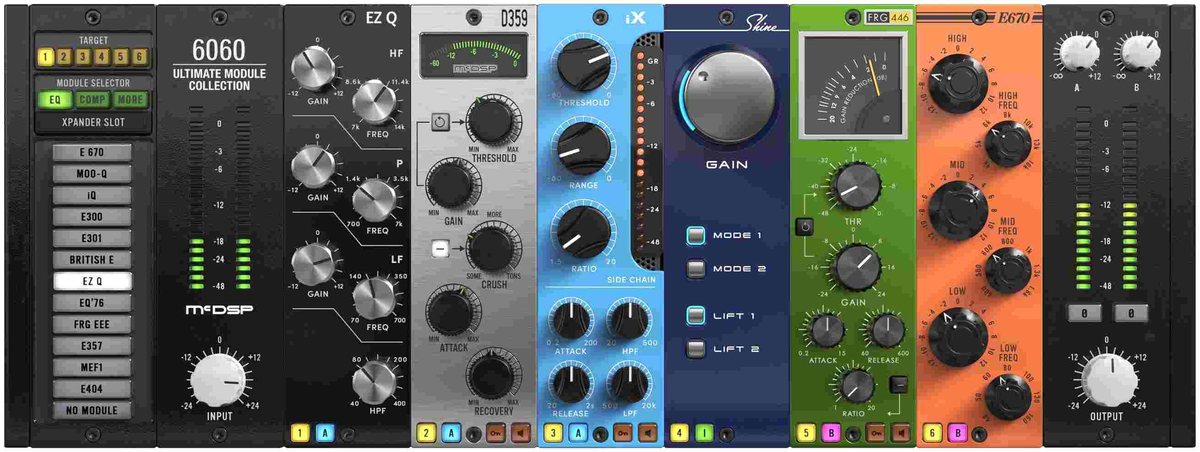
Up to six modules can run at once, in any order, and they can be swapped on the fly from the module selector panel or each module's pop-up menu. Relative control values are retained when switching, which McDSP presents as a quick way to compare modules.
A split mode divides the modules into two separate signal paths for parallel processing. McDSP lists twelve EQ modules and ten compressor modules, with the rest covering saturation, specialized filters, tape machine emulation, transformer circuit modeling, bass-optimized biasing, de-essing and more.
The 6060 includes updated compression algorithms that are not in the 6050 Ultimate Channel Strip or the original 6030 Ultimate Compressor. They offer both feedback and feedforward processing, and a rare negative compression option on a few modules.
Key features
Over 30 modules
It includes EQ, compression, saturation, distortion, gating, expansion, tape and de-essing modules, for example BC-23 (British-style compressor), C671 (Fairchild 670 variation), Opto-C3/Opto-L3 (optical), British-E (Neve-style EQ) and PDQ (Pultec-like peak and dip). It may help when you want to try many types in one plug-in.
Up to six modules in any order
Up to six modules can be arranged in any order and swapped by drag and drop or from the selector panel, so a chain such as EQ, compressor and saturation fits in one plug-in.
Split mode
Modules can be divided into two parallel paths. This supports techniques such as splitting a bass guitar into two processed parts, which McDSP discusses in its own articles.
Negative compression
Compressor modules such as FRG446, D359 and SST’78 offer a negative compression mode. McDSP warns that it causes pumping and distortion and should be used carefully.
BOB for low end
The Bass Optimized Bias module offers over 24 dB of boost at a chosen frequency while reducing signal below it, so the boosted bass is better focused. A Squash control adds frequency-selective compression.
TAPE, SOS, SHINE and other special modules
TAPE builds on Analog Channel's AC202 for tape compression, with tape types based on Quantegy GP9 and Ampex 456. SOS is a de-esser and SHINE adds a high-shelf-like lift.
Specifications
| Item | Details |
|---|---|
| Type | Module-based multi-function plug-in (EQ, compression, saturation, gating) |
| Modules | Over 30 (12 EQ, 10 compressor) |
| Simultaneous use | Up to six modules, two paths in split mode |
| Formats (Native) | AAX Native, AU, VST3 |
| OS | macOS 10.13 or later (64-bit only), Windows 7/8/10 (64-bit only) |
| Authorization | iLok2/iLok3, or free iLok License Manager with iLok Cloud |
| Activations | Two per license |
| Processing | Double precision, zero latency, anti-clip output stage |
What is included and system requirements
- Over 30 modules covering EQ, compression, saturation, distortion, filtering and gating
- Mono and stereo versions
- Presets from award-winning mix engineers
- Split mode
- Anti-clip output stage
- Compatible DAWs include Pro Tools, Logic Pro, Cubase, Nuendo, Ableton Live, LUNA, Reaper, Sonar and Studio One
How to use it
- Create a free iLok account and install iLok License Manager.
- Enter the code shown after purchase into iLok License Manager and assign the license to iLok Cloud or a USB key.
- Download and run the installer from your account.
- In your DAW, load 6060 as an insert on a vocal, bass or other track.
- Choose the first module, for example an EQ, in the module selector panel.
- Add a compressor or saturation module in the next slot and reorder them by dragging.
- Swap modules to compare them, and try split mode for parallel processing.
Where it may come in handy
Two-path bass processing
You could split bass into two paths, tidying the lows in one and adding distortion in the other. Combining this with the BOB module may be worth a try.
Vocal chain in one plug-in
EQ, compression and de-essing (SOS) can sit in one plug-in with their order tested, which may suit those who want fewer plug-ins.
Comparing compressor flavors
On one track you can swap optical, Fairchild-style and solid-state-style compressor modules to find a preference.
Who it may suit
- People who want to try many modules in one plug-in
- Users who want to compare EQ and compressor types inside the DAW
- Those who want to process bass or drums in parallel
- Anyone who wants fewer plug-ins to manage in a mix
Good to know before you buy
- Authorization needs an iLok2/iLok3 USB key or a free iLok account with iLok Cloud.
- Each license can be authorized on two computers.
- The older VST format is not supported in v7.
- This entry is the Native version; an HD version for AAX DSP is sold separately.
- Negative compression can cause pumping and distortion if overused.
- A 14-day demo is offered on the official site.
How it differs from similar products
We do not pick a winner; the official figures are placed side by side.
McDSP Analog Channel
6060 offers up to six of over 30 modules, and its TAPE module builds on Analog Channel's AC202. Analog Channel focuses on two plug-ins, AC101 (channel amplifier) and AC202 (tape machine), with detailed controls such as tape speed and IEC1/IEC2 equalization.
Price
$249 (Plugin Boutique, checked 2026-10-27). Prices can vary by region and promotion, so check the official page before buying.
See 6060 Ultimate Module Collection Native v7 on the product page
More of the same kind
Other introduction articles of the same kind.
- NUGEN Audio Halo Upmix
- Waves MaxxBass
- Harrison Consoles Drum Flow
- Waves Waves Maserati ACG
- sonible pure:unmask
- Sonarworks SoundID VoiceAI ROCK Voice pack
We have introduced 53 other products from McDSP.
- McDSP 6034 Ultimate Multi-band Native v7
- McDSP SA-3 Spectral Processor
- McDSP SA-2 Dialog Processor HD v7
- McDSP SA-2 Dialog Processor
- McDSP SA-2 Dialog Processor v7
See the full list in Product database: Effects.
Sources: mcdsp.com pluginboutique.com (checked 2026-10-27)










Comments