
Disclosure: This page may contain affiliate links. Prices were checked on the date shown and may change.
An introduction to Tokyo Dawn Labs TDR VOS SlickEQ GE, based on information from the maker and distributors: what it does, how to use it and who it may suit. It is not scored.
An elaborate auto gain option automatically compensates for changes of perceived-loudness during EQ.
— Tokyo Dawn Labs official site
What is TDR VOS SlickEQ GE?
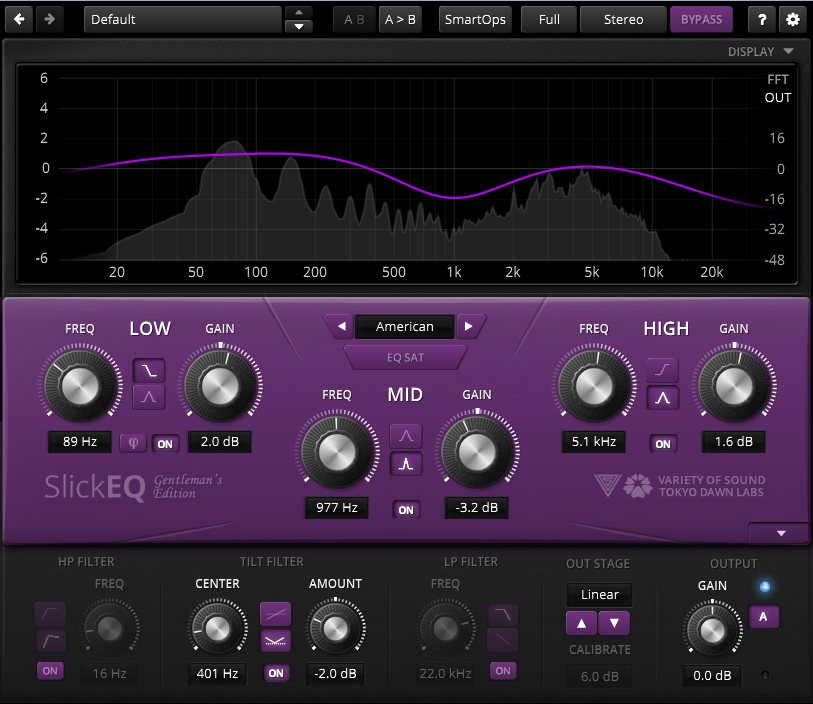
TDR VOS SlickEQ GE (Gentleman's Edition) is the extended version of SlickEQ, an equalizer developed jointly by Tokyo Dawn Labs and Variety of Sound. It is built around three semi-parametric bands, a tilt filter, and low-pass and high-pass filters, giving several ways to shape tone.
Five EQ models are offered: American, British, German, Soviet and Japanese. Each comes with its own predefined curves and behavior, so the same knob movement can respond differently. A switchable EQ non-linearity and a set of output stages (eight, according to the official page) let you choose anything from subtle texture to more obvious saturation.
Internally it uses a 64-bit multi-rate scheme (processing at a raised internal sample rate) intended to avoid frequency warping, quantization distortion and aliasing that can affect digital EQs. A loudness-compensated auto gain and a gain trim for handling peak overloads are also included.
Supporting tools include a frequency magnitude display with a real-time analyzer, preset management, undo/redo, A/B comparison, copy and paste, and online help. Stereo, mono, left, right and sum/difference (mid/side) modes let you process the center or the sides alone without an external encoder.
Key features
Five EQ models
Choose from American, British, German, Soviet and Japanese models. Each has its own predefined curves and behavior, so you can compare how the same move responds in each.
Tilt filter with HP/LP
A tilt filter shifts the overall balance, flanked by low-pass and high-pass filters. The high-pass has an optional Bump mode and the low-pass offers 6 dB/oct and 12 dB/oct slopes.
Output stages and non-linearity
Output stages such as Linear, Silky, Mellow, Deep, Excited, Toasted, Funky and Seven can be switched, together with an EQ non-linearity option, covering clean use through added texture.
Smart Operations
Functions such as Match Pink, Match reference, De-resonate and Auto HP/LP help match a noise or reference curve and reduce resonances automatically, which you can then fine-tune by hand.
Auto gain and trim
A loudness-compensated auto gain evens out perceived level changes caused by EQ, and a gain trim handles peak overloads, which makes before/after comparison easier.
Channel modes and Dual Mono
Stereo, mono, left, right and sum/difference modes are available, plus a Dual Mono mode that applies slightly randomized tolerances across channels.
Display and analyzer
A magnitude display with a real-time analyzer is included, along with a zero-latency Live mode and UI scales of 100, 125 and 150 percent.
Specifications
| Item | Details |
|---|---|
| Type | Equalizer (Tokyo Dawn Labs x Variety of Sound) |
| Bands | 3 semi-parametric bands + tilt + high-pass/low-pass |
| EQ models | American, British, German, Soviet, Japanese |
| Output stages | 8 (official) |
| Processing | 64-bit multi-rate |
| Channel modes | Stereo, mono, left, right, mid/side |
| Latest version (official) | 1.3.9 |
| Formats (Plugin Boutique) | Windows: VST, AAX; Mac: VST, AU, AAX (64-bit only) |
What is included and system requirements
- Personal / small business license with free updates
- Windows: VST, AAX (per Plugin Boutique)
- Mac: VST, AU, AAX (64-bit only)
- Demo edition available on the official site
How to use it
- Install the demo or purchased version and rescan plug-ins in your DAW.
- Insert SlickEQ GE on the track you want to shape.
- Pick an EQ model first (American, British and so on).
- Move the three bands to boost or cut the ranges you need.
- Use the tilt and high-pass / low-pass filters to balance the overall tone.
- Switch output stages to check how much coloration you want.
- Turn on auto gain to compare before and after at similar loudness.
- Save settings you like as presets.
Where it may come in handy
Vocal shaping
The tilt and high-pass filters may be a quick way to rebalance a vocal or clear unwanted low end, and an output stage could add a little texture.
Overall mix balance
Mid/side mode lets you shape the center and the sides separately, which may be useful on a bus or lightly on the master.
Moving toward a reference
Match reference may help move the rough balance toward a reference track, as a starting point for comparison.
Live-oriented use
The zero-latency Live mode may suit situations where you monitor through the plug-in.
Who it may suit
- People who want to try different EQ models while mixing
- Those who want broad tonal shaping with a tilt filter
- Users who adjust frequency balance against a reference
- Anyone who wants some range of coloration from a single EQ
Good to know before you buy
- The Mac version is 64-bit only (per Plugin Boutique).
- The official site lists eight output stages while the Plugin Boutique text says seven; the newer official figure is used here.
- The license covers personal / small business use, with free updates.
- The official site asks buyers to confirm the demo runs on their system before purchase.
Price
about $34 (converted from €30.00) (Tokyo Dawn Labs official site, checked 2026-10-27). Prices can vary by region and promotion, so check the official page before buying.
See TDR VOS SlickEQ GE on the product page
More of the same kind
We have introduced 122 EQs. Here are some of the others.
- Antelope Audio VMEQ-5
- Waves PuigTec EQs
- Blue Cat Audio Liny EQ
- Kuassa EFEKTOR Paten Graphic Equalizer
- Antelope Audio NEU-W495
- Kuassa EVE-AT1
We have introduced 4 other products from Tokyo Dawn Labs.
- Tokyo Dawn Labs Tokyo Dawn Labs TDR Nova GE
- Tokyo Dawn Labs TDR SlickEQ M
- Tokyo Dawn Labs TDR Molot GE
- Tokyo Dawn Labs OD DeEdger
For a side-by-side comparison scored on the same criteria, see our comparison of EQs.
See the full list in Product database: Effects.
Sources: tokyodawn.net pluginboutique.com (checked 2026-10-27)










Comments