
Disclosure: This page may contain affiliate links. Prices were checked on the date shown and may change.
An introduction to Universal Audio Hitsville EQ Collection, based on information from the maker and distributors: what it does, how to use it and who it may suit. It is not scored.
The Hitsville EQ Collection gives you the soulful tone of the custom-built graphic equalizers that shaped the legendary Motown Sound.
— Universal Audio official site
What is Hitsville EQ Collection?
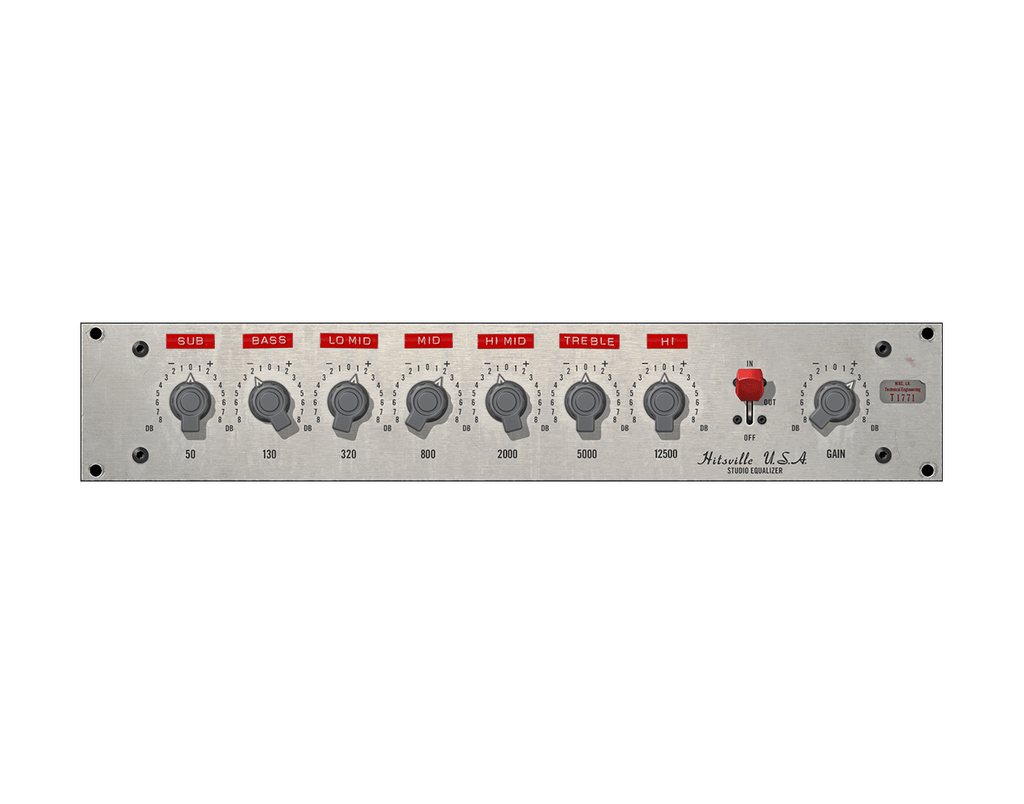
Hitsville EQ Collection is an equalizer plug-in from Universal Audio (UA). It is modeled on the custom-built graphic equalizers used at the Motown studio known as Hitsville U.S.A.
According to UA, it was recreated with help from the technical engineers who built the originals, and the emulations are officially licensed by the Hitsville U.S.A. studio. It is set up to work on vocals, drums, bass, keyboards and guitars alike.
The collection has two parts. One is a simple seven-band graphic EQ. The other is a mastering EQ with mid/side control, including custom filters UA calls the Motown Filters and half-speed frequency settings.
Both UAD Native and Apollo Realtime / UAD-2 versions are included. You can run it on a Mac or PC without any UA hardware, which makes it approachable for a home-recording setup.
Key features
Seven-band graphic EQ
You raise or cut each frequency band with its own slider. With few complex parameters, it may suit quick tone shaping on vocals or drums.
Mid/side mastering EQ
The collection includes an EQ that adjusts the center (mid) and the stereo sides separately. It may help at the finishing stage when you want different tone on the center and the edges.
Motown Filters
The mastering EQ carries custom filters UA calls the Motown Filters, meant for shaping the top and bottom edges of the spectrum.
Half-speed frequency settings
Half-speed frequency settings are provided, in the spirit of disc mastering. You can switch between them and the standard settings to compare.
Studio-licensed emulation
UA states the modeling was done with the original engineers and is officially licensed by the studio. It may appeal to anyone who wants to try that Motown-style approach.
Native and Apollo versions included
UAD Native (UADx) runs without UA hardware, and the Apollo Realtime / UAD-2 version runs on Apollo or UAD-2 DSP. Both come with one purchase.
Specifications
| Item | Details |
|---|---|
| Type | Graphic EQ + mastering EQ (emulation) |
| Formats | VST3 / AU / AAX |
| macOS | Big Sur 11 through Tahoe 26 |
| Windows | Windows 10 / 11 (64-bit) |
| Processor | Intel / AMD / Apple silicon |
| Licensing | Free iLok account required; UA Connect app manages UADx plug-ins |
| Versions | UAD Native and Apollo Realtime / UAD-2 |
What is included and system requirements
- UAD Native version (UADx)
- Apollo Realtime / UAD-2 version
- Seven-band graphic EQ
- Mid/side mastering EQ (including Motown Filters and half-speed settings)
- A DAW supporting VST3, AU or AAX
- Internet connection to download and authorize UADx plug-ins
How to use it
- Buy from the UA website and prepare a free iLok account.
- Install UA Connect and download Hitsville EQ Collection.
- Authorize the UADx (Native) plug-in. An iLok USB key is not required.
- Open your DAW and insert the plug-in on the track you want to shape.
- Start with the seven-band graphic EQ and move the sliders of the bands you care about a little at a time.
- For finishing, put the mastering EQ on the stereo mix and adjust the mid and the sides separately.
- Toggle bypass while matching volume so you can compare before and after.
Where it may come in handy
Shaping a vocal
The seven-band graphic EQ may suit nudging vocal bands up and down a little at a time, with simple slider moves.
Tidying drums and bass
It may help balance the weight of each band on low-end material such as drums and bass.
Finishing a stereo mix
The mid/side mastering EQ could be used to adjust the center and the stereo width separately.
Who it may suit
- People who want the simplicity of a graphic EQ for shaping vocals and drums
- People who want to adjust mid and sides separately when finishing a mix
- Anyone curious about an EQ modeled on Motown studio gear
- Apollo or UAD-2 owners who want a DSP version as well
Good to know before you buy
- A free iLok account and the UA Connect app (for managing UADx plug-ins) are required.
- An internet connection is needed to download and authorize UADx plug-ins.
- Supported formats are VST3, AU and AAX.
- UA sometimes shows limited-time sale prices. Check the current price before buying.
How it differs from similar products
We do not pick a winner; the official figures are placed side by side.
Blonder Tongue Audio BatonAntelope Audio
Both are graphic-style EQs modeled on vintage gear. Per UA, Hitsville EQ Collection pairs a seven-band graphic EQ with a mastering EQ, while Antelope describes the Blonder Tongue Audio Baton as 9 bands with a 28 dB control range per band.
Price
$199 (Universal Audio official site, checked 2026-10-27). Prices can vary by region and promotion, so check the official page before buying.
See Hitsville EQ Collection on the product page
More of the same kind
We have introduced 122 EQs. Here are some of the others.
- Three-Body Technology Tube Bell
- Sonnox Oxford EQ
- Solid State Logic SSL X-DynEQ
- Kuassa Kuassa EVE-AT4 Equalizer
- Waves eMo Q4 Equalizer
- Antelope Audio VMEQ-5
We have introduced 46 other products from Universal Audio.
- Universal Audio Manley Massive Passive EQ
- Universal Audio Anthem Analog Synthesizer
- Universal Audio Empirical Labs EL8 Distressor Compressor
- Universal Audio Volt 2 Max
- Universal Audio Fairchild Tube Limiter Collection
For a side-by-side comparison scored on the same criteria, see our comparison of EQs.
See the full list in Product database: Effects.
Sources: uaudio.com pluginboutique.com (checked 2026-10-27)










Comments