
Disclosure: This page may contain affiliate links. Prices were checked on the date shown and may change.
An introduction to Waves Renaissance Bass, based on information from the maker and distributors: what it does, how to use it and who it may suit. It is not scored.
Renaissance Bass creates harmonics that convince the ear it's hearing deeper bass than what actually exists.
— Waves official site
What is Renaissance Bass?
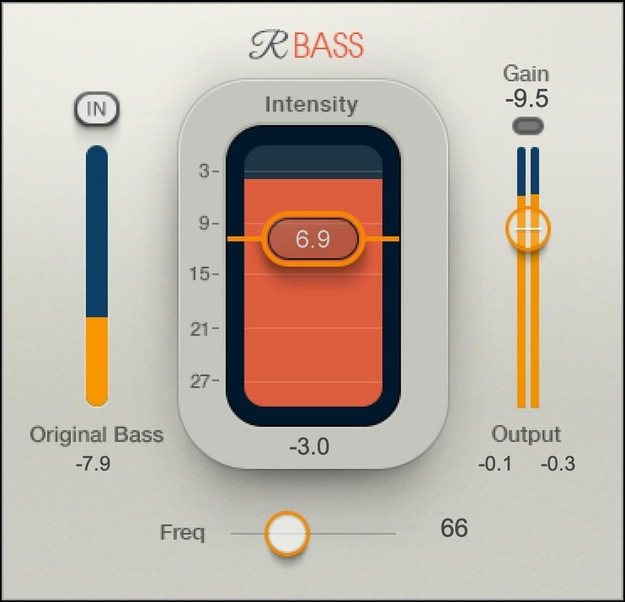
Renaissance Bass is a bass-enhancement plug-in from Waves. On small playback systems such as computer speakers and earbuds, bass tends to disappear, and this plug-in aims to keep its presence in those situations.
It is based on psychoacoustic studies of how the ear perceives bass. The plug-in generates harmonics from the original low frequencies so that the ear perceives deeper bass than is physically reproduced. Waves contrasts this with an EQ, saying it adds bottom without muddying the sound.
Operation is simple: you balance the original bass against the enhanced bass. It can be used on individual tracks or on a whole mix, and clip protection is included to simplify gain staging.
Hip hop and dance / club productions are given as examples where extra bass power is wanted. It supports VST, AU and AAX on Mac and VST and AAX on Windows.
Key features
Harmonics for perceived bass
It generates harmonics from the low end so bass can be perceived on small speakers, using how hearing works rather than only raising low frequencies.
Different from boosting with EQ
Waves says it adds bottom without muddying the sound or losing headroom, which differs from simply boosting low frequencies with an EQ.
Original and enhanced balance
You can set how much of the original and the enhanced bass are blended together, deciding how much to add.
Tracks or full mixes
Use it on individual tracks such as bass or kick, or on an entire mix.
Clip protection
Clip protection helps avoid overload when gain is raised and simplifies gain staging.
Power for hip hop and dance
Waves positions it for adding power to bass in hip hop and dance / club productions.
Specifications
| Item | Details |
|---|---|
| Type | Bass enhancement (psychoacoustic) |
| Mac OS | macOS Monterey 12, Ventura 13, Sonoma 14, Sequoia 15 |
| Windows OS | Windows 10+ |
| Mac formats | VST / AU / AAX |
| Windows formats | VST / AAX |
What is included and system requirements
- Renaissance Bass plug-in
- Mac: VST / AU / AAX
- Windows: VST / AAX
- Supported OS: macOS 12-15, Windows 10+
How to use it
- Install via Waves Central and let your DAW recognize it.
- Insert it on a bass or kick track, or on the master bus.
- Start with a small amount of the enhanced signal in the blend.
- Check on small speakers or earbuds to see how the bass is perceived.
- Add more enhanced signal step by step if needed.
- Watch the clip protection so gain does not grow too much.
- Compare with simply boosting lows by EQ.
- Before export, confirm the bass is not excessive on larger speakers.
Where it may come in handy
Checking on earbuds
It may help keep bass from thinning out on small playback systems.
Reinforcing a bass track
It may support the low end without swelling the whole band as an EQ boost can.
Kicks and 808s in hip hop and dance
It might add weight to kicks in bass-driven genres.
Home-studio setups with small speakers
It could suit setups where you often check on small speakers.
Who it may suit
- Those who want bass to be perceived on small speakers
- People whose EQ boosts make the low end muddy
- Producers of hip hop and dance music
- Users who want simple bass enhancement
Good to know before you buy
- Waves products are managed through Waves Central.
Price
Please check the official page for the price.
See Renaissance Bass on the product page
More of the same kind
Other introduction articles of the same kind.
- Blue Cat Audio Blue Cat's Re-Guitar
- Klevgrand Grand Finale
- W. A. Production Detroubler
- Metric Halo / Make Believe David’s 2Bus
- Slate Digital MetaPitch
- Leapwing Audio Joe Chiccarelli
We have introduced 215 other products from Waves.
- Waves Clarity Vx DeReverb
- Waves PAZ Analyzer
- Waves Doppler
- Waves Waves CLA Unplugged
- Waves Bass Rider
See the full list in Product database: Effects.
Sources: pluginboutique.com (checked 2026-10-27)










Comments