
Disclosure: This page may contain affiliate links. Prices were checked on the date shown and may change.
An introduction to Waves Waves CLA Unplugged, based on information from the maker and distributors: what it does, how to use it and who it may suit. It is not scored.
Acoustic instruments play in an acoustic space, so enveloping them with a realistic ambiance is crucial to the mixing process.
— Waves official site
What is Waves CLA Unplugged?
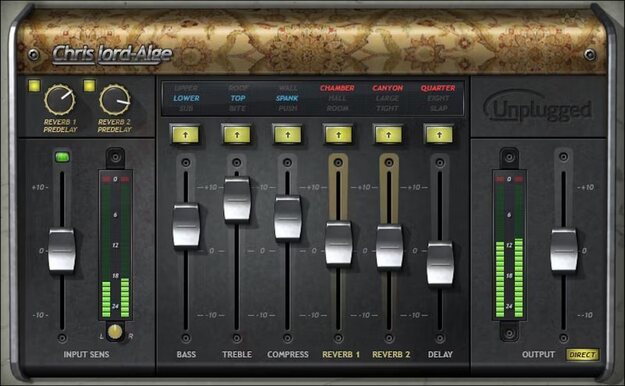
CLA Unplugged is an effect plugin from Waves, created with mix engineer Chris Lord-Alge, aimed at acoustic instruments. It puts two reverbs, a delay, bass and treble EQ and a compressor in a single plugin.
According to the product page, it is meant for piano, acoustic guitar, strings, woodwinds and voice, where the natural sound of the instrument leads the mix. The page explains that acoustic instruments sound in a physical space, so adding a believable ambience is an important step in mixing.
It contains six effects, each with three modes and an amount fader. The two reverbs have different characters and each has its own pre-delay. The delay can be synced to the host tempo, so rhythmic echoes follow the song.
The bass and treble EQ curves are described as tuned for acoustic instruments, and the compressor adds control over punch and consistency. The layout suits sessions where you want to handle space, tone and dynamics from one place instead of opening several plugins.
Key features
Two reverbs
Two reverbs with different characters are included. You can switch between them to add a natural room around an acoustic instrument or to try a more atmospheric tail.
Separate pre-delay
Each reverb has its own pre-delay. Opening a gap between the dry sound and the tail lets you adjust the sense of space while keeping the performance clear.
Tempo-synced delay
The delay time can sync to the host tempo, so rhythmic echoes can be set without calculating times by hand.
EQ tuned for acoustic sources
The bass and treble EQ curves are described as optimized for acoustic instruments. They may suit light moves such as clearing muddiness or adding some air.
Compression
A compressor is built in for controlling dynamics. It may help even out the presence of sources with large level swings, such as strummed guitar.
Six effects, three modes each
Each of the six effects has three modes and an amount fader, so you can pick a direction by switching modes before fine-tuning.
Specifications
| Item | Details |
|---|---|
| macOS | Monterey 12 / Ventura 13 / Sonoma 14 / Sequoia 15 |
| Windows | Windows 10 or later |
| Formats (Mac) | VST / AU / AAX |
| Formats (Windows) | VST / AAX |
| Activation and installation | Waves account and Waves Central (enter the Plugin Boutique serial number) |
What is included and system requirements
- Two reverbs (each with pre-delay)
- Delay with tempo sync
- Bass and treble EQ
- Compressor
- Supported systems: Mac with macOS Monterey 12, Ventura 13, Sonoma 14 or Sequoia 15 (VST, AU, AAX); Windows 10 or later (VST, AAX).
How to use it
- Buy the plugin at Plugin Boutique and note the serial number shown in your account.
- Create a Waves account (or log in) and enter the serial number under Register New Products.
- Download Waves Central from your Plugin Boutique account or the Waves downloads page and install it.
- Log in to Waves Central, tick the plugin on the Install Products tab, and click Install & Activate.
- Open your DAW and insert CLA Unplugged on a piano, acoustic guitar or similar track.
- Switch the reverb modes first and pick a direction that fits the song.
- Adjust pre-delay and the effect faders to set the amount of space while the attack of the performance stays clear.
- Add a little EQ and compression if needed, then compare against the other instruments.
Where it may come in handy
Singer-songwriter acoustic guitar
It may help when a guitar and vocal arrangement needs more space. A workflow could be setting depth with reverb and pre-delay, then clearing low-end muddiness with the EQ.
Piano and string arrangements
You may try switching reverb characters on piano or strings to see which room suits the piece. A light delay can add width in some cases.
Narration and vocal accents
You may use small amounts of reverb or echo on a voice with the effect faders. Adding a sense of space to home-recorded material is one possible use.
Rough mix sketches
It may be convenient when you want to settle on a direction with one plugin before opening several. It suits quick trials at the rough-mix stage.
Who it may suit
- People recording acoustic guitar or piano who want to add space in the mix
- Those who want reverb, delay, EQ and compression on one screen
- Users interested in an effect chain made with Chris Lord-Alge
Good to know before you buy
- Activation requires a Waves account and Waves Central (enter the serial number for Plugin Boutique purchases).
- Formats are VST, AU and AAX on Mac and VST and AAX on Windows, per the Plugin Boutique page.
- This article does not judge the sound. Check the official demos or trial if available before buying.
Price
Please check the official page for the price.
See Waves CLA Unplugged on the product page
More of the same kind
Other introduction articles of the same kind.
- Thenatan Audio TRIO
- MeldaProduction MVintageRotary
- FLUX:: Alchemist
- Celemony Tonalic
- Sugar Bytes Transfigure
- Kuassa EFEKTOR Meloditron
We have introduced 215 other products from Waves.
- Waves Scheps Parallel Particles
- Waves Abbey Road Vinyl
- Waves X-Hum
- Waves Abbey Road King's Microphones
- Waves C4 Multiband Compressor
See the full list in Product database: Effects.
Sources: pluginboutique.com (checked 2026-10-27)










Comments