
Disclosure: This page may contain affiliate links. Prices were checked on the date shown and may change.
An introduction to Waves Q-Clone, based on information from the maker and distributors: what it does, how to use it and who it may suit. It is not scored.
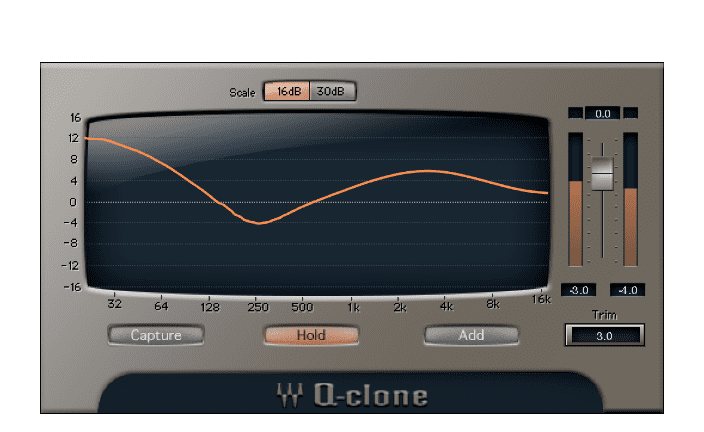
Q-Capture “samples” a hardware EQ’s curve. Save it as a Q-Clone plugin preset, insert it in as many tracks as you like, and see the exact curve represented graphically.
— Waves official site
What is Q-Clone?
Q-Clone from Waves captures the curve of a hardware EQ and lets you use it as a plug-in on as many tracks as you like. It consists of two components, Q-Capture and Q-Clone.
Hardware EQs have three limits: you cannot use more than one unit, you cannot save presets, and you cannot see the curve actually applied. Waves says the Q-Capture/Q-Clone pair addresses all three.
Q-Capture samples the unit's curve and you save it as a Q-Clone preset. The saved curve can be inserted on any number of tracks, with the exact curve shown on a graph.
Curves from different EQs can be mixed, and a large collection of presets from vintage hardware EQs is included.
Key features
Hardware EQ on any number of tracks
The unit's characteristics can be used on as many tracks as your CPU allows, and the distributor describes capturing EQs for 48 tracks in turn.
Save settings as presets
Analog EQ settings can be saved as plug-in presets and recalled for later changes.
Add mode
Add mode layers several EQ settings in one Q-Clone, which suits saving series EQs as a single preset.
Capture and Hold
Capture mode keeps receiving the unit's curve several times a second, while Hold fixes the chosen curve. One click switches between them.
Shows the real curve
You can see the curve actually applied, which often differs from the panel markings.
Vintage EQ preset collection
A large collection of presets from vintage hardware EQs is included, so you can start without owning the units.
Virtual cables and double precision
Virtual cables allow cloning without an audio interface, and processing is double precision.
Specifications
| Item | Details |
|---|---|
| Components | Q-Capture / Q-Clone |
| Channels | Mono / Stereo |
| Processing | Double precision |
| Mac OS | macOS 12 to 15 |
| Windows OS | Windows 10 or later |
| Mac formats | VST / AU / AAX |
| Windows formats | VST / AAX |
What is included and system requirements
- Q-Clone
- Q-Capture
- Vintage EQ preset collection
- Mac: macOS 12 Monterey, 13 Ventura, 14 Sonoma, 15 Sequoia; VST, AU, AAX
- Windows: Windows 10 or later; VST, AAX
How to use it
- Create a Waves account and register the serial number from Plugin Boutique.
- Log in to Waves Central and install Q-Clone.
- Connect your hardware EQ through an audio interface, or use virtual cables.
- Open Q-Capture in your DAW and capture the characteristics of the signal passing through the EQ.
- Switch Q-Clone between Capture and Hold to fix the captured curve.
- Save the setting as a preset.
- Insert Q-Clone on each track and recall the saved preset.
- Use Add mode to layer settings from other EQs when needed.
Where it may come in handy
Using one outboard EQ across many tracks
You might capture one hardware EQ's settings and use the same curve on other tracks.
Total recall of a mix
Saved presets may make recalling settings and re-adjusting during a mix easier than with hardware.
Trying vintage EQ curves without the hardware
The included presets let you try vintage curves while viewing them on a graph.
Who it may suit
- People who own hardware EQs and want to save and recall settings
- People who want one unit's character on many tracks
- People who want to use vintage EQ curves while viewing them
Good to know before you buy
- Capturing requires your own hardware EQ and a way to connect it; the included presets let you start without one.
- You create a Waves account, register the serial number from your Plugin Boutique account, and install through the Waves Central app.
- Waves products are also offered through subscription plans in addition to perpetual licenses.
How it differs from similar products
We do not pick a winner; the official figures are placed side by side.
Waves Linear Phase EQ
Q-Clone captures and reproduces a hardware EQ's curve, whereas Linear Phase EQ offers five bands plus a low band and avoids phase shift, with ±30 dB per band.
Price
$99 (Plugin Boutique, checked 2026-10-27). Prices can vary by region and promotion, so check the official page before buying.
See Q-Clone on the product page
More of the same kind
We have introduced 122 EQs. Here are some of the others.
- Antelope Audio Antelope Audio Gyratec XIV
- sonible sonible entropy:EQ+
- Slate Digital Eiosis AirEQ
- MeldaProduction MeldaProduction MFreeformEqualizer
- Antelope Audio Blonder Tongue Audio Baton
- Universal Audio Manley Massive Passive EQ
We have introduced 215 other products from Waves.
- Waves Manny Marroquin EQ
- Waves RS56 Passive Equalizer
- Waves Q10 Equalizer
- Waves API 560
- Waves Curves AQ
For a side-by-side comparison scored on the same criteria, see our comparison of EQs.
See the full list in Product database: Effects.
Sources: pluginboutique.com minet.jp (checked 2026-10-27)










Comments