
Disclosure: This page may contain affiliate links. Prices were checked on the date shown and may change.
An introduction to Antelope Audio MG4+, based on information from the maker and distributors: what it does, how to use it and who it may suit. It is not scored.
The MG4+ is a software emulation of a legendary Series 500 EQ module that’s heard on hundreds of top-charting records.
— Antelope Audio official site
What is MG4+?
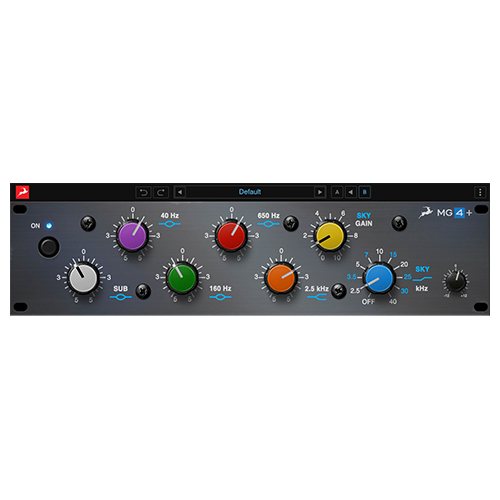
MG4+ is a six-band EQ plugin from Antelope Audio. It is modeled on a Series 500 EQ module and the maker describes it as a software emulation.
The hardware original is known for a high-frequency function called the Sky Band, the maker says. MG4+ recreates the Sky Band and adds more options for adjusting it.
Another feature, per the maker, is highly linear-phase operation, uncommon in analog gear, which lets audio pass without phase-shifting artifacts. Clarity is the stated focus.
The Native version runs in a DAW on macOS or Windows, and it can also run in real time on a Synergy Core Antelope interface.
Key features
Six bands
Boost/cut knobs for sub, 40 Hz, 160 Hz, 650 Hz and 2.5 kHz, plus the Sky Band.
Sky Band
A high-frequency function with a frequency select knob and a gain knob.
Sky Gain
A function new in MG4+ that adds flexibility to how the signal is handled.
Linear-phase behavior
The maker describes passing audio without phase-shifting artifacts.
Native and Synergy Core
A Native plugin and a real-time version for compatible Synergy Core devices are listed.
On/Bypass button
The maker's feature list includes an On/Bypass button.
Specifications
| Item | Details |
|---|---|
| Type | EQ (6 bands) |
| Versions | Native Plugin / Synergy Core Real-Time |
| Platforms | macOS and Windows (in a DAW); Synergy Core devices |
| Controls | Sub, 40 Hz, 160 Hz, 650 Hz, 2.5 kHz, Sky Band (frequency and gain) |
What is included and system requirements
- MG4+ Native plugin
- MG4+ Synergy Core real-time version (for compatible devices)
How to use it
- Buy it on the Antelope Audio site and get the installer.
- Activate the license and install.
- Insert MG4+ on a track in the DAW.
- Set the overall tone with the band knobs.
- Select the Sky Band frequency and shape the highs with its gain.
- Adjust headroom with Sky Gain.
- Use Bypass to compare with the original.
Where it may come in handy
Finishing vocals
It may suit shaping the texture of the highs with the Sky Band.
Drums and guitars
The six bands may help tidy ranges on each instrument.
Mix bus
Its low-phase-shift behavior may suit shaping bus tone.
Who it may suit
- People who want to shape vocal highs
- People who use Antelope interfaces
- People looking for an EQ that limits phase effects
Good to know before you buy
- The maker also offers Antelope Cosmos, which unlocks more than 75 native plugins.
- The maker's site shows 119 EUR; this entry uses the 119 USD price on Plugin Boutique.
Price
$119 (Plugin Boutique, checked 2026-10-27). Prices can vary by region and promotion, so check the official page before buying.
More of the same kind
We have introduced 122 EQs. Here are some of the others.
- McDSP FilterBank
- IK Multimedia T-RackS Lurssen Mastering EQ
- Zynaptiq UNFILTER
- Tokyo Dawn Labs TDR VOS SlickEQ GE
- Cockos ReaEQ ReaPlugs
- IK Multimedia T-RackS Linear Phase Equalizer
We have introduced 54 other products from Antelope Audio.
- Antelope Audio Blonder Tongue Audio Baton
- Antelope Audio VEQ-55A
- Antelope Audio NEU-PEV
- Antelope Audio Antelope Audio Filtek Mk3
- Antelope Audio VMEQ-5
For a side-by-side comparison scored on the same criteria, see our comparison of EQs.
See the full list in Product database: Effects.
Sources: antelopeaudio.com pluginboutique.com (checked 2026-10-27)










Comments