
Disclosure: This page may contain affiliate links. Prices were checked on the date shown and may change.
An introduction to Antelope Audio VEQ-55A, based on information from the maker and distributors: what it does, how to use it and who it may suit. It is not scored.
VEQ-55A is a versatile three-band EQ that delivers edge and energy to any instrument or audio source.
— Antelope Audio official site
What is VEQ-55A?
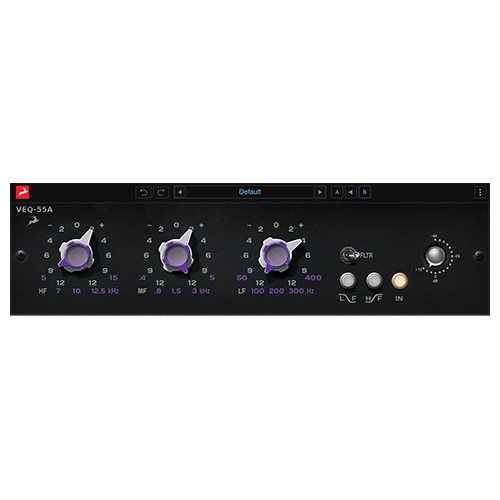
VEQ-55A is a three-band EQ plug-in from Antelope Audio. The maker describes it as inspired by the EQ module of one of the widely known mixing consoles for rock music.
It has low, mid and high bands, each with five fixed frequency points and five steps of boost or cut up to a maximum of 12 dB. The maker calls it reciprocal equalization. Switchable low-pass and high-pass filters are also available.
According to the maker, the hardware original goes back to the late 1960s and was adopted in the early 1970s as the standard EQ module for a rock-oriented console. The maker adds that interest in the unit has continued, leading to its manufacturing restarting and to various digital tools.
The maker presents it as an EQ for emphasizing details missing from a mix or gently cutting troublesome frequencies. Examples include adding edge to bass guitar, meat to drums, or body to guitars. Native and Synergy Core Real-Time versions are included.
Key features
Three-band EQ
Low, mid and high bands. With few controls, it suits quick adjustments.
Fixed frequency points
Each band offers five fixed frequencies to choose from, so you step between set points instead of sweeping continuously.
Five steps of boost/cut
Boost and cut come in five steps to a maximum of 12 dB, suited to gradual adjustments.
Switchable filters
Switchable high-pass and low-pass filters for tidying the low and high ends.
Rock-console EQ inspiration
The maker describes it as inspired by the EQ module of a well-known rock-oriented console.
Native and Real-Time versions
Includes the DAW-based Native version and the Synergy Core Real-Time version.
Specifications
| Item | Details |
|---|---|
| Type | Three-band EQ |
| Bands | Low, mid, high |
| Frequencies | Five fixed points per band |
| Gain | Five steps of boost/cut, up to 12 dB |
| Filters | Switchable high-pass / low-pass |
| Formats | Native (in a DAW on Mac or Windows) and Synergy Core Real-Time (per Plugin Boutique) |
| Mac | 2015 or newer Mac with Intel or Apple Silicon, macOS 10.14 Mojave or newer (11 Big Sur or higher recommended), 8 GB RAM minimum |
| Windows | Windows 10/11 (64-bit), 8 GB RAM minimum, Intel Core i3 or AMD Ryzen 1000 or better |
| Authorization | Free iLok account with iLok Cloud or iLok USB (2nd gen or higher); a physical iLok is not required |
| Other | Internet connection required to download and authorize |
What is included and system requirements
- Native plug-in (runs in a DAW on Mac or Windows)
- Synergy Core Real-Time version (runs in real time on compatible Synergy Core devices)
- Authorization through an iLok account (iLok Cloud or iLok USB)
- The maker's site also offers a free trial of Antelope Cosmos, which unlocks 75+ native plug-ins
How to use it
- Insert the plug-in on a track in your DAW.
- Begin with the gain controls at zero to hear the original sound.
- Move the gain of the band you are interested in gradually while listening.
- Enable the high-pass and low-pass filters when you want to remove a range, and listen to the change.
- Toggle bypass to compare with the original.
- If the output level changes a lot, match the levels on the DAW side for a fair comparison.
- Repeat the same steps on other tracks.
- With a Synergy Core device, choose the Real-Time version and place it on the input side.
Where it may come in handy
Adding edge to bass
As the maker's example suggests, it could be tried when you want more definition on bass.
Adding weight to drums
You could step between fixed frequencies in the low and mid bands to look for weight.
Tidying guitar ranges
It can be used to trim a troublesome range or add a little to a lacking one.
Fast EQ work
With fixed frequencies, it may suit situations where you want to move on without fine settings.
Who it may suit
- Users who want to shape sound with few operations
- People curious about the approach of rock-console EQs
- Anyone who likes EQs with stepped, fixed frequencies
Good to know before you buy
- The Synergy Core Real-Time version requires a compatible Synergy Core device.
- An iLok account is required for authorization; a physical iLok is not required.
- The maker's site shows euros and Plugin Boutique shows US dollars, with the same number.
- The product is described by the maker as inspired by, or modeled on, the hardware named; no affiliation with that hardware's maker is claimed.
Price
$99 (Plugin Boutique, checked 2026-10-27). Prices can vary by region and promotion, so check the official page before buying.
See VEQ-55A on the product page
More of the same kind
We have introduced 122 EQs. Here are some of the others.
- Zynaptiq BALANCE
- Waves API 550
- McDSP FilterBank
- Waves Abbey Road RS56 Passive EQ
- Mastering The Mix MIXVAULT
- MeldaProduction MFreeformAnalogEq
We have introduced 54 other products from Antelope Audio.
- Antelope Audio VEQ-HA32C
- Antelope Audio Antelope Audio VEQ-55B
- Antelope Audio Antelope Audio Filtek Mk3
- Antelope Audio VEQ-STU 089
- Antelope Audio Antelope Audio VEQ-1A
For a side-by-side comparison scored on the same criteria, see our comparison of EQs.
See the full list in Product database: Effects.
Sources: en.antelopeaudio.com pluginboutique.com support.antelopeaudio.com (checked 2026-10-27)










Comments