
Disclosure: This page may contain affiliate links. Prices were checked on the date shown and may change.
An introduction to Arturia EQ SITRAL-295, based on information from the maker and distributors: what it does, how to use it and who it may suit. It is not scored.
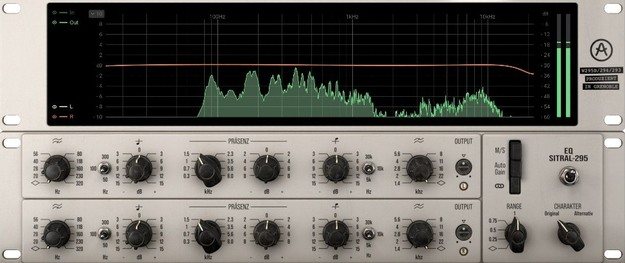
EQ SITRAL-295 is a highly musical equalizer effect based on an elusive transistor broadcast console, known for its warm, characterful sound.
— Arturia official site
What is EQ SITRAL-295?
EQ SITRAL-295 is an EQ plugin from Arturia. It is modeled on equalizer modules from the Siemens Sitral transistor broadcast consoles of 1970s Germany.
It combines several Sitral modules: the W293 high-pass, the W294 low-pass and the W295b EQ. The EQ core has low and high shelves and a mid-range bell filter called Präsenz.
Controls are stepped, like the original, but can be switched to continuous. It can run as left/right stereo or in mid/side (M/S) mode.
A Range knob scales the overall effect, and the Charakter Alternative mode gives a more contemporary sound with a little more crunch and compression. A spectrum analyzer and presets are included.
Key features
High-pass and low-pass
The high-pass spans 20 to 320 Hz and the low-pass 22 kHz down to 1400 Hz, based on the W293 and W294.
EQ module
It has low and high shelves and the Präsenz bell. The shelves have three positions.
Mid/side processing
The M/S button lets you adjust the center and sides separately.
Range and Charakter
Range scales the effect at 1, 0.75, 0.50 and 0.25. The Charakter Alternative mode adds a more contemporary sound.
Spectrum analyzer
It can be shown with a button, with colour-coded EQ curves.
Stepped or continuous controls
You can switch between stepped, original-style controls and continuous ones.
Specifications
| Item | Details |
|---|---|
| Type | EQ (two shelves, Präsenz bell, high-pass / low-pass) |
| Formats | Standalone / VST / AAX / Audio Unit / NKS (64-bit DAWs only) |
| Operating systems | Mac OS 10.13 or later; Windows |
| Stereo modes | L/R, M/S, mono |
What is included and system requirements
- EQ SITRAL-295 plugin
- Preset library
- In-app tutorials
- Management through Arturia Software Center
How to use it
- Activate the license in Arturia Software Center and install it.
- Insert EQ SITRAL-295 on a track in the DAW.
- Load a preset and hear how it behaves.
- Clear unneeded ranges with the high-pass and low-pass.
- Shape the tone with the shelves and Präsenz.
- Lower the Range knob if the effect is too strong.
- Try the M/S button to adjust center and sides separately.
Where it may come in handy
Adding air to vocals
The high shelf may suit adjusting how a voice sits.
Weighting a drum bus
The low shelf may help tune the weight of a drum bus.
Stereo masters
M/S processing may suit adjusting center and width separately.
Who it may suit
- People who want vintage-style EQ with few controls
- People who want to try M/S processing easily
- People who like fast decisions with stepped controls
Good to know before you buy
- FX Collection features such as in-app tutorials and a resizable GUI are listed for this plugin.
- Prices may vary by store and time.
Price
$49 (Plugin Boutique, checked 2026-10-27). Prices can vary by region and promotion, so check the official page before buying.
See EQ SITRAL-295 on the product page
More of the same kind
We have introduced 122 EQs. Here are some of the others.
- Antelope Audio VEQ-432C
- IK Multimedia IK Multimedia EQ 73
- Mastering The Mix MIXVAULT
- McDSP AE600 Active EQ
- Waves API 550
- Zynaptiq BALANCE
We have introduced 45 other products from Arturia.
- Arturia Farfisa V
- Arturia Flanger BL-20
- Arturia MiniBrute V
- Arturia Buchla Easel V
- Arturia Delay ETERNITY
For a side-by-side comparison scored on the same criteria, see our comparison of EQs.
See the full list in Product database: Effects.
Sources: pluginboutique.com (checked 2026-10-27)










Comments