
Disclosure: This page may contain affiliate links. Prices were checked on the date shown and may change.
An introduction to Waves API 550, based on information from the maker and distributors: what it does, how to use it and who it may suit. It is not scored.
The API 550 introduced visionary EQ curves. Q varies with gain, so boosting adds a more focused musical quality—while reducing gain provides natural, subtle-to-steep tone shaping.
— Waves official site
What is API 550?
API 550 is an EQ plugin from Waves, developed in collaboration with API. It recreates the 550A and 550B from the late 1960s, and is known for curves where Q changes with gain.
Boosting gives a more focused band and cutting widens it naturally, according to the description. It is presented for individual tracks, buses and masters.
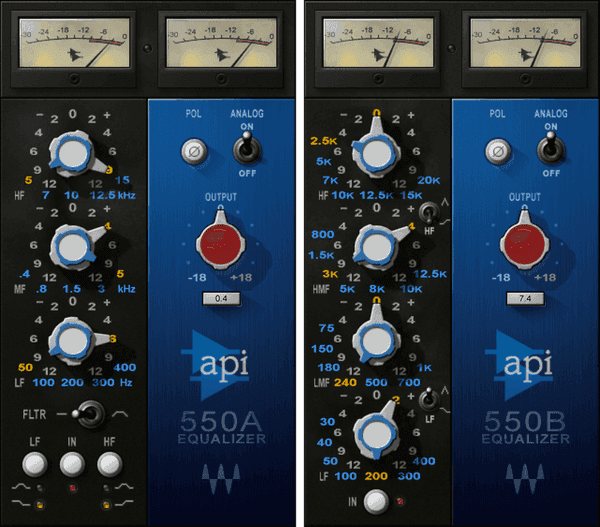
The 550A has three bands with five selectable frequencies each and a 50 Hz-15 kHz filter. The 550B has four bands with overlapping, multi-octave ranges.
The high and low bands switch between peak and shelf. Switchable analog-style harmonic distortion and hiss, a phase switch, output trim and metering are also included.
Key features
Q that varies with gain
Q changes with gain: boosts are more focused and cuts are broader. It may be worth trying when you want natural-sounding corrections with few moves.
550A: three bands, five frequencies
The 550A has three bands with five frequencies each, plus a 50 Hz-15 kHz filter. It may suit quick switching between fixed frequencies.
550B: four overlapping bands
The 550B has four bands with wide ranges that overlap, which you may use to adjust one area with several bands.
Peak/shelf switching
The high and low bands switch between peak and shelf shapes, so you can compare and choose by ear.
Harmonic distortion and hiss
Analog-style harmonic distortion and hiss can be switched on or off, so you may add texture or keep it clean as needed.
Specifications
| Item | Details |
|---|---|
| Type | EQ (550A / 550B) |
| Formats | Mac: VST / AU / AAX; Windows: VST / AAX |
| OS | macOS Monterey 12, Ventura 13, Sonoma 14, Sequoia 15 / Windows 10+ |
| Extras | Phase switch, output trim, metering |
What is included and system requirements
- Two EQs: 550A and 550B
- Installation and license registration through Waves Central
How to use it
- Create a Waves account and log in.
- Register the serial from your Plugin Boutique account.
- Download and launch Waves Central, then log in.
- Choose the product under Install Products and run install and activate.
- Insert it on a track or bus in your DAW.
- Switch between the 550A and 550B and move the gain to hear how Q changes.
Where it may come in handy
Drums and bass
You may try the 550A for fast switching between fixed frequencies.
Vocals
You may use the gain-dependent Q for natural-feeling corrections.
Mix bus
You may use the wide range of the 550B to adjust the overall tilt.
Who it may suit
- People who want to try an API-style EQ
- People who want to make corrections with few moves
- Existing Waves users
Good to know before you buy
- A Waves account and activation through Waves Central are required.
How it differs from similar products
We do not pick a winner; the official figures are placed side by side.
Kuassa EVE-MP5
API 550 includes two EQs, 550A and 550B, with gain-dependent Q. EVE-MP5 combines Pultec MEQ-5 and EQP-1A ideas and has input saturation.
Price
Please check the official page for the price.
See API 550 on the product page
More of the same kind
We have introduced 122 EQs. Here are some of the others.
- Pulsar Audio Pulsar 8200
- Mellowmuse Mellowmuse EQ2V
- Minimal Audio Morph EQ
- Antelope Audio Blonder Tongue Audio Baton
- Universal Audio Manley Massive Passive EQ
- Pulsar Audio Pulsar MP-EQ
We have introduced 215 other products from Waves.
For a side-by-side comparison scored on the same criteria, see our comparison of EQs.
See the full list in Product database: Effects.
Sources: pluginboutique.com (checked 2026-10-27)










Comments