
Disclosure: This page may contain affiliate links. Prices were checked on the date shown and may change.
An introduction to Klevgrand GotoEQ, based on information from the maker and distributors: what it does, how to use it and who it may suit. It is not scored.
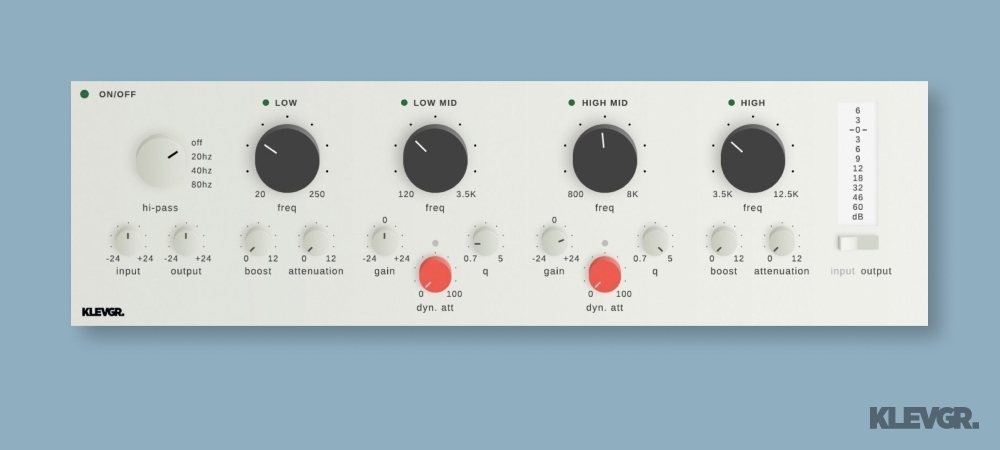
GotoEQ is a new evolution of a vintage passive tube-based program equalizer, expanding on that classic sound with dynamic EQ bands.
— Klevgrand official site
What is GotoEQ?
Klevgrand GotoEQ is based on a vintage passive tube-based program equalizer and adds dynamic EQ bands.
The low shelf has separate Boost and Attenuate controls for the classic low-end trick, and the high shelf offers the same approach as a high-end trick.
Its two mid bands offer dynamic attenuation, reducing level automatically according to the signal. Suggested uses include de-essing vocals and taming harsh overheads.
All four bands have continuous frequency selection, and the high-pass filter offers 20, 40, and 80 Hz. A preset library and input/output metering are included.
Key features
Low-end trick
Boost and Attenuate on the low shelf can be used together, which may help clear the low-mids of a bass.
High-end trick
The high shelf works in the same way, suggested for adding air while scooping high-mids.
Dynamic attenuation
The two mid bands react to the signal, usable on vocal sibilance or harsh overheads.
Continuous frequency selection
All four bands can be tuned continuously to fit the source.
High-pass filter
Choose 20, 40, or 80 Hz to quickly clear unwanted lows.
Metering and bypass
Peak metering for input or output, global and per-band bypass, and input/output gain of plus or minus 24 dB.
Preset library
Presets give a starting point.
Specifications
| Item | Details |
|---|---|
| Type | Passive-style EQ model with dynamic EQ |
| Bands | Low shelf, high shelf, two dynamic mid bands |
| High-pass | 20 / 40 / 80 Hz |
| I/O gain | Plus or minus 24 dB |
| Mac | macOS 10.10 or later (optimized for M1) |
| Windows | Windows 7 SP1 or later |
| Formats | AU / VST2 / VST3 / AAX (64-bit) |
What is included and system requirements
- GotoEQ plugin
- Preset library
- An iPad AUv3 version is offered separately
How to use it
- After installing, insert GotoEQ on a track in your DAW.
- Set the input level properly so the dynamic processors work well.
- Raise both Boost and Attenuate on the low shelf.
- Tune the mid band frequencies to the target area.
- Increase dynamic attenuation gradually.
- Adjust the high shelf for air.
- Check input and output levels on the meter.
Where it may come in handy
Bass low-mids
The low-end trick can be used to clear low-mids.
Vocal sibilance
Dynamic attenuation on a mid band may help with de-essing.
Overheads
It may tame harsh high-mids according to the signal.
Full mix or bus
Light settings with mild compression are suggested for a whole mix.
Who it may suit
- People who want passive-style EQ and dynamic EQ together
- Those who want light vocal sibilance control
- Anyone clearing bass low-mids
- Users who prefer a simple four-band layout
Good to know before you buy
- For the Pultec-style effect, both Boost and Attenuate must be above 0 dB.
- Setting the input level correctly matters for the dynamic processors.
Price
$59.99 (Klevgrand official site, checked 2026-10-27). Prices can vary by region and promotion, so check the official page before buying.
See GotoEQ on the product page
More of the same kind
We have introduced 122 EQs. Here are some of the others.
- Antelope Audio VEQ-432C
- Kuassa EVE-AT1
- Audified 1A Equalizer
- PSP Audioware PSP ConsoleQ
- Three-Body Technology Tube Shelf
- Solid State Logic SSL X-DynEQ
We have introduced 26 other products from Klevgrand.
For a side-by-side comparison scored on the same criteria, see our comparison of EQs.
See the full list in Product database: Effects.
Sources: klevgrand.com pluginboutique.com (checked 2026-10-27)










Comments