
Disclosure: This page may contain affiliate links. Prices were checked on the date shown and may change.
An introduction to Klevgrand Klevgrand Jussi, based on information from the maker and distributors: what it does, how to use it and who it may suit. It is not scored.
Jussi emulates male voice vowels in a unique way.
— Klevgrand official site
What is Klevgrand Jussi?
Jussi is a synthesizer from Klevgrand of Sweden that emulates male voice vowels. The maker's tagline is a golden throat at your fingertips. It can range from soft, airy, choir-like vowels to hard, angry shouting.
Its playing method is distinctive: formants are controlled by velocity, that is, by how hard you play. This makes it fun and easy to play from a MIDI keyboard, according to the maker.
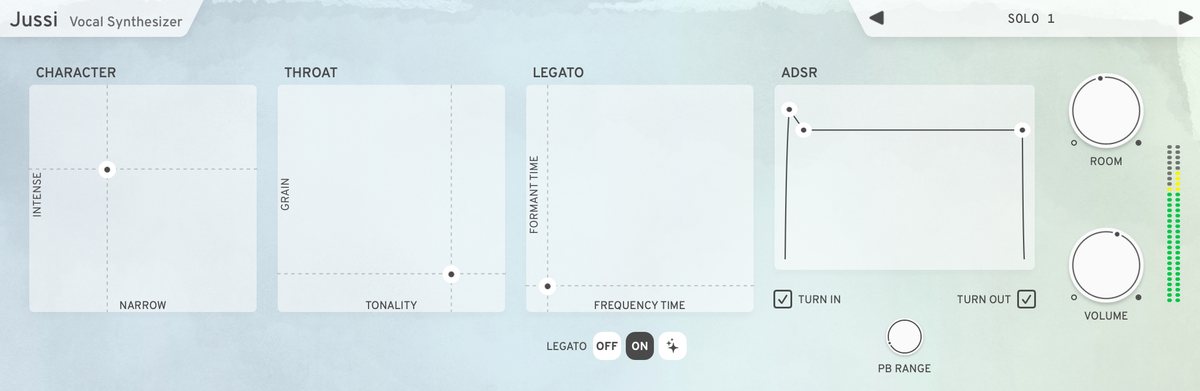
There are two XY pads. Character changes tone intensity, with one axis controlling the formant's Q value and the other its gain. Throat emulates the quality of the throat, controlling grain (Y axis) and the tonality/noise balance (X axis).
Three legato modes and an ADSR with Turn-in and Turn-out are also provided. Legato glides between notes and velocity levels, and Turn-in/out maps pitch movement to attack and release so the pitch slides at the start and end of a note.
Jussi is one of Klevgrand's synths, and installation, updates and license activation are handled through Klevgrand Helper. Its site describes the desktop version as part of bundles, while Plugin Boutique also sells it individually. It moves the vowel character with two XY pads and velocity, which suits people who want to control vocal nuance by hand.
Key features
Vowels shaped by velocity
Formants change with how hard you play, so touch alone shifts the vowel character. It may help when you want to build a singing-like expression by hand.
Character XY pad
Drag the pad to alter tone intensity: the intense axis sets the formant's Q value and the narrow axis its gain. It may let you move quickly from soft to sharp voices.
Throat XY pad
The vertical axis controls the grain factor and the horizontal axis the tonality/noise factor, emulating the throat. It may help for breathy or rough voices.
Three legato modes
Off plays like an ordinary polysynth, On is normal legato, and Hold is a polyphonic legato used with a sustain controller. Switch among them to find a voice-like connection between notes.
ADSR with Turn-in and Turn-out
Besides the volume envelope, Turn-in and Turn-out link pitch movement to attack and release. It may help create sigh-like entrances or rising endings.
Free demo
A free demo can be downloaded from the maker. It matches the full version except for occasional dropouts, so you can try shaping vowels before buying.
Specifications
| Item | Details |
|---|---|
| Type | Male voice vowel emulation synth |
| XY pads | Character (intensity/narrowness), Throat (grain/tonality-noise) |
| Legato | Off / On / Hold |
| Envelope | ADSR with Turn-in/Turn-out |
| Playing | Velocity controls the formants |
| Supported OS | macOS 10.15 or later (optimized for M1) / Windows 10 or later |
| Formats | AU, VST, AAX (a 64-bit host on macOS 10.12 or later is mentioned in the maker's notes) |
| Licensing | Serial number in the Klevgrand account |
What is included and system requirements
- Jussi plug-in
- macOS 10.15 or later / Windows 10 or later
- At Plugin Boutique, a redemption code is entered on the Klevgrand website to install
How to use it
- Buy at Plugin Boutique and check the 16-digit redemption code.
- Enter the code at klevgrand.com/redeem.
- Create (or sign in to) a Klevgrand account and activate by email.
- Download the installer from the account page and install.
- Load Jussi as an instrument in your DAW and paste the serial number to activate.
- Play a MIDI keyboard with varying velocity and listen to how the vowel changes.
- Drag the Character and Throat XY pads to adjust the voice color.
- Use the legato modes and the ADSR Turn-in/out to shape how notes connect and begin and end.
Where it may come in handy
Choir-like pads and background voices
Layering soft vowels with low velocity may give a choir-like background sound.
Chopped-vocal-style phrases
Playing phrases while switching vowels with velocity may produce an effect reminiscent of chopped vocals.
Rough shouts and chants
High velocity combined with Throat adjustments could produce a gritty, shout-like sound.
Sketching a vocal melody
You might play a temporary melody with a voice-like synth before a real vocal is added, to check how it sounds.
Who it may suit
- People who want voice-like synth sounds played from a MIDI keyboard
- People who want to add a vocal nuance to a track without a real vocal recording
- People who prefer building sounds intuitively with two XY pads
Good to know before you buy
- The maker's site says desktop Jussi is offered in the Kanvas Synth Bundle, Instrument Bundle and Everything Bundle; Plugin Boutique sells it individually.
- After purchase, a redemption code is entered on the Klevgrand website to install.
- When accessed through a Rent to Own plan or Beatport Studio membership, it is installed through Beatport Access and needs an internet connection every 30 days to validate the license.
- The demo has occasional audio dropouts.
- Because velocity directly drives vowel changes, MIDI data with fixed velocity will give less vowel variation.
How it differs from similar products
We do not pick a winner; the official figures are placed side by side.
Klevgrand Pads
Both are Klevgrand synths. Jussi shapes male voice vowels with two XY pads and velocity, while Pads builds pad sounds from wavetables and includes 30 presets.
Price
$24.99 (Plugin Boutique, checked 2026-10-27). Prices can vary by region and promotion, so check the official page before buying.
See Klevgrand Jussi on the product page
More of the same kind
We have introduced 178 synthesizers. Here are some of the others.
- AIR Music Technology Fabric Vintage Matrix
- BLEASS Megalit
- LANDR LANDR Strata
- Cherry Audio Cherry Audio Memorymode 2
- UVI Rumble
- Native Instruments Blocks Primes
We have introduced 26 other products from Klevgrand.
For a side-by-side comparison scored on the same criteria, see our comparison of synthesizers.
See the full list in Product database: Instruments.
Sources: klevgrand.com pluginboutique.com (checked 2026-10-27)










Comments