
Disclosure: This page may contain affiliate links. Prices were checked on the date shown and may change.
An introduction to United Plugins FireEQ, based on information from the maker and distributors: what it does, how to use it and who it may suit. It is not scored.
FireEQ combines several EQ techniques that will ease your life no matter if you mix or master.
— United Plugins official site
What is FireEQ?
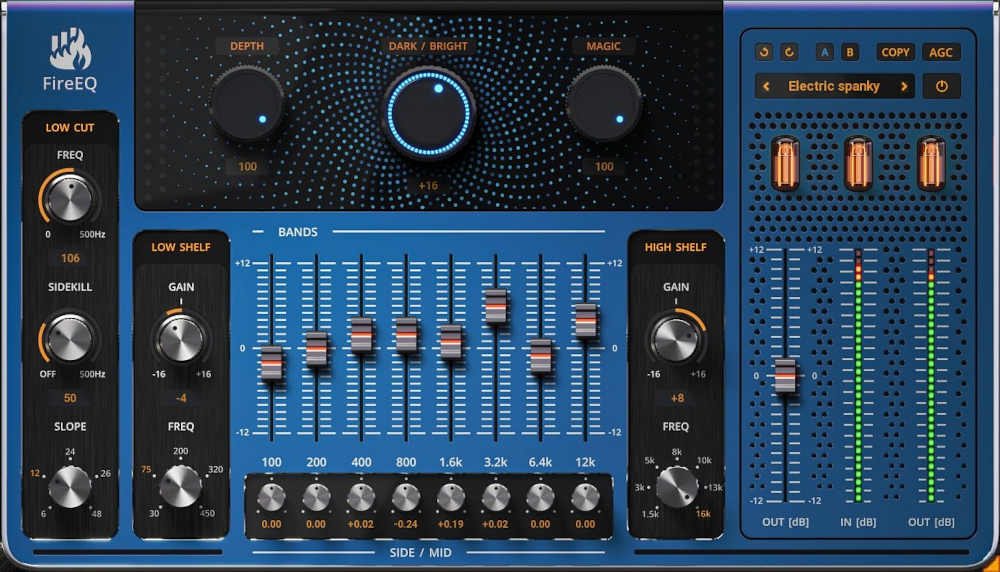
FireEQ from United Plugins (FireSonic brand) combines ordinary equalization with dynamics processing and stereo control. It is described as suited to both mixing and mastering.
Its low and high shelves are modelled after favoured vintage-style analogue equalizers. A single Dark/Bright knob shifts the overall colour of a mix toward brighter or darker.
The Magic knob applies complex dynamic processing that raises quiet parts and lowers loud ones, much like a multiband compressor. The low-cut filter has a Side Kill function that removes stereo content from low frequencies.
Each of its eight core frequencies has a Side/Mid knob to adjust the balance between mid and side signals nearby. It also offers automatic gain compensation and a resizable, photorealistic interface.
Key features
Analogue-style shelves
The low and high shelves model vintage-style analogue equalizers, which may suit adding a warmer character.
Dark/Bright knob
One knob changes the overall colour, handy for quickly trying a broad tonal direction.
Magic knob
Raises quiet parts and lowers loud ones to even out the sound, similar to a multiband compressor.
Low cut with Side Kill
Sets a frequency at which the side signal alone is filtered, tidying stereo content in the lows.
Side/Mid knobs
Each of eight core frequencies can push mid and side in opposite directions to adjust stereo width per area.
Automatic gain compensation
Matches output loudness to input, making it easier to judge whether a change is better or just louder.
15-day trial and 64-bit processing
A 15-day unlimited trial is available. Internal processing is 64-bit and handles sample rates of 192 kHz or higher.
Specifications
| Item | Details |
|---|---|
| Type | Equalizer with dynamics and stereo functions |
| Mac | macOS 10.10 or later, 64-bit, VST2 / VST3 / AAX / AU |
| Windows | Windows 8-11, 64-bit, VST2 / VST3 / AAX |
| Processing | 64-bit, any sampling rate |
| Licensing | No iLok, dongle, or internet needed (licence file) |
What is included and system requirements
- FireEQ plugin
- 15-day trial version
- Free updates after purchase
How to use it
- Download the trial from the official site to try it.
- After purchase, authorize with the licence file.
- Insert FireEQ on a track or bus in your DAW.
- Set a broad tone with the shelves and the Dark/Bright knob.
- Use the Magic knob to even out dynamics if needed.
- Use Side Kill on the low cut to tidy stereo content in the lows.
- Turn on gain compensation and compare at matched level.
Where it may come in handy
Mix bus tweaks
Dark/Bright could be used to lightly adjust the overall colour.
Mastering
Side Kill and the Side/Mid knobs may help with low-end stereo content and width.
Drums and bass cohesion
The Magic knob can reduce level variations to help parts hang together.
Exploring tonal direction
The analogue-style shelves may suit adding warmth to a source.
Who it may suit
- People who want dynamics and stereo control in one EQ
- Those who prefer licence-file activation without iLok
- Anyone who wants to trial before buying
- Users who need an EQ for both mixing and mastering
Good to know before you buy
- Updates are described as free.
- Mac requires macOS 10.10 or later (Apple Silicon supported).
- The Magic knob changes dynamics, so it behaves differently from a plain EQ.
Price
$107 (Plugin Boutique, checked 2026-10-27). Prices can vary by region and promotion, so check the official page before buying.
See FireEQ on the product page
More of the same kind
We have introduced 122 EQs. Here are some of the others.
- Antelope Audio VEQ-432C
- MAAT MAAT SantaCruzEQ12
- SPL Plugin Alliance Free Ranger
- Klevgrand GotoEQ
- W. A. Production Ignition
- Antelope Audio VEQ-STU 089
We have introduced 34 other products from United Plugins.
- United Plugins UniChannel
- United Plugins TrapTune
- United Plugins QuickVox
- United Plugins Voxessor
- United Plugins FireSpacer
For a side-by-side comparison scored on the same criteria, see our comparison of EQs.
See the full list in Product database: Effects.
Sources: unitedplugins.com pluginboutique.com (checked 2026-10-27)










Comments