
Disclosure: This page may contain affiliate links. Prices were checked on the date shown and may change.
An introduction to Waves Torque, based on information from the maker and distributors: what it does, how to use it and who it may suit. It is not scored.
Torque can change tone and formants, while preserving the original drum sound’s natural attack, resonance, and duration
— Waves official site
What is Torque?
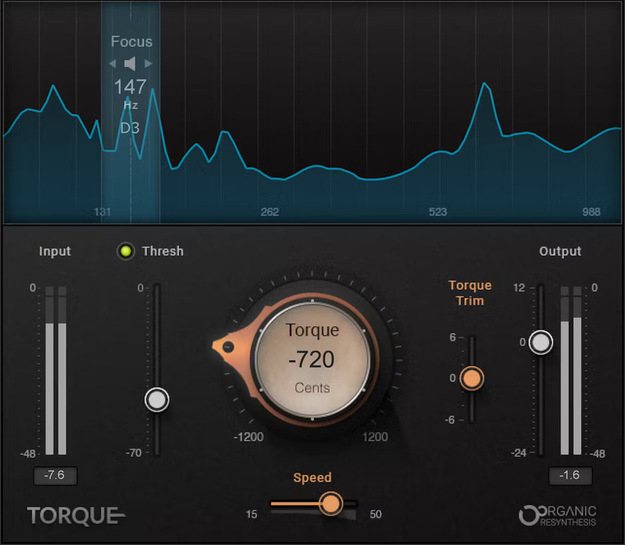
Waves Torque is a plugin for adjusting the pitch character, or tuning, of drums and percussion after they have been recorded. It is aimed at situations such as a snare that does not sit with the key of the song, without re-recording the part.
Ordinary pitch shifters can smear the attack of a drum hit or add artifacts. Torque uses Waves' Organic ReSynthesis engine, which is described as changing tone and formants while keeping the original attack, resonance, and duration.
Besides tone and formant, Focus, Trim, and Threshold options let you narrow the change to chosen frequencies and refine how strongly it acts. The change range is up to plus or minus one octave.
It is intended for individual drums as well as drum buses and loops, and its low latency is presented as suitable for live use. It may help when you want to tidy up drum pitch without the work of a full drum replacer.
Key features
Organic ReSynthesis engine
Described as changing tone while preserving the original attack, resonance, and duration. It may help when you want to avoid the smeared transients common with standard pitch shifters.
Tone and formant control
You can change formants as well as pitch, which may let you shape either a bigger or a thinner sound from the same drum recording.
Up to plus or minus one octave
The change range covers up to one octave in either direction, which leaves room for both large moves and small corrections.
Focus
Lets you narrow the tonal change to specific frequencies. It may suit loops where several sounds are mixed together.
Trim and Threshold
These options refine how the effect responds, letting you decide which levels it acts on while shaping the drum sound.
Works on buses and loops
Described as usable on buses and loops as well as single drums, which may help when balancing the kit as a whole near the end of a mix.
Low latency
Presented as running with very low latency for live performance, making it a possible option when you want to shape drums during a show.
Specifications
| Item | Details |
|---|---|
| Type | Drum tuning and tone-shaping plugin |
| Change range | Up to plus or minus 1 octave |
| macOS | Monterey 12 / Ventura 13 / Sonoma 14 / Sequoia 15 |
| Windows | Windows 10 or later |
| Mac formats | VST / AU / AAX |
| Windows formats | VST / AAX |
What is included and system requirements
- Torque plugin
- Mac: VST / AU / AAX; Windows: VST / AAX
- Licence is registered through a Waves account and the Waves Central app
How to use it
- Create a Waves account, or log in to an existing one.
- Register the serial number with Register New Products in your account.
- Download and install the Waves Central app.
- Log in to Waves Central and install Torque.
- Insert Torque on the drum track or bus you want to adjust in your DAW.
- Move tone and formant slightly and compare with the original.
- Use Focus, Trim, and Threshold to refine where and how strongly it acts.
Where it may come in handy
Matching snare or tom pitch
If a snare or tom pitch bothers you against the key of a song, it may let you adjust it without re-recording.
Adjusting drum loops
You could use Focus to narrow the change to part of the spectrum on a sampled drum loop.
Finishing a drum bus
It may suit light adjustments to the overall drum tone late in a mix.
Live use
Its stated low latency makes it worth considering for shaping drums live.
Who it may suit
- People who want to adjust the pitch or resonance of recorded drums later
- Those who want something lighter than a full drum replacer
- Anyone adjusting the character of drum loops or samples
- Players who want a plugin for live drum sound
Good to know before you buy
- A Waves account and Waves Central installation are required.
- Supports macOS Monterey 12 through Sequoia 15 and Windows 10 or later.
- This is a drum tuning plugin rather than an equalizer.
Price
Please check the official page for the price.
See Torque on the product page
More of the same kind
Other introduction articles of the same kind.
- Sugar Bytes Looperator
- New Audio Technology Spatial Audio Designer In-One
- ADPTR AUDIO Metric AB
- Kuassa Efektor Whammo
- Antares Mic Mod
- IK Multimedia AmpliTube Fender Collection 2
We have introduced 215 other products from Waves.
See the full list in Product database: Effects.
Sources: pluginboutique.com (checked 2026-10-27)










Comments