
Disclosure: This page may contain affiliate links. Prices were checked on the date shown and may change.
An introduction to ADPTR AUDIO Metric AB, based on information from the maker and distributors: what it does, how to use it and who it may suit. It is not scored.
Instantly hear how your mix compares to commercially released tracks, mixes and masters with a click of the “A/B” button.
— ADPTR AUDIO official site
What is Metric AB?
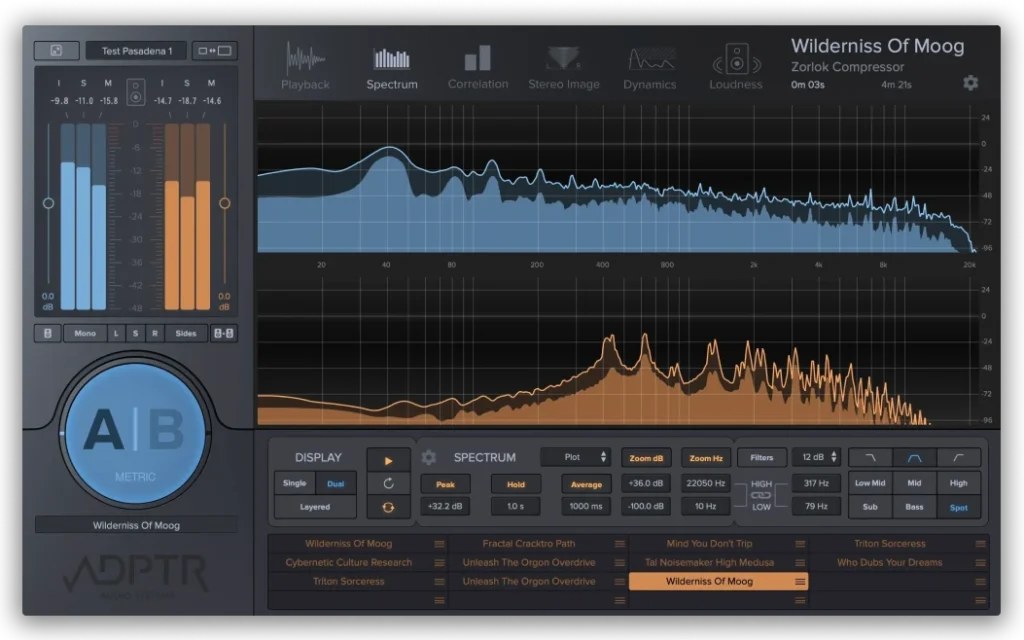
ADPTR AUDIO's Metric AB is a reference plug-in for comparing your mix with commercially released tracks, other mixes and masters. One click of the A/B button switches between your mix and a reference track, and the maker presents it as a go-to plug-in for mix referencing.
Insert it on the master channel and key-bind the A/B button to switch quickly from your keyboard. You can drag and drop up to 16 reference tracks into it, and loudness matching with four modes levels your mix and every reference track at once.
It brings together the meters mixers and mastering engineers use: loudness (LUFS), the PSR dynamics metric, spectrum, stereo and correlation. Matching the volume of one to the other keeps you from being misled by level differences.
Reference playback can sync with the DAW, and cue markers let you start references at different song sections. Reference tracks are streamed directly from disk, which keeps memory use low.
Key features
One-click A/B
Switch between your mix and a reference with one button; blue is your mix and orange is the reference, so you always know which you are hearing.
Up to 16 reference tracks
A preset holds up to 16 tracks, loaded and rearranged by drag and drop.
Loudness matching
One click matches the reference volume to your mix, with four matching modes.
Comprehensive metering
Spectrum with several graph types, multiband phase, Spectral Pan, PSR and loudness (integrated, short-term, momentary), loudness range, PLR, RMS and true peak.
Monitor section
Check the mix in mono, left and right separately and solo in place, plus the Sides signal extracted from M/S.
Cue, loop and filters
Four cue and loop points per track, and filters let you isolate bass, mids or highs to focus on a range.
Specifications
| Item | Details |
|---|---|
| Type | Reference plug-in and analyser |
| Reference tracks | Up to 16 per preset |
| Loudness matching | Four modes |
| Playback modes | Four |
| Meters | LUFS, PSR, PLR, RMS, true peak, spectrum, stereo, correlation, Spectral Pan |
| Reference loading | Streamed from disk |
| Price (maker) | Regular $140 (the sales page shows a sale price) |
What is included and system requirements
- Metric AB plug-in
- Features: A/B comparison, loudness matching, analysers, monitor section, cue and loop
How to use it
- Insert Metric AB on the master channel.
- Drag and drop the reference tracks into it.
- Key-bind the A/B button to a keyboard key.
- Switch on loudness matching.
- Switch between your mix and the references while comparing the spectrum and loudness meters.
- Sync with the DAW's playback to compare the same section.
Where it may come in handy
Checking a mix
You could compare against commercial tracks to check tonal balance and loudness differences.
Finishing and mastering
You could finish a mix while watching loudness and dynamics numbers.
When your ears are tired
Some users quoted on the maker's page use it as a guide when their ears are tired.
Who it may suit
- People who want to mix while comparing with commercial tracks
- People who want to compare at matched loudness
- People who want a reference tool inside the DAW
Good to know before you buy
- Metric AB is a comparison tool; using it does not by itself improve a mix.
- You need to supply your own reference tracks.
- Prices change with sales, so check the maker's page before buying.
- This article is based on the maker's product pages. Check the maker or retailer pages for the latest specifications and prices.
Price
Please check the official page for the price.
See Metric AB on the product page
More of the same kind
Other introduction articles of the same kind.
- Waves S1 Stereo Imager
- Rhodes V-Pan
- Waves MultiMod Rack
- Mellowmuse IR1A Convolver
- MeldaProduction MDrumCleaner
- Waves OneKnob Brighter
We have introduced 1 other product from ADPTR AUDIO.
See the full list in Product database: Effects.
Sources: adptraudio.com (checked 2026-11-09)









Comments