
Disclosure: This page may contain affiliate links. Prices were checked on the date shown and may change.
An introduction to Waves SSL G-Channel, based on information from the maker and distributors: what it does, how to use it and who it may suit. It is not scored.
Waves’ meticulous modeling, licensed by SSL, captures all the nuances that made the G-series consoles legendary.
— Waves official site
What is SSL G-Channel?
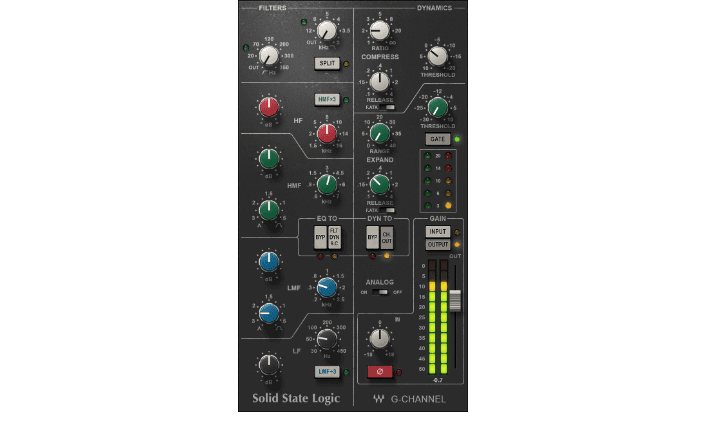
SSL G-Channel is a plugin from Waves, licensed by SSL, that recreates a channel strip of the G-series consoles, combining EQ and dynamics in one plugin.
Plugin Boutique's description says the redesigned EQ, coupled with the E-series dynamics, powered thousands of hit albums and still finds favor today for rock and pop.
The EQ recreates the 383's proportional-Q EQ and its novel shelving curves, with high and low shelves and two fully parametric stages.
The dynamics section has program-sensitive attack and a fast attack switch. Advanced sidechain routing is available for both dynamics and EQ, and low CPU load is said to allow multiple instances in track-heavy projects.
Developed with SSL
Developed in association with and licensed by SSL.
Proportional-Q EQ
Recreates the 383's proportional-Q EQ and its novel shelving curves.
Two shelves and two parametric stages
High and low shelves plus two fully parametric stages.
Program-sensitive dynamics
Dynamics with program-sensitive attack and a fast attack switch.
Sidechain routing and low CPU
Sidechain routing for both dynamics and EQ, with low CPU load.
Specifications
| Item | Details |
|---|---|
| Type | Channel strip (EQ + dynamics) |
| EQ | High/low shelves, two parametric stages, proportional Q |
| Formats | Mac: VST/AU/AAX, Windows: VST/AAX |
| Mac | macOS Monterey 12 through Sequoia 15 |
| Windows | Windows 10 or later |
What is included and system requirements
- SSL G-Channel plugin
- Serial registration through a Waves account is required
How to use it
- Buy at Plugin Boutique and find the serial in your user account.
- Create and log in to a Waves account.
- Enter the serial under Register New Products.
- Download from Waves or Plugin Boutique.
- Install and rescan plugins in your DAW.
- Insert on a track and adjust EQ and dynamics.
Rock and pop tracks
It may be worth trying to handle EQ and dynamics in one plugin.
Drum or vocal channels
Inserting one per track and using it like a console channel is a possible workflow.
Using the sidechain
Sidechain routing may let it react to other tracks.
Who it may suit
- People who want console-channel-style workflow
- People who want EQ and dynamics in one plugin
- People interested in SSL G-series
Good to know before you buy
- A Waves account and serial registration are required.
- System requirements may change; please check before buying.
Price
Please check the official page for the price.
See SSL G-Channel on the product page
More of the same kind
We have introduced 51 channel strips. Here are some of the others.
- Antelope Audio VEQ-4K BLACK
- Solid State Logic SSL 4K E
- AudioThing Space Strip
- Universal Audio SSL 4000 E Channel Strip
- Antelope Audio VEQ-4K BROWN
- Solid State Logic Solid State Logic SSL 4K B
We have introduced 215 other products from Waves.
- Waves Abbey Road REDD Consoles
- Waves Renaissance Channel
- Waves Scheps Omni Channel 2
- Waves SSL E-Channel
- Waves Waves Eddie Kramer Drum Channel
See the full list in Product database: Effects.
Sources: pluginboutique.com (checked 2026-10-27)










Comments