
Disclosure: This page may contain affiliate links. Prices were checked on the date shown and may change.
An introduction to AudioThing Lines, based on information from the maker and distributors: what it does, how to use it and who it may suit. It is not scored.
Lines is an effect plugin that crosses borders: it can be used as a creative mangler of all kinds of signals.
— AudioThing official site
What is Lines?
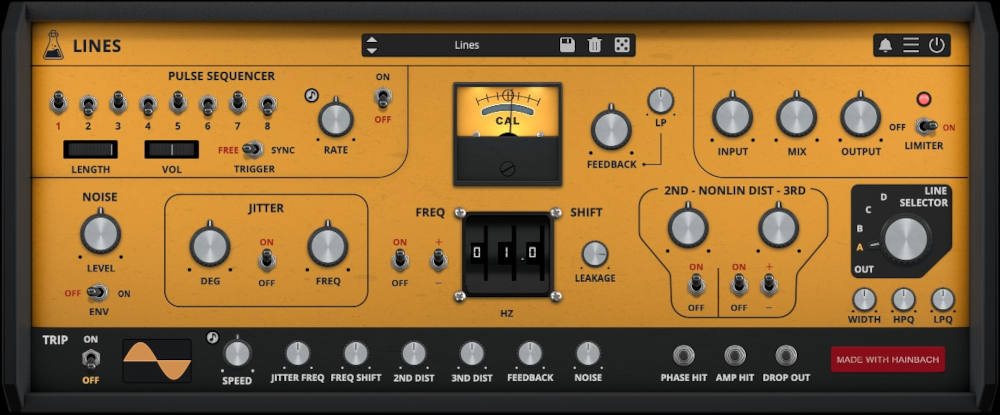
Lines is an experimental multi-effect and feedback synthesizer that AudioThing made with Berlin-based composer and YouTuber Hainbach. It is described as the sixth plugin made with him.
It is modeled on the Axel Line Simulator, made in the 1970s in New York. The unit was originally meant to simulate signal loss over telephone and data lines, and is described as having jitter, noise, intermittent pulses, frequency shift, distortion and band-pass filters for various bandwidths.
The plugin simulates the feedback and signal path down to the component level, then adds a wider frequency-shift range, fine-tunable filters, an extra filter in the feedback path, a pulse sequencer, and sync and modulation options. It can be used for lo-fi telephone voices, phasing, distortion and ring modulation.
Even without input, routing the output back into itself lets it produce rhythms, basses and organic soundscapes. A built-in limiter is described as keeping feedback patching from sounding harsh.
Key features
Frequency shifter
It shifts all frequencies of the input, which gives tonal changes different from ordinary pitch shifting. The shift range is wider than on the original unit.
Phase jitter and noise
It has jitter that reproduces line instability and noise that follows an envelope. It may be worth trying for lo-fi texture or the feel of an unstable transmission.
2nd and 3rd non-linear distortion
2nd- and 3rd-order distortion lets you create anything from warm to rough distortion. It may help when you want to add harmonics to a source.
Line selector
It switches between band-pass filters of different bandwidths, which suits making narrow, telephone-like voices.
Pulse sequencer
A sequencer that interrupts the signal rhythmically. It can sync to the host tempo and adds pulsing movement to a sound.
Feedback and trip modulation
It has feedback that returns the output to itself and modulation that adds drift. You can also use it experimentally to make sound without any input.
Presets and randomizer
A preset system with randomizer is included, and the window can be resized. It suits exploring by sound first before learning every control.
Specifications
| Item | Details |
|---|---|
| Maker | AudioThing |
| Type | Multi-effect / feedback synthesizer |
| Latest version listed | v1.1 (October 2024) |
| Main functions | Frequency shifter, phase jitter, 2nd and 3rd non-linear distortion, line selector, pulse sequencer, feedback, noise, trip modulation, oversampling |
| Formats (Windows) | VST2 / VST3 / AAX / CLAP (64-bit) |
| Formats (macOS) | VST2 / VST3 / AU / AAX / CLAP (64-bit, Universal 2) |
| Formats (Linux) | VST2 / VST3 / CLAP (64-bit) |
| OS | Windows 7 to 11, macOS 10.13 to macOS 14, Ubuntu 20.04 LTS |
| Requirements | 2GHz CPU, 4GB RAM |
| Authorization | 1 license for up to 3 computers, no iLok, offline activation available |
| Demo | 3 seconds of silence every 45 seconds, saving disabled |
What is included and system requirements
- Lines plugin
- Presets and randomizer
- PDF manual (downloadable from the official site)
- A separate iOS/iPadOS version (AUv3 and standalone) is on the App Store
- Formats for Windows, macOS and Linux (see specs above)
How to use it
- Create an AudioThing account and check the license you bought.
- Download and install the installer that matches your OS.
- Open the plugin and activate online with your account, or offline with a license file.
- Insert Lines on a track or an aux channel in your DAW.
- First switch presets and listen to what kind of sounds it produces.
- Move the frequency shifter and line selector and check how the sound changes.
- Raise the feedback slightly and explore while checking how the built-in limiter behaves.
- Sync the pulse sequencer to tempo to add rhythmic movement.
Where it may come in handy
Telephone-like lo-fi voice
With the line selector and distortion you may be able to make a vocal that sounds as if heard over a telephone. It suits effects at intros or scene changes.
Experimental ambient and sound design
You can let feedback sound without input to create pulses and textures. It may also be worth trying for sound effects in video work.
Transforming drums or piano
Passing drums or piano through it to add frequency-shifted or ring-modulation-like texture, then mixing with the original, is one way to use it.
Stream or radio jingles
Transmission noise and intermittent pulses could be used to build sound-effect-like touches.
Who it may suit
- Those who enjoy experimental processing that breaks or transforms sound
- Sound designers and ambient producers
- Those looking for lo-fi telephone voices or transmission-noise effects
- Those who want to try a demo before buying
Good to know before you buy
- The demo inserts 3 seconds of silence every 45 seconds and disables saving.
- One license can be used on up to 3 computers. No iLok is needed.
- macOS support is listed as macOS 10.13 to macOS 14; check the official site for later OS versions.
- When using feedback, watch your listening level. There is a built-in limiter, but the playback volume still needs checking.
How it differs from similar products
We do not pick a winner; the official figures are placed side by side.
AudioThing Wires
Both are AudioThing effects made with Hainbach. Lines is based on a 1970s line simulator and centers on frequency shifting and feedback, while Wires is based on a 1970s Soviet wire recorder and centers on echo.
Price
$69 (Plugin Boutique, checked 2026-10-27). Prices can vary by region and promotion, so check the official page before buying.
More of the same kind
Other introduction articles of the same kind.
- Waves Eddie Kramer Guitar Channel
- Waves Eddie Kramer Effects Channel
- Universal Audio Universal Audio dbx 160 Compressor/Limiter
- Sound Particles AudioMatrix
- McDSP McDSP 6050 Ultimate Channel Strip HD v7
- accentize dxLevel
We have introduced 34 other products from AudioThing.
- AudioThing Vinyl Strip
- AudioThing Frostbite 2
- AudioThing Arguments
- AudioThing Megaphone
- AudioThing Wave Box
See the full list in Product database: Effects.
Sources: audiothing.net pluginboutique.com (checked 2026-10-27)










Comments