
Disclosure: This page may contain affiliate links. Prices were checked on the date shown and may change.
An introduction to AudioThing Vinyl Strip, based on information from the maker and distributors: what it does, how to use it and who it may suit. It is not scored.
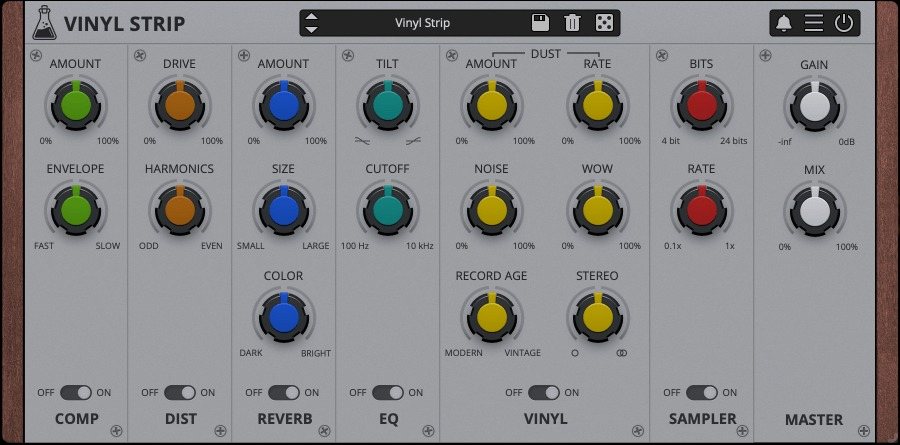
Vinyl Strip is a multi-effect plugin featuring 6 modules: Distortion, Compressor, Bit Crusher, Tilt EQ, Vintage Reverb, and Vinylizer.
— AudioThing official site
What is Vinyl Strip?
Vinyl Strip is a multi-effect from AudioThing for creating retro textures. It contains six modules: Distortion, Compressor, Bit Crusher, Tilt EQ, Vintage Reverb and Vinylizer.
The modules can be rearranged in any order by drag and drop. For example, you can easily place the compressor after the vinyl emulation.
The Vinylizer module emulates the dust, noise, warp and response of vinyl. It may be a candidate for people who want to add an old-record feel to sampled sounds or whole tracks.
It is optimized to be light on the CPU and supports macOS, Windows and Linux. It is also available separately on the App Store for iOS and iPadOS.
Key features
6 modules
Distortion chooses the kind of harmonics generated and the compressor makes sounds softer or harder. Together with the bit crusher, tilt EQ, reverb and Vinylizer, they form one channel strip.
Drag and drop order
All modules except the master can be moved to different positions. Changing the order changes the result, so you can try various signal flows.
Vinylizer
It emulates dust, noise, warp and the response of vinyl, adding an old-record atmosphere to tracks or samples.
Bit crusher in the manner of early samplers
The Sampler (bit crusher) module recreates the sound quality of early samplers. It can be used when you want lo-fi texture.
Tilt EQ and vintage reverb
A tilt EQ balances the sound like an old hi-fi system, and the reverb adds a warm vintage space.
Presets and randomizer
A preset system with a randomizer helps you find starting points. Parameter lock and random lock are also available.
Display and efficiency
The window is resizable, brightness and contrast can be adjusted, and the plug-in is optimized to be lightweight on the CPU.
Specifications
| Item | Details |
|---|---|
| Maker | AudioThing |
| Type | Retro multi-effect |
| Modules | Distortion / Compressor / Bit Crusher (Sampler) / Tilt EQ / Reverb / Vinylizer |
| Plug-in formats (Windows) | VST2 / VST3 / AAX / CLAP (64-bit) |
| Plug-in formats (Mac) | AU / VST2 / VST3 / AAX / CLAP (64-bit) |
| Plug-in formats (Linux) | VST2 / VST3 / CLAP (64-bit) |
| OS | Windows 7 to 11, macOS 10.13 to macOS 15, Ubuntu 20.04 LTS |
| Requirements | 2GHz CPU, 4 GB RAM |
| Demo | Silence for 3 seconds every 45 seconds, saving disabled |
What is included and system requirements
- Vinyl Strip plug-in
- Presets and randomizer
- Free demo (with limitations)
- iOS/iPadOS version (AUv3 and Standalone) separately on the App Store
How to use it
- Purchase the license on the official site, install and authorize.
- In your DAW, insert Vinyl Strip on the track or bus you want to process.
- Choose a preset with a similar atmosphere.
- Adjust the amount of noise and warp in the Vinylizer.
- Set up the distortion and compressor.
- Reorder the modules by drag and drop and listen to the difference.
- Finish the overall balance and space with the tilt EQ and reverb.
- Compare with the original sound and check that the effect is not too strong.
Where it may come in handy
Lo-fi beats
Adding the texture of old recordings to samples and drums with the bit crusher and Vinylizer may be worth trying.
Texture for a whole track
Inserted on a bus or master, it could add the atmosphere of listening from a record.
Processing samples
It may be useful for adding noise and warp to samples when aiming for an old-recording sound.
Mobile production
Since separate iPhone and iPad versions exist, using it for sketches on the go is also conceivable.
Who it may suit
- People who want to make lo-fi or retro sounds
- People who want to create old textures in one plug-in
- People who want to process samples to sound like records
- People looking for a CPU-light effect
Good to know before you buy
- The free demo inserts 3 seconds of silence every 45 seconds and saving is disabled.
- After purchase, the demo version is authorized.
- The iOS/iPadOS version is sold separately, so check its price separately.
How it differs from similar products
We do not pick a winner; the official figures are placed side by side.
iZotope Vinyl
Vinyl Strip is a channel-strip type with six freely reorderable modules.
Price
$59 (Plugin Boutique, checked 2026-10-27). Prices can vary by region and promotion, so check the official page before buying.
See Vinyl Strip on the product page
More of the same kind
Other introduction articles of the same kind.
- Tokyo Dawn Labs OD DeEdger
- Arturia Tape MELLO-FI
- Blue Cat Audio Blue Cat's StereoScope Pro
- Waves Curves Resolve
- LANDR LANDR FX Electric
- Waves NLS Non-Linear Summer
We have introduced 34 other products from AudioThing.
- AudioThing Frostbite 2
- AudioThing Wave Box
- AudioThing Speakers
- AudioThing Arguments
- AudioThing Lines
See the full list in Product database: Effects.
Sources: audiothing.net pluginboutique.com (checked 2026-10-27)










Comments