
Disclosure: This page may contain affiliate links. Prices were checked on the date shown and may change.
An introduction to AudioThing Speakers, based on information from the maker and distributors: what it does, how to use it and who it may suit. It is not scored.
Speakers is a plugin effect designed to emulate a wide range of loudspeakers and microphones using AudioThing's state-of-the-art convolution engine.
— AudioThing official site
What is Speakers?
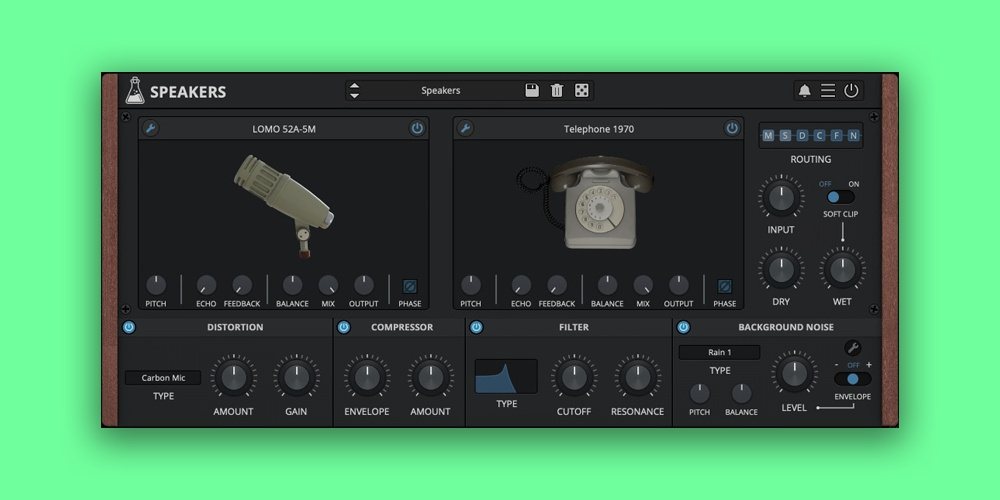
Speakers from AudioThing is an effect that imitates the sound of loudspeakers and microphones using a convolution engine. It can make a sound seem as though it is coming from an old phone, a radio, a cabinet or a toy speaker.
AudioThing's own page lists 64 speakers (cabinets, phones, radios, toys and more) and 42 microphones (condensers, dynamics, ribbons and others). The Plugin Boutique page quotes different counts, so the manufacturer's figures are used here.
The signal path contains compression, distortion and filter modules that can be reordered freely, plus looping background noises that can be blended in. That makes it possible to build a sense of place around a sound.
It is described as zero latency, apart from some degradation algorithms, and the maker states that no iLok or other dongle is needed.
Key features
Speaker and microphone models
Separate speaker and microphone panels can be combined, which may help when you want a source to sound as if it was played through, or recorded with, a different device.
Reorderable routing
Modules can be dragged left or right in the Routing panel, and the Input position can be moved too, so noise can for example be sent through a filter before it meets the source.
Five-band EQ
The spanner button opens a five-band EQ (low and high shelves plus three parametric bands) for adjusting the frequency response of the speaker and microphone models.
Distortion and degradation
The maker lists 18 distortion and degradation algorithms, including carbon mic, diode clipper, tape, bit crusher, GSM and robotization, which may suit phone-call and worn-device textures.
42 background noises
Looping noises from devices, places and organic sources can be blended with the input, and your own samples can be added, which may help with scene-setting atmospheres.
Snapshots and presets
A snapshot system stores several settings per instance, and the preset system includes a randomizer.
Specifications
| Item | Details |
|---|---|
| Speakers | 64 (manufacturer) |
| Microphones | 42 (manufacturer) |
| Distortion/degradation algorithms | 18 |
| Background noises | 42 |
| Other modules | EQ, compressor, multimode filter |
| Formats | VST2, VST3, AU, AAX, CLAP (64-bit) |
| OS | macOS 10.13+, Windows 7+, Ubuntu 20.04+ |
| Demo | Limited models, 3 seconds of silence every 2 minutes |
What is included and system requirements
- Speaker and microphone models
- Background noises (about 190 MB)
- Presets
- Supported systems: macOS 10.13+, Windows 7+, Ubuntu 20.04+ (64-bit)
How to use it
- Create an AudioThing account and redeem the serial number.
- Download the installer and the license file.
- Run the installer, then restart the DAW and rescan plugins.
- Insert Speakers on a track and activate online or offline.
- Choose a model in the speaker and microphone panels.
- Enable the EQ, distortion and noise modules as needed and reorder them in Routing.
- Save settings you like as snapshots or presets.
Where it may come in handy
Phone and radio voices
Speaker models and distortion could be combined to make narration or dialogue sound like it comes from a phone or radio.
Scene-setting for video and streams
Layering background noise may add the feeling of a room or street around a sound.
Lo-fi music
Drums or piano could be passed through a toy-speaker model with bit crushing for extra texture.
Who it may suit
- People who want to process voices or instruments to sound like phones or radios
- Those making sound effects for video or games
- Producers adding lo-fi texture
- Users who prefer plugins without a dongle
Good to know before you buy
- The speaker and microphone counts differ between Plugin Boutique and the manufacturer; this article uses the manufacturer's figures.
- The robotization and quantization algorithms add latency depending on the FFT size.
- An iOS/iPadOS version (AUv3 and standalone) is listed on the App Store.
Price
Please check the official page for the price.
See Speakers on the product page
More of the same kind
Other introduction articles of the same kind.
- Leapwing Audio StageOne 2
- Sound Particles Brightness Panner 2
- United Plugins Bassment
- Sugar Bytes Looperator
- accentize dxLevel
- Universal Audio Universal Audio dbx 160 Compressor/Limiter
We have introduced 34 other products from AudioThing.
- AudioThing Vinyl Strip
- AudioThing Frostbite 2
- AudioThing Megaphone
- AudioThing Lines
- AudioThing Arguments
See the full list in Product database: Effects.
Sources: audiothing.net pluginboutique.com (checked 2026-10-27)










Comments