
Disclosure: This page may contain affiliate links. Prices were checked on the date shown and may change.
An introduction to Blue Cat Audio Blue Cat's StereoScope Pro, based on information from the maker and distributors: what it does, how to use it and who it may suit. It is not scored.
Blue Cat's StereoScope Pro is a real time stereo field analyzer with multiple views and MIDI/automation output capabilities.
— Blue Cat Audio official site
What is Blue Cat's StereoScope Pro?
Blue Cat's StereoScope Pro is a stereo field analysis plug-in from Blue Cat Audio. It shows in real time where the audio sits between left and right and how wide it spreads. It does not process the sound; it works as a meter for checking a mix or master by eye.
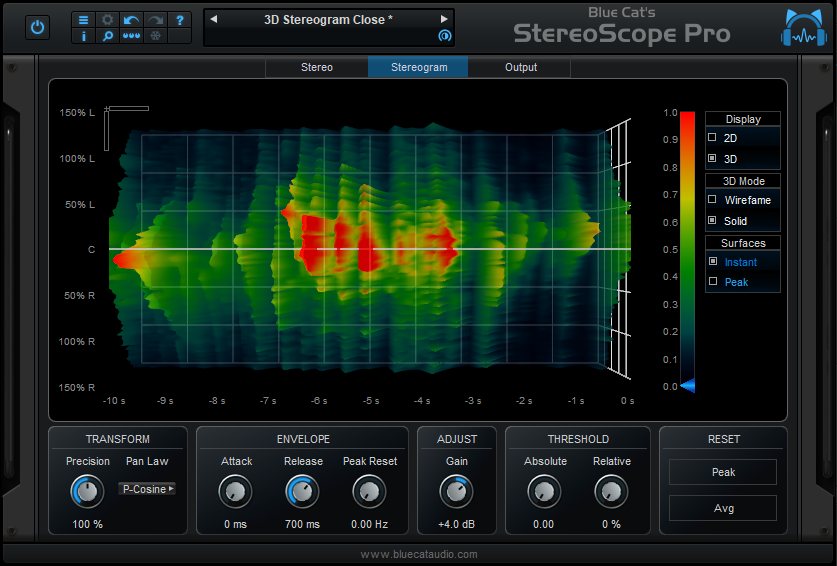
There are three main views: the current stereo image, a stereogram showing how the image changes over time, and output parameters that describe the average position and extent of the signal. The displays can be zoomed, so you can look closely at the area you want to measure.
A 3D waterfall view lets you follow the stereo image over time from a viewpoint of your choice, with solid or wireframe surface display. An integrated correlation meter is also included, which may help when you look for phase cancellation or mono-compatibility problems.
The results can be sent out as DAW automation curves or MIDI CC messages to control other plug-ins. Four memory slots store curves so that you can compare different tracks or settings. It runs on Windows and macOS in VST, VST3, AU and AAX formats.
Key features
Three analysis views
You can switch between the stereo image, the stereogram that tracks change over time, and output parameters for position and extent. Animated zoom helps you inspect a specific area.
3D waterfall view
The change of the stereo image over time is drawn as a 3D surface that you can view from any angle. Solid and wireframe displays make it easier to follow how the width changes through a song.
Built-in correlation meter
A correlation meter shows how the left and right signals relate. You can check it next to the stereo image when looking for phase cancellation or mono-compatibility issues.
Instant, peak and average curves
Instant, peak and average stereo image curves can be displayed. Absolute and relative thresholds can be set, so the measurement conditions can be adjusted in detail.
Four memory slots
Up to four curves can be stored for comparing tracks or effect settings. The maker notes that you can also compare a mix with other commercial recordings.
Automation and MIDI output
The minimum and maximum positions and the perceived position based on energy are available as automation or MIDI CC. They can drive other effects in a side-chain-like way.
Interface customization
Skinning and window opacity control let you adapt the interface to your screen. Processing shuts down on silence, so there is no CPU load while idle.
Specifications
| Item | Details |
|---|---|
| Type | Stereo field analyzer (no audio processing) |
| Formats | VST / VST3 / AU / AAX (Windows and macOS) |
| Supported OS (official) | Mac OS 10.9 or newer (Intel / Apple Silicon), Windows Vista / 7 / 8 / 10 / 11 |
| 3D view | Requires an OpenGL-compatible graphics card |
| Sample rates | Any sample rate supported |
| Demo limitations | One instance per session; frozen for 4 seconds every 40 seconds |
| Version history | V2.14 (2025/09/08) |
What is included and system requirements
- StereoScope Pro plug-in (VST / VST3 / AU / AAX)
- A demo version is available for download (with limitations)
- Also included in the maker's All Plugins Pack and Analysis Pack
- Preset manager and copy/paste of plug-in state between instances
How to use it
- After purchase, get the installer for your OS and DAW from your Plugin Boutique account or the official download page.
- Run the installer and choose the plug-in formats you need (VST, AU, AAX and so on).
- Open your DAW and insert StereoScope Pro on the track or master bus you want to analyze.
- Enter the email address and key you received to authorize the plug-in.
- Pick the stereo image view and play the song to see how wide the sound is.
- Switch to the stereogram or 3D view to see how the image changes over time.
- Store the curve you want to compare in a memory slot and check it against another setting.
- If needed, assign the output parameters to automation or MIDI CC.
Where it may come in handy
Checking mix width
After panning vocals and guitars, you could check by eye whether the overall width is lopsided.
Checking mono compatibility
Looking at the correlation meter and the stereo image may help you find parts that could disappear in mono.
Before and after mastering
Storing curves before and after processing may make it easier to see how the stereo width changed.
Controlling other effects
Recording the output parameters as automation and linking them to other plug-ins may let you tie effects to the width of the sound.
Who it may suit
- People who want to check stereo width on screen as well as by ear
- People concerned about phase or mono playback
- People who want to drive other effects with analysis data
- People who want to compare the width of several tracks or songs
Good to know before you buy
- This is an analysis (display) plug-in and does not process the audio.
- The 3D view requires an OpenGL-compatible graphics card.
- For analyzing several tracks at once, the maker points to a separate product, StereoScope Multi.
- The demo allows one instance per session and freezes for 4 seconds every 40 seconds.
How it differs from similar products
We do not pick a winner; the official figures are placed side by side.
Blue Cat's StereoScope Multi
The maker suggests its separate StereoScope Multi plug-in for analyzing several tracks. StereoScope Pro is built around examining a single signal with three views and a 3D display.
Price
$99 (Blue Cat Audio official site, checked 2026-10-27). Prices can vary by region and promotion, so check the official page before buying.
See Blue Cat's StereoScope Pro on the product page
More of the same kind
Other introduction articles of the same kind.
- Safari Audio Time Machine V2
- Baby Audio Super VHS
- Karanyi Sounds Playmod
- Mastering The Mix ANIMATE
- Xfer Records OTT
- W. A. Production Obsidian
We have introduced 21 other products from Blue Cat Audio.
- Blue Cat Audio Blue Cat's Chorus
- Blue Cat Audio Re-Head
- Blue Cat Audio Plug'n Script
- Blue Cat Audio Blue Cat's Connector
- Blue Cat Audio Hot Tuna
See the full list in Product database: Effects.
Sources: bluecataudio.com pluginboutique.com (checked 2026-10-27)










Comments