
Disclosure: This page may contain affiliate links. Prices were checked on the date shown and may change.
An introduction to BLEASS Fusion, based on information from the maker and distributors: what it does, how to use it and who it may suit. It is not scored.
BLEASS Fusion is a unique and powerful waveshaping tool that harnesses the limitless flexibility of wavetables to unleash sumptuously smooth saturations, disgracefully dirty distortions, and maximally mad mashups.
— BLEASS official site
What is Fusion?
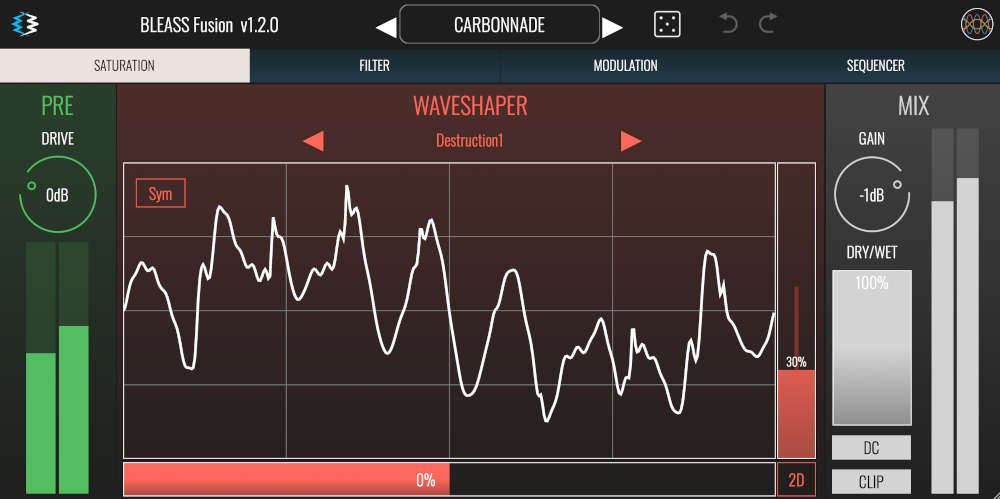
BLEASS Fusion is a distortion and saturation plugin that uses wavetables for waveshaping, which means reshaping the waveform to distort it. The page says the character changes with the wavetable you pick, from soft saturation to harsh distortion.
The input signal is hard clipped at 0 dB, and its level is mapped to a position along the wavetable. The quieter the input, the closer the output sits to the centre of the wavetable. 58 wavetables are included.
You can also load your own wavetables. Files with a frame size of 2048 samples and up to 256 frames go into a designated folder.
Two multi-mode filters, two LFOs, an envelope follower and a motion sequencer add movement to the distortion. A version for iPhone and iPad is available as well as Mac and Windows.
Key features
58 wavetables
The wavetable you choose changes the character of the distortion. Position (vertical slider) and fold (horizontal slider) reshape it further, which may help when exploring edge for drums or synths.
Custom wavetable import
Audio files with 2048-sample frames and up to 256 frames are dropped into a folder; after a restart they appear in the USER menu.
Two multi-mode filters
Each filter can sit before (PRE) or after (POST) the waveshaper. PRE affects how the distortion responds, while POST shapes the distorted tone. Types include high-pass, low-pass, bell and notch.
LFOs and envelope follower
The two LFOs offer shape, time shape, sync mode, rate and smoothing. The envelope follower moves parameters according to the input level.
Motion sequencer
A step pattern modulates up to two parameters. Each step can be set to STEP, RAMP, UP, DOWN or SMOOTH RAMP, and the sequencer runs while the DAW plays.
Patch library and Dice
A searchable, filterable patch menu is provided. Dice generates a new patch automatically and is described as tuned to give usable results.
DC removal and clip
A DC offset removal processor and a simple limiter against peaks can be switched on, to deal with offsets that waveshaping may produce.
Specifications
| Item | Details |
|---|---|
| Type | Wavetable waveshaper (distortion / saturation) |
| Wavetables | 58 (user import supported) |
| Filters | 2 (high-pass / low-pass / bell / notch) |
| Modulation | 2 LFOs, envelope follower, motion sequencer |
| Formats (Mac) | VST3 / Audio Unit |
| Formats (Windows) | VST3 |
| Windows | Windows 8 or later (64-bit) |
| macOS | macOS 10.9 or later (64-bit) |
| Other | iPhone / iPad version available |
What is included and system requirements
- Plugin (Mac: VST3 / AU, Windows: VST3)
- 58 wavetables
- Patch library
- Supported OS: Windows 8 or later (64-bit), macOS 10.9 or later (64-bit)
How to use it
- Install and confirm it appears in your DAW's plugin list.
- Load it on the track you want to distort.
- Set the input level with Drive.
- Choose a wavetable and move position and fold.
- Use Dry/Wet to blend with the original.
- If needed, set a filter to PRE or POST in the Filter tab.
- In the Modulation tab, set the destination and amount for LFOs and others.
- Adjust output Gain and switch Clip on if needed.
Where it may come in handy
Drum and bass distortion
Switching wavetables to explore anything from saturation to harsh distortion.
Synth texture
Filters and LFOs together may suit moving, evolving distortion.
Rhythmic distortion
The motion sequencer can vary the amount per step to follow the beat.
Wavetable experiments
Importing your own wavetables lets you build a distortion of your own.
Who it may suit
- Those who want to explore distortion tones in detail
- People curious about wavetable processing
- Anyone building moving distortion
- Users who want to try a creative effect at a modest price
Good to know before you buy
- The motion sequencer only runs while the host DAW is playing.
- Input is hard clipped at 0 dB, so input level adjustments affect the tone.
- On Windows, only VST3 is listed by both the maker and Plugin Boutique.
Price
$19.99 (BLEASS official site, checked 2026-10-27). Prices can vary by region and promotion, so check the official page before buying.
See Fusion on the product page
More of the same kind
We have introduced 82 saturation and distortion effects. Here are some of the others.
- Kuassa Efektor Bass Smasher Distortion
- Slate Digital Virtual Tape Machines
- Native Instruments Kolor
- Black Rooster Audio Magnetite
- Stagecraft Software Picante
- MNTRA Instruments BRUITAGE
We have introduced 16 other products from BLEASS.
- BLEASS BLEASS Spectral Reverb
- BLEASS BLEASS Spectral Resonator
- BLEASS BLEASS Motion EQ
- BLEASS BLEASS Multiband Compressor
- BLEASS BLEASS Peaks
For a side-by-side comparison scored on the same criteria, see our comparison of saturation and distortion effects.
See the full list in Product database: Effects.
Sources: bleass.com pluginboutique.com (checked 2026-10-27)










Comments