
Disclosure: This page may contain affiliate links. Prices were checked on the date shown and may change.
An introduction to Stagecraft Software Picante, based on information from the maker and distributors: what it does, how to use it and who it may suit. It is not scored.
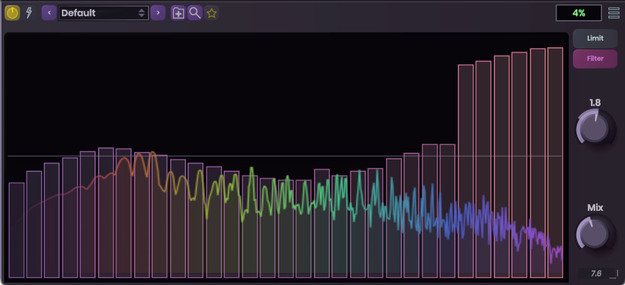
Picante works as a tone shaper, graphic EQ, and light distortion.
— Stagecraft Software official site
What is Picante?
Picante is a plug-in from Stagecraft Software that combines a tone shaper, a graphic EQ and light distortion. It is designed not only for equalization but also for adding some grit or edge to a sound.
It is a direct collaboration with Dr Chris Warren (Superhoax), known for the EchoThief impulse response library, and is adapted from his Max for Live patch of the same name. The retailer page explains that Stagecraft's EchoThief modeling reverb uses his impulse responses.
At the core is a combination of limiters and saturation. According to the retailer page, it gives a light push of overdrive that can bring out grit in horns and vocals, or, used more aggressively, a hard tone that is not heavily distorted.
Variable Q is included, and pushing resonance toward ringing allows unusual effect-like sounds. It supports AU, AAX and VST3 on macOS, and AAX and VST3 on Windows.
Key features
As a tone shaper
The full-range EQ shapes tone while the limiters introduce a small amount of nonlinearity for tonal depth, according to the product description.
Graphic EQ
It works as a graphic-style EQ with adjustment per band, suited to balancing frequencies visually.
Light distortion
Limiters and saturation are combined to add grit or a soft fuzz. Bringing out grit in horns and vocals is one of the uses described.
Variable Q resonance
Changing Q pushes the resonance toward ringing, and the description mentions turning a saxophone into a thin metallic sound or a ringing percussive blast.
Link to EchoThief
It is adapted from a Max for Live patch by Dr Chris Warren, who is also behind the EchoThief impulse responses.
Specifications
| Item | Details |
|---|---|
| Type | Tone shaper / graphic EQ / light distortion |
| Formats (Mac) | AU, AAX, VST3 |
| Formats (Windows) | AAX, VST3 |
| Operating systems | macOS 10.13 or newer (Intel / Apple Silicon), Windows 7 or later (64-bit only) |
What is included and system requirements
- Picante plug-in
- macOS (64-bit only): AU, AAX, VST3
- Windows (64-bit only): AAX, VST3
How to use it
- Download the installer from your Plugin Boutique account.
- Install it and restart your DAW.
- Insert it on a track that needs more edge, such as horns or vocals.
- Set the overall direction with the EQ first.
- Raise the limiter side gradually to hear the light push.
- Move Q to hear how the resonance changes.
Where it may come in handy
Edge on vocals and horns
Since it is described as bringing out grit with a light push, it may be worth trying on recordings that need a little roughness.
Sound design
Raising Q to emphasize ringing is said to create unusual effects, so it may be worth trying for effect sounds.
EQ and distortion in one
It may help when you would like to avoid inserting separate EQ and saturation plug-ins.
Who it may suit
- People who want light distortion together with EQ
- People interested in Dr Chris Warren's EchoThief background
- People who want to change the texture of horns or vocals quickly
Good to know before you buy
- The Windows version has no AU format (AAX and VST3 only).
- Information is taken from the Plugin Boutique product page.
Price
$45 (Plugin Boutique, checked 2026-10-27). Prices can vary by region and promotion, so check the official page before buying.
See Picante on the product page
More of the same kind
We have introduced 82 saturation and distortion effects. Here are some of the others.
- Three-Body Technology Nylon
- McDSP FutzBox
- Kuassa Efektor Bass Smasher Distortion
- Arturia Filter MS-20
- W. A. Production Combustor
- Universal Audio Ampex ATR-102 Mastering Tape Recorder
We have introduced 5 other products from Stagecraft Software.
- Stagecraft Software Overdrive 5
- Stagecraft Software Parity EQ
- Stagecraft Software Universal Plug
- Stagecraft Software Cenere
- Stagecraft Software Theremin
For a side-by-side comparison scored on the same criteria, see our comparison of saturation and distortion effects.
See the full list in Product database: Effects.
Sources: pluginboutique.com (checked 2026-10-27)










Comments