
Disclosure: This page may contain affiliate links. Prices were checked on the date shown and may change.
An introduction to Sugar Bytes Artillery 2, based on information from the maker and distributors: what it does, how to use it and who it may suit. It is not scored.
An arsenal of 28 effects can be assigned to zones on your keyboard. Then fire up the effects with your keyboard!
— Sugar Bytes official site
What is Artillery 2?
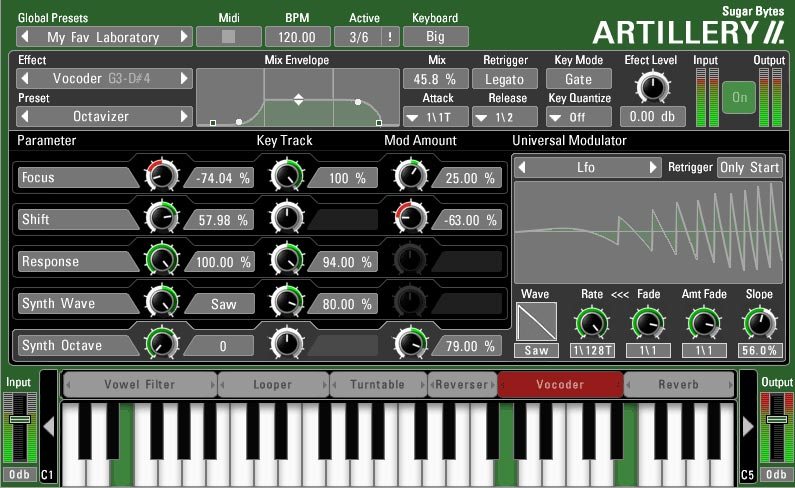
Artillery 2 is an effect plugin from Sugar Bytes. Its distinguishing feature is that effects are assigned to ranges of keys, so you can switch effects by playing a MIDI keyboard. It offers 28 effects.
You draw boxes across ranges of keys on the on-screen keyboard to create zones, then assign an effect to each. The effects, in six categories, range from basic processors such as filters and delays to granular processing and a vocoder.
Each parameter can be moved by key tracking (the pitch of the played note), an LFO, an envelope or a step sequencer. Each parameter in one effect can use a different modulation source, which allows detailed movement but, as the official page notes, can be a little daunting at first.
It syncs to the host DAW and has MIDI output. The page says it can be used live, in DJ software or in the studio. The official changelog records Apple Silicon support and VST3 support.
Key features
Keyboard zones
Effects are assigned to key ranges and triggered by the keys you play, so you can perform effects along with the song.
28 effects
Filters, delays, granular, looper, ring modulator, vocoder and more are included. The official page says CPU load is rarely in the double digits even when stacking many.
Universal Modulator
Each parameter can be driven by key tracking, an LFO, an envelope follower or a step sequencer. A ring around each knob shows modulation strength.
Key tracking
Within one zone, the depth of the effect changes with the key played. The official page gives examples of changing delay time, feedback or loop length across keys.
Host integration
The official page shows a setup example for FL Studio using a MIDI Out layer and matching input/output numbers in Artillery. It can be used in other DAWs.
Per-effect controls
Each effect has its own modulation, envelope and dry/wet. A vocoder and MIDI output are also included.
Specifications
| Item | Details |
|---|---|
| Type | Keyboard-zone multi-effect |
| Number of effects | 28 |
| OS (Mac) | macOS 10.13 or higher (Apple Silicon supported) |
| Formats (Mac) | AU, VST2, VST3, AAX, Standalone |
| OS (Windows) | Windows 7 or higher (64-bit) |
| Formats (Windows) | VST2, VST3, AAX, Standalone |
| Demo | A demo is available on the official site |
What is included and system requirements
- 28 effects
- Universal Modulator (key tracking, LFO, envelope, step sequencer)
- Vocoder and MIDI out
- Presets
- Standalone application
- Mac and Windows are 64-bit (32-bit is not supported)
How to use it
- Insert the plugin on a DAW track. MIDI input routing differs by DAW.
- Draw a box on the on-screen keyboard over the key range you want to assign an effect to.
- Choose an effect for the zone.
- Adjust the effect's own parameters as they appear.
- Assign key tracking, an LFO, an envelope or the step sequencer to a parameter.
- Play keys on a MIDI keyboard or DAW notes and check how the effect is triggered.
- Add more zones as needed and save as a preset.
Where it may come in handy
Live and DJ performance
You could bring effects in and out from the keyboard to add variation to a performance.
Varying a mix
In songs where the same material repeats, you could switch effects per section with notes.
Building transitions
Changing loop length or delay time across keys could be used to build stutters before an impact.
Who it may suit
- People who want to play effects like an instrument
- People producing with a MIDI keyboard or pads
- People who want to try many effects in one plugin
Good to know before you buy
- The official page notes that the flexible modulation assignments can take time to get used to.
- MIDI routing setup differs by DAW.
- A demo is available on the official site.
Price
Please check the official page for the price.
See Artillery 2 on the product page
More of the same kind
Other introduction articles of the same kind.
- Bogren Digital Ampknob BDM 410 JVH
- MeldaProduction MVintageRotary
- New Audio Technology Spatial Audio Designer In-One
- United Plugins Electrum
- Waves UltraPitch
- United Plugins Lofinity
We have introduced 10 other products from Sugar Bytes.
- Sugar Bytes Transfigure
- Sugar Bytes Looperator
- Sugar Bytes WOW2
- Sugar Bytes Aparillo
- Sugar Bytes Obscurium
See the full list in Product database: Effects.
Sources: sugar-bytes.com pluginboutique.com (checked 2026-10-27)










Comments