
Disclosure: This page may contain affiliate links. Prices were checked on the date shown and may change.
An introduction to Waves UltraPitch, based on information from the maker and distributors: what it does, how to use it and who it may suit. It is not scored.
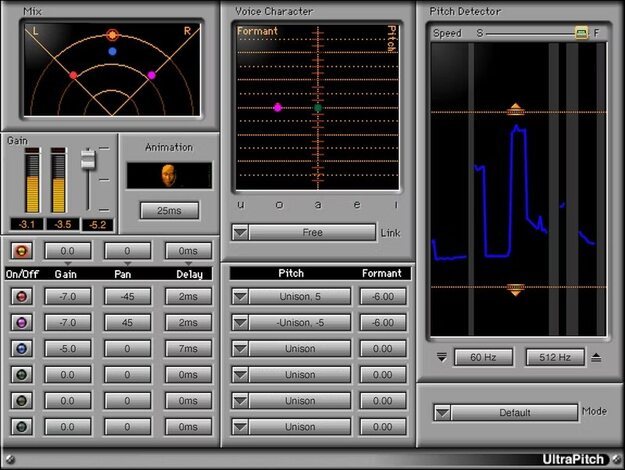
Ultrapitch is a sound design tool that spans the range from simple pitch shifts to complex, 6-voice harmonies with formant changes and panning.
— Waves official site
What is UltraPitch?
UltraPitch is a Waves plug-in for pitch shifting and harmony, ranging from simple pitch shifts to 6-voice harmonies with formant changes and panning.
It has two harmony components (3-voice and 6-voice) and a pitch shift component. Building a six-voice choir from a single voice is one of the uses shown.
It works with monophonic sources including voice, with detection profiles for voice characters and for bass. Making robot voices or voicing several roles in audiobooks and podcasts are also mentioned.
Formant correction profiles cover voice, brass, woods and strings, and formant can be linked to pitch or adjusted independently.
Key features
3- and 6-voice harmony
Two harmony components build up to a six-voice choir from one voice, which may help when you want harmonies quickly.
Per-voice control
Gain, pan, delay, pitch and formant can be set for every voice, so each one can have its own character.
±1 octave pitch shift
The pitch shift covers ±1 octave in 5 cent steps, with pitch picked from a virtual keyboard or a pull-down menu.
Formant correction profiles
Profiles for voice, brass, woods, strings and more are available, linked to pitch or adjusted independently.
Animation and automation
Animation adds random delays to voices, and automation can change the pitches of specific harmonies.
Tuning systems
Harmonies can be tuned using even-tempered or other intonations.
Specifications
| Item | Details |
|---|---|
| Type | Pitch shift / harmony (vocal processing) |
| Components | 3-voice harmony, 6-voice harmony, pitch shift |
| Pitch shift range | ±1 octave (5 cent steps) |
| Plug-in formats (Mac) | VST, AU, AAX |
| Plug-in formats (Windows) | VST, AAX |
| Supported OS (Mac) | macOS Monterey 12, Ventura 13, Sonoma 14, Sequoia 15 |
| Supported OS (Windows) | Windows 10 or later |
What is included and system requirements
- UltraPitch with 3-voice and 6-voice harmony and pitch shift components
- Formats: VST, AU, AAX on Mac; VST, AAX on Windows
How to use it
- Buy from a retailer and install.
- Rescan in your DAW and insert UltraPitch on a mono vocal track.
- Choose the 3-voice, 6-voice or pitch shift component.
- Set each voice's pitch from the virtual keyboard or pull-down.
- Adjust gain, pan, delay and formant per voice.
- Pick the detection profile and formant correction that fit the voice.
- Add animation to loosen up the layered voices.
Where it may come in handy
Building vocal choirs
A single sung line can be layered into a wide choir with pan and delay.
Voicing several roles in narration
Changing pitch and formant may help one speaker cover multiple characters.
Robot voices and effects
Extreme settings may suit character voices and processed effects.
Who it may suit
- People who want harmonies from a single voice
- Audiobook and podcast creators who need voice variation
- Producers experimenting with vocal sound design
Good to know before you buy
- It is designed for monophonic sources.
- Requirements are macOS 12 to 15 and Windows 10 or later.
How it differs from similar products
We do not pick a winner; the official figures are placed side by side.
W. A. Production TriVox
UltraPitch has 3-voice and 6-voice harmonies plus a pitch shifter, with per-voice gain, pan, delay and formant. TriVox sets three voices between -12 and +12 semitones and can lock to 20 scales.
Price
Please check the official page for the price.
See UltraPitch on the product page
More of the same kind
Other introduction articles of the same kind.
- Karanyi Sounds Cloudmax 3
- MeldaProduction MeldaProduction MRingModulatorMB
- AIR Music Technology Tape Echo
- MeldaProduction MTrackAlign
- MeldaProduction MCompare
- Serato Hex FX
We have introduced 215 other products from Waves.
- Waves Renaissance Bass
- Waves JJP Bass
- Waves JJP Strings & Keys
- Waves Eddie Kramer Guitar Channel
- Waves Playlist Rider
See the full list in Product database: Effects.
Sources: pluginboutique.com waproduction.com (checked 2026-10-27)










Comments