
Disclosure: This page may contain affiliate links. Prices were checked on the date shown and may change.
An introduction to Lese Fletcher, based on information from the maker and distributors: what it does, how to use it and who it may suit. It is not scored.
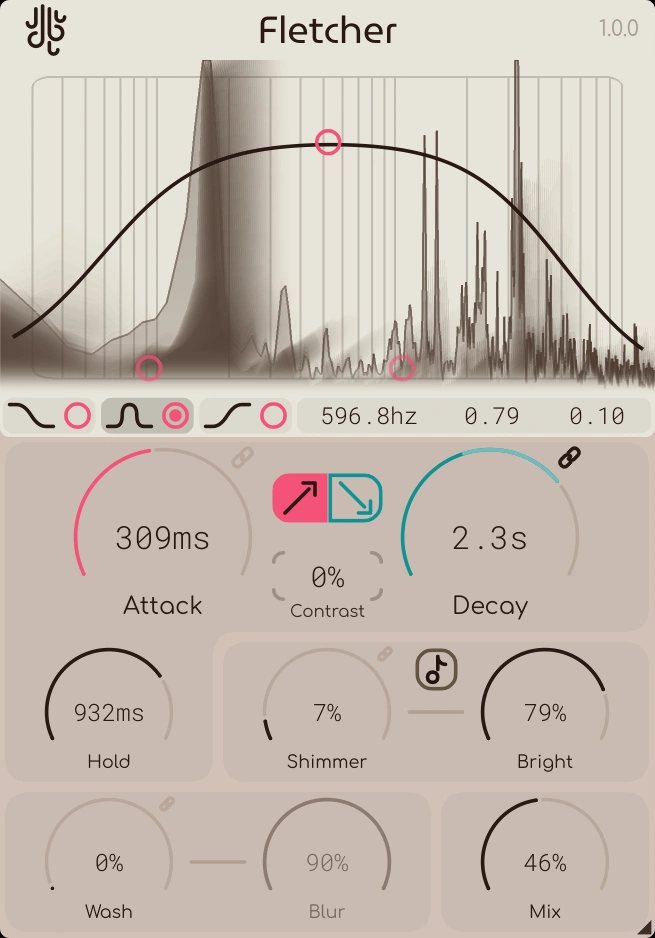
Fletcher is a tool for smoothing time. Working spectrally (using FFTs), Fletcher takes the current signal’s frequency spectrum and uses it as a “target” to slowly morph the output sound.
— Lese official site
What is Fletcher?
Fletcher is a spectral effect from Lese, described as a 'Temporal Smoother'. It takes the frequency spectrum of the input as a target and slowly morphs the output toward it, working with FFTs (frequency analysis).
The official description says it is somewhat like a compressor and somewhat like a reverb, but not exactly either. It can also add extra sound acting as a decay, so the morphing continues after the input has stopped.
Attack and decay can be set separately across frequency regions using Lese's Factor Bands system, which ramps smoothly through the spectrum. The Fitting control automatically levels out non-uniform parts of the spectrum, and when set negative it works as a kind of spectral contrast.
Shimmer detects the pitch of incoming sounds and adds harmonics on top, and MIDI input lets those harmonics be played from an external MIDI source. It costs $45 and is a one-time purchase rather than a subscription.
Key features
Morphing toward the input spectrum
The output slowly morphs toward the input spectrum, smoothing contours in a way that differs from reverb or compression.
Attack and decay per band
Factor Bands lets each frequency region have its own attack and decay, for example quick lows and slow highs.
Fitting for uniformity or contrast
Automatically levels out non-uniform parts of the spectrum; set negative, it acts as spectral contrast.
Shimmer adds harmonics
Detects the pitch of the input and adds harmonics above it, which can be tried when you want extra shine.
Playing harmonics via MIDI
With MIDI input, the added harmonics can be played from an external source such as a keyboard.
Continuing after the input stops
By adding decay-like sound, morphing continues after the input ends, which can be used for a tail-like effect.
Demo and one-time license
A demo download is offered. Licenses are valid on up to 6 computers and offline activation is possible.
Specifications
| Item | Details |
|---|---|
| Type | Spectral effect (Temporal Smoother) |
| Windows | VST3, AAX |
| Mac | VST3, AU, AAX (Intel and ARM) |
| License | One-time purchase; up to 6 computers; offline activation possible |
| Copy protection | No dongle; connects to the internet for activation and update/news checks (the latter can be turned off) |
| Price | $45 (Lese official and Plugin Boutique) |
What is included and system requirements
- Fletcher plugin (VST3 / AU / AAX)
- Demo version available
How to use it
- Download and install the demo from the Lese site and confirm it loads in your DAW.
- After purchasing, activate with your license.
- Insert Fletcher on a track.
- Set attack and decay and listen to how slowly the sound changes.
- Use Fitting to level the spectrum or push it toward contrast.
- Add harmonics with Shimmer and play them with MIDI if needed.
- Adjust the dry/wet balance.
Where it may come in handy
Pads and ambient textures
On long sounds, slowing down the spectral changes may give a distinctive tail.
Sound design
Running drums or noise through it and watching how it evolves may turn up new textures.
Adding shine to vocals
A little Shimmer may layer sparkle over a voice.
Playing the effect with MIDI
Triggering harmonics from external MIDI could let you treat the effect like an instrument.
Who it may suit
- People interested in sound design or experimental textures
- Those looking for a character different from reverb or compression
- Users who prefer a one-time purchase
- Buyers who want to try a demo first
Good to know before you buy
- The Plugin Boutique page lists VST3 and AAX on Windows and VST3, AU and AAX on Mac; the official page title mentions VST3 / AU, so check AAX support before buying.
- Detailed system requirements are in the System Requirements section of the official page.
How it differs from similar products
We do not pick a winner; the official figures are placed side by side.
Lese Smear
Lese describes Fletcher as building on its Smear plugin for spectral processing. Fletcher lists at $45 and Smear at $55.
Price
$45 (Lese official site, checked 2026-10-27). Prices can vary by region and promotion, so check the official page before buying.
See Fletcher on the product page
More of the same kind
Other introduction articles of the same kind.
- Polyverse Music I Wish
- Safari Audio Time Machine V2
- Zynaptiq UNVEIL
- Sugar Bytes Transfigure
- United Plugins FireSpacer
- Yamaha VOCALO CHANGER PLUGIN
We have introduced 2 other products from Lese.
See the full list in Product database: Effects.
Sources: lese.io pluginboutique.com (checked 2026-10-27)










Comments