
Disclosure: This page may contain affiliate links. Prices were checked on the date shown and may change.
An introduction to TAL Software TAL-DAC, based on information from the maker and distributors: what it does, how to use it and who it may suit. It is not scored.
TAL-DAC brings back the character and sound of the 80's samplers and Lo-Fi devices in one effect plug-in.
— TAL Software official site
What is TAL-DAC?
TAL-DAC is an effect plug-in from TAL Software of Germany that recreates the character of 80s samplers and lo-fi devices. The official page says it can be used for anything from subtle changes to extreme effects.
According to the official description, it emulates vintage digital-to-analog converters, the circuits of early digital samplers, including their harmonics and nonlinearities. Drums, synths and sampled sounds are named as typical targets.
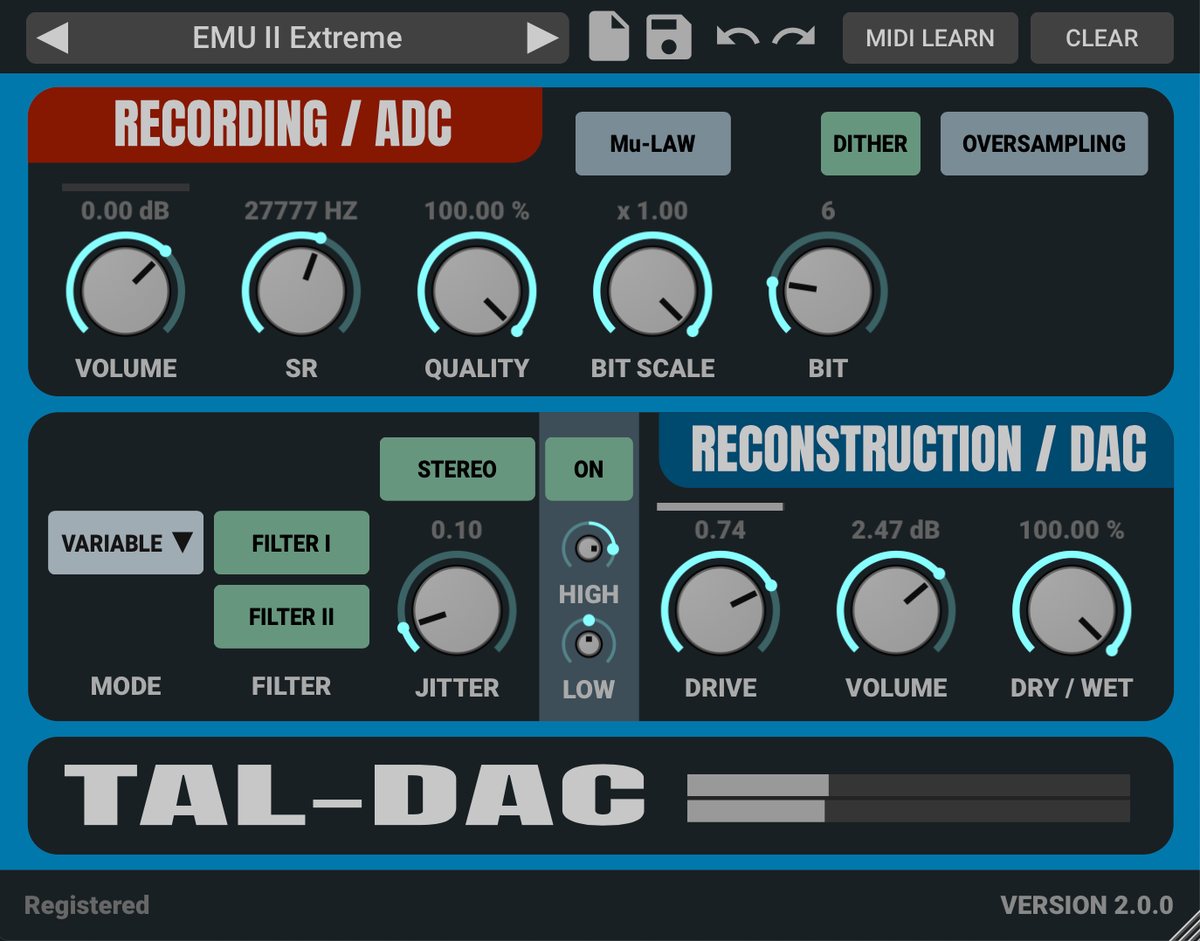
Plugin Boutique adds details: an input stage with a soft clipper, a selectable recording bit depth from 4 to 16 bits (mu-law, mu-law delta and linear algorithms), reconstruction methods including hold, variable, linear and S1000/sinc, an AMP drive stage and optional 8x oversampling for the non-linear parts.
It supports VST, VST3, AU, AAX and CLAP on Windows, macOS and Linux. The official page shows version 2.0.3 and says it is free for TAL-Sampler owners.
Key features
Vintage DAC character
It reproduces the harmonics and non-linear behavior of early sampler converters, which may add vintage digital character to drums and synths.
Input soft clipper
The recording stage has a volume control and a soft clipper that adds odd harmonics, so distortion can be changed with input level.
4- to 16-bit depth
Recording bit depth runs from 4 to 16 bits with mu-law, mu-law delta or linear algorithms to vary the roughness.
Reconstruction methods
Hold, variable, linear and S1000/sinc methods can be selected, ranging from stepped lo-fi to somewhat smoother results.
AMP drive and oversampling
The AMP drive adds even and odd harmonics, and 8x oversampling can be selected for non-linear parts.
Wide format support
VST, VST3, AU, AAX and CLAP are supported, with a Linux version available, so it can fit many DAWs.
Specifications
| Item | Details |
|---|---|
| Type | Sampler / lo-fi effect |
| Formats | VST / VST3 / AU / AAX / CLAP |
| Supported OS | Windows / macOS / Linux (x64, VST2 and VST3) |
| Version | 2.0.3 (official) |
| Bit depth | 4 to 16 bits |
| Oversampling | 8x for non-linear parts (optional) |
| AAX | Pro Tools 10.3.6 or later (Plugin Boutique) |
What is included and system requirements
- TAL-DAC plug-in
- User manual (PDF)
- Downloads for Windows, macOS and Linux
How to use it
- Create a TAL Software account and register the purchased serial.
- Download and run the installer for the operating system.
- If VST3 or AAX does not appear, move the file to the proper folder and rescan in the DAW.
- Insert TAL-DAC as an effect in the DAW.
- Enter the serial at first launch to authorize.
- Choose the recording bit depth and algorithm.
- Switch reconstruction methods and check the texture.
- Adjust distortion with the AMP drive and input level.
Where it may come in handy
Lo-fi drums
Sampled drums could be roughened to resemble an old sampler.
Synth coloring
Harmonics could give a synth a slightly rougher impression.
Lo-fi tracks
Lowering bit depth could suit hip-hop and similar styles.
Sound design
Extreme settings could be used to create effect-like sounds.
Who it may suit
- Users seeking sampler-style character
- Anyone wanting to try lo-fi processing
- TAL-Sampler owners
- Linux DAW users
Good to know before you buy
- The official page says TAL-Sampler owners can activate it free of charge with their serial.
- The official price differs from the Plugin Boutique price.
Price
$19 (TAL Software official site, checked 2026-10-27). Prices can vary by region and promotion, so check the official page before buying.
See TAL-DAC on the product page
More of the same kind
Other introduction articles of the same kind.
- Kuassa EFEKTOR Meloditron
- Klevgrand Parrot
- Mastering The Mix REFERENCE 3
- Solid State Logic SSL Fusion HF Compressor
- Waves Retro Fi
- Rob Papen MasterMagic
We have introduced 8 other products from TAL Software.
- TAL Software TAL-Reverb-2
- TAL Software TAL-Sampler
- TAL Software TAL-Mod
- TAL Software TAL-J-8
- TAL Software TAL-Filter-2
See the full list in Product database: Effects.
Sources: tal-software.com pluginboutique.com (checked 2026-10-27)










Comments