
Disclosure: This page may contain affiliate links. Prices were checked on the date shown and may change.
An introduction to Klevgrand Parrot, based on information from the maker and distributors: what it does, how to use it and who it may suit. It is not scored.
Parrot creates rhythmic patterns by sampling small slices of incoming audio, and repeating it in a sequenced loop.
— Klevgrand official site
What is Parrot?
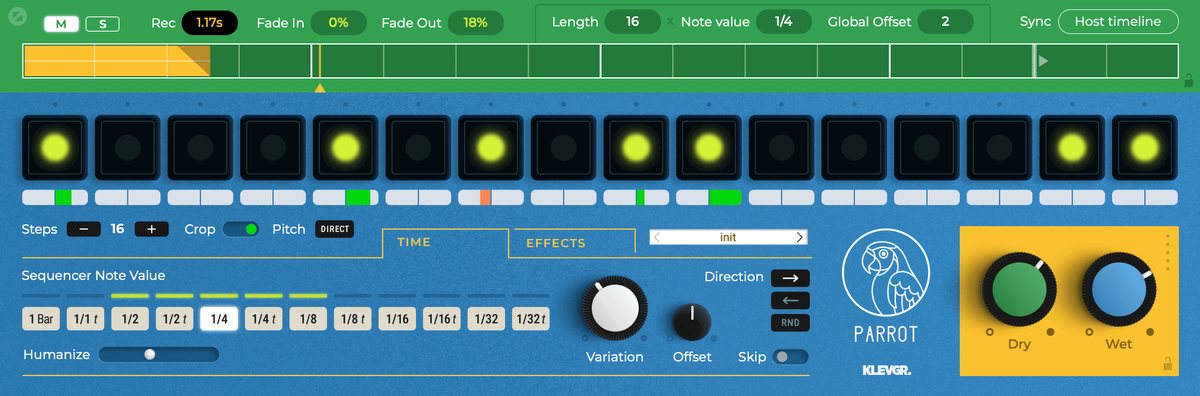
Parrot is an audio repeater effect from Klevgrand. It samples short slices of the incoming audio and repeats them as a sequenced loop.
You can shape loop length, pitch, variation, dynamics and filtering, and the maker describes results from subtle rhythmic variation to glitchy textures.
It can sync to the DAW or free-run. Synced use may suit structured productions, while free-run may suit more exploratory, generative work.
Presets are included. It is offered as AU, VST and AAX on macOS and Windows, plus AUv3 and standalone on iPad.
Key features
Step sequencer
A sequencer of up to 16 steps replays the sampled slice in patterns.
Per-step pitch and accent
Pitch and accent can be set per step, which may allow melodic rhythms.
Variation and humanizer
Variation changes note values, and the humanizer slightly shifts timing for a less mechanical feel.
Filter and volume curve
A moving filter and volume curve reshape each repeat, and a separate filter is available for the dry signal.
Pan alternation
Panning alternates left and right following the sequencer.
Sync and lock
Choose DAW sync or free-run, and lock parameters so they stay when switching presets.
Specifications
| Item | Details |
|---|---|
| Type | Audio repeater |
| Steps | Up to 16 |
| Formats | AU / VST / AAX (AUv3 and standalone on iPad) |
| Requirements | macOS 10.13 or later (ARM/Intel), Windows 7 SP1 or later (64-bit) |
What is included and system requirements
- Parrot plugin (AU / VST / AAX)
- Preset collection
- The demo is the full version with occasional audio dropouts
How to use it
- Install and activate with Klevgrand Helper.
- Insert Parrot on a track or send in your DAW.
- Choose DAW sync or free-run.
- Listen as the incoming audio is sampled and repeated.
- Adjust pitch and accent per step.
- Add variation, filtering and humanize to finish.
Where it may come in handy
Dance and electronic production
It may add rhythmic variation when placed on drums or synths.
Vocal processing
It could chop parts of a vocal into repeated phrases.
Sound design
It may be used to build evolving, generative textures.
Who it may suit
- People looking for glitch or repeat effects
- People who want rhythmic variation in a DAW
- People who like chance-driven sound design
Good to know before you buy
- The demo is the full version but has occasional audio dropouts.
- The iPad version is offered separately as AUv3 / standalone.
Price
$49.99 (Klevgrand official site, checked 2026-10-27). Prices can vary by region and promotion, so check the official page before buying.
See Parrot on the product page
More of the same kind
Other introduction articles of the same kind.
- TAL Software TAL-DAC
- LANDR LANDR FX Beats
- Solid State Logic Acoustifier
- ADPTR AUDIO Metric AB
- Waves JJP Cymbals & Percussion
- Waves Waves Tune Real-Time
We have introduced 26 other products from Klevgrand.
See the full list in Product database: Effects.
Sources: klevgrand.se pluginboutique.com (checked 2026-10-27)










Comments