
Disclosure: This page may contain affiliate links. Prices were checked on the date shown and may change.
An introduction to Klevgrand REAMP, based on information from the maker and distributors: what it does, how to use it and who it may suit. It is not scored.
The seven models available are based on real analog gear, individually measured in two dimensions; gain responses (-inf dB to +6 dB) at the frequency spectrum 20Hz to 20kHz.
— Klevgrand official site
What is REAMP?
REAMP is a plugin from Sweden's Klevgrand, described as an audio gear modeler. Although the name suggests a guitar amp, the maker describes a processor that uses spectral saturation to reproduce the tendencies of analog gear.
What is distinctive is that it uses data measured in two dimensions: the gain response (from minus infinity dB to +6 dB) against frequency (20 Hz to 20 kHz). That data transforms input audio to output audio. The maker says this approach is light on CPU and adds almost no latency.
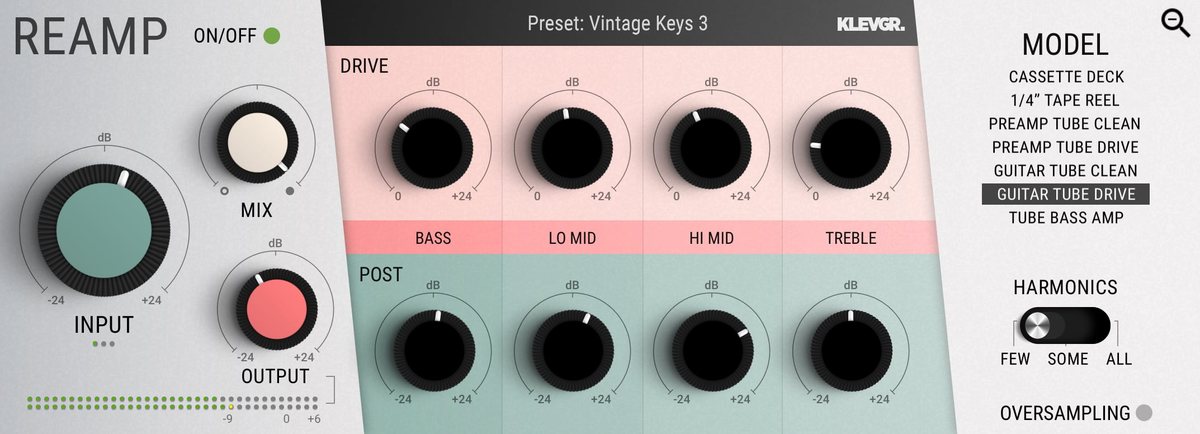
The seven models are based on real analog gear chosen by the maker. A four-band spectral drive lets you lift how strongly selected frequency bands work. A post-model EQ allows final adjustment, and there is a dry/wet mix and plenty of factory presets.
It supports macOS 10.10 or later (optimized for M1) and Windows 7 SP1 or later, in AU, VST or AAX formats on a 64-bit host (Plugin Boutique lists VST2, VST3 and AAX). There is also an AUv3 version for iPad. The trial download on the official site is the full version, with occasional audio dropouts.
Key features
Spectral saturation
Saturation is created using gain changes across the frequency spectrum. The maker says it is more CPU-efficient than typical saturators and adds almost no latency, which is useful to know when using many instances.
Seven models from measured gear
The seven models are based on real analog gear chosen by the maker, using data measured along input level and frequency.
Four-band spectral drive
You can pick frequency bands and push the processing harder there, for example emphasizing the low end alone or adding definition to the highs.
Character depends on input level
The maker says REAMP's character is largely determined by how much audio it is fed. You explore the effect by raising and lowering the level.
Post-model EQ
An EQ after the model lets you fine-tune the result. The maker labels this stage Fix it in post.
Dry/wet mix and presets
You can blend with the dry signal, and there are many factory presets. This is handy for adding texture with a light touch.
Oversampling and iPad version
Version 1.1.0 added optional 16x oversampling, and there is an AUv3 version for iPad. Check these if you want to use it on desktop and tablet.
Specifications
| Item | Details |
|---|---|
| Maker | Klevgrand |
| Type | Saturation / gear modeler |
| Models | Seven, based on real gear |
| Spectral drive | Four bands |
| Other | Post EQ, dry/wet, optional oversampling up to 16x |
| Formats | AU / VST / AAX (PB lists VST2, VST3, AAX, AU); AUv3 for iPad |
| Windows | Windows 7 SP1 or later (64-bit host) |
| Mac | macOS 10.10 or later (optimized for M1, 64-bit host) |
| Latest version | v1.2.2 (updated authorization system, minor fixes) |
| Trial | Same as the full version, with occasional audio dropouts |
What is included and system requirements
- REAMP itself (macOS / Windows)
- AUv3 version for iPad
- Seven models, four-band spectral drive, post EQ and factory presets
- Klevgrand Helper (app for updates, installation and activation)
How to use it
- Create a Klevgrand account and register the purchased product (with Plugin Boutique, redeem the code).
- Download and run the installer.
- Create a track in your DAW and insert REAMP.
- Choose one of the seven models.
- Adjust the input level to find how strongly it acts.
- Lift selected frequency bands with the spectral drive.
- Finish with the post EQ and set the amount with the dry/wet control.
- Save settings you like as user presets.
Where it may come in handy
Shaping guitar and bass tone
It can be tried on DI guitar or bass to add analog-style texture.
Light touch on a drum bus or vocal
With low CPU load and small latency, it could be used on many tracks in a large project.
Dirtying synths and loops
Because its character changes with input level, it may be worth trying on synths or drum loops when you want a little grit.
Who it may suit
- People who want analog-style saturation at light CPU load
- Those who want to emphasize processing in specific frequency bands
- Users who also want it on iPad
Good to know before you buy
- The trial is the same as the full version, with occasional audio dropouts.
- Plugin Boutique uses a redemption code, activated through a Klevgrand account.
Price
$59.99 (Klevgrand official site, checked 2026-10-27). Prices can vary by region and promotion, so check the official page before buying.
More of the same kind
Other introduction articles of the same kind.
- Bogren Digital Ampknob Duet
- Kuassa Amplifikation VVV
- Waves Nx Germano Studios New York
- Universal Audio Universal Audio dbx 160 Compressor/Limiter
- Waves X-FDBK
- Sonnox Oxford Envolution
We have introduced 26 other products from Klevgrand.
See the full list in Product database: Effects.
Sources: klevgrand.com pluginboutique.com (checked 2026-10-27)










Comments