
Disclosure: This page may contain affiliate links. Prices were checked on the date shown and may change.
An introduction to United Plugins FirePreamp, based on information from the maker and distributors: what it does, how to use it and who it may suit. It is not scored.
Proper gain staging is critical but often tedious. FirePreamp automates this with Detect Input Level, analyzing your audio to set the optimal input gain instantly.
— United Plugins official site
What is FirePreamp?
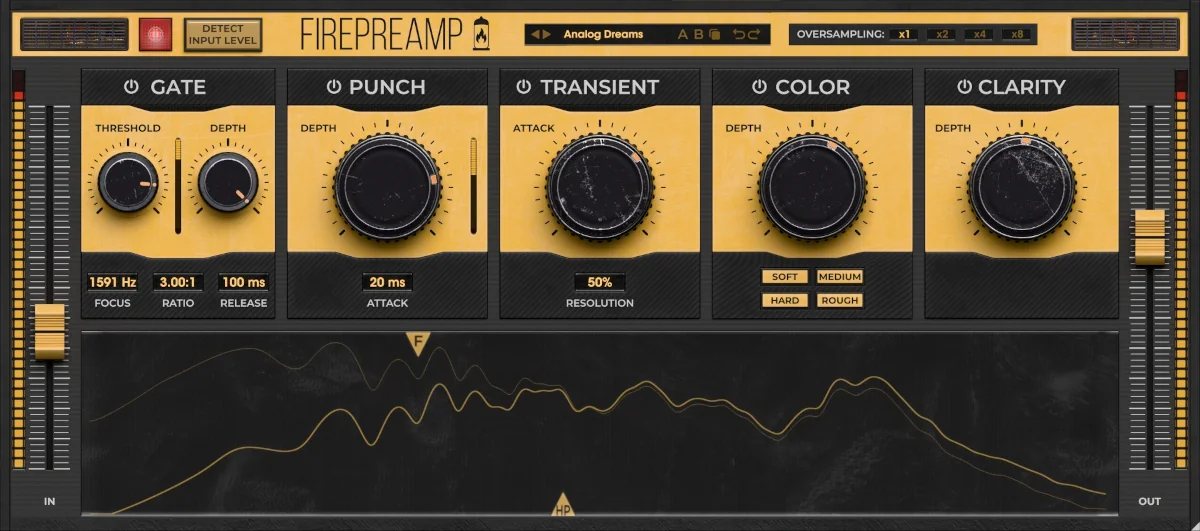
FirePreamp is a pre-mix utility plugin from United Plugins, released under the FireSonic name. Despite the name, the maker describes it as more than a preamp: a preprocessing tool for tidying raw recordings before they reach the mix. It brings gain adjustment, low-end clean-up, gating, saturation, clarity and transient control into one window.
The entry point is gain staging, meaning how loudly each stage receives the signal. A function called Detect Input Level analyzes the incoming audio and sets a suitable input gain automatically. A high-pass filter can then be moved on the built-in spectrum analyzer, so you can remove unwanted low-end rumble while watching the spectrum.
The tone-shaping side has two parts. Color is a saturation section with four modes from Soft to Rough, meant for adding harmonics so a source cuts through. Clarity is described as a modern algorithm that defines the upper spectrum. There is also an analog-style Punch module and a transient shaper for adjusting the attack.
It runs on Windows 10/11 (64-bit, Intel/AMD with SSE2) and macOS 10.14 Mojave or later (Intel, AMD and Apple silicon). Licensing uses a license file, and the maker says no iLok, dongle or internet activation is required. A 15-day unlimited trial is available.
Key features
Automatic input level detection
Detect Input Level analyzes the audio you play through it and sets the input gain automatically. For recordings whose levels vary from take to take, it may give you a consistent starting level for the plugins that follow.
High-pass filter on a spectrum display
The high-pass filter is moved directly on the built-in analyzer. The maker suggests placing it just below the lowest fundamental of the source to free up headroom. It looks suited to cleaning up rumble such as mic handling noise or floor vibration.
Gate with a Focus control
A normal gate can open on neighboring sounds. The Focus control narrows the frequency the gate responds to; the maker gives the example of tuning it to a snare's fundamental so hi-hat and cymbal bleed is ignored. Depth, Ratio and Release are also adjustable.
Color: four saturation modes
Four saturation modes run from Soft to Rough. Added harmonics can help a source stand out in a mix. It is an option for adding warmth to vocals or drums.
Clarity: defining the upper range
Clarity is a dedicated module that brightens and defines the spectrum. The maker positions it as the clarity counterpart to Color's harmonic richness. It can be tried on recordings that sound dull.
Punch and Transient shaper
Punch adds an analog-style roundness and dynamic consistency. The Transient shaper lets you increase or reduce the attack with the Attack and Resolution controls. The maker mentions softening a harsh pick or adding power to drums.
Sleep on silence and 64-bit processing
The plugin detects silence and enters a sleep mode that uses virtually no CPU. Internal processing is 64-bit and it handles sample rates up to 192 kHz and higher. This is useful to know when placing several instances in a large project.
Specifications
| Item | Details |
|---|---|
| Maker | United Plugins (FireSonic) |
| Type | Pre-mix utility plugin (gain, gate, saturation, transients) |
| Modules | Input level detection, high-pass filter, gate, Color, Clarity, Punch, Transient |
| Processing | 64-bit internal, sample rates of 192 kHz and above |
| License | License file (no iLok, dongle or internet activation) |
| Trial | 15 days, no restrictions |
| Windows | Windows 10/11 (64-bit, Intel/AMD with SSE2) |
| Mac | macOS 10.14 Mojave or later (64-bit, Intel/AMD/Apple silicon) |
| Updates | Free (per the maker) |
What is included and system requirements
- The plugin itself (installer and license file)
- Supported OS: Windows 10/11 (64-bit), macOS 10.14 or later (Intel and Apple silicon)
- 15-day free trial to try before buying
- A host that supports sidechain routing is needed (the maker warns about hosts such as GarageBand)
How to use it
- Get the trial or the purchased version from the official site or Plugin Boutique and run the installer.
- If you bought it, activate with the license file (no internet activation is needed per the maker).
- Insert FirePreamp as the top plugin on the track in your DAW.
- While playing the audio, use Detect Input Level to set the input gain automatically.
- Move the high-pass filter on the spectrum display to remove unwanted low end.
- If you use the gate, set Focus to the frequency you want it to react to and adjust Depth, Ratio and Release.
- Choose a tonal direction with Color and Clarity, and shape the attack with Punch and the Transient section if needed.
- Drag the arrow at the bottom right of the window to resize the interface to your screen.
Where it may come in handy
Prepping a home-recorded vocal
Home vocal takes often differ in level or carry low-frequency noise. Placing FirePreamp at the head of the chain, setting the input gain and clearing the low end with the high-pass filter may make it easier to set the compressor and EQ that follow.
Reducing bleed on drums
Drum recordings often have hi-hat bleed in the snare mic. The Focus gate lets you narrow its response to the snare's fundamental, which may reduce the effect of the bleed.
Finishing touches on a bus
It could be placed on a drum or guitar bus, adding a little harmonic content with Color and defining the sound with Clarity. The artist comments on the maker's page also mention using it on single tracks and buses.
Adjusting guitar attack
For a guitar with a harsh pick attack, the maker mentions using the Transient shaper to soften the attack.
Who it may suit
- People who want to prepare raw recordings with a single plugin
- Those who want to use a gate on drums while reducing the effect of bleed
- Anyone who wants to try saturation and high-end definition in one window
- Users who prefer not to rely on iLok or internet activation
Good to know before you buy
- The maker warns that hosts without sidechain routing, such as GarageBand, do not work well with it.
- Prices are shown in US dollars on both the official site and Plugin Boutique. The trial lasts 15 days with no feature limits.
- How much the sound changes depends on the material, so trying the trial on your own recordings is the reliable check.
Price
Please check the official page for the price.
See FirePreamp on the product page
More of the same kind
Other introduction articles of the same kind.
- Waves TRACT SPL Meter
- IK Multimedia AmpliTube Fender Collection 2
- iZotope Neutron 5
- NUGEN Audio Halo Upmix
- Waves Maserati GTi
- Boz Digital Labs ProVocative
We have introduced 34 other products from United Plugins.
- United Plugins United Plugins VoxDucker
- United Plugins Bassment
- United Plugins FireSpacer
- United Plugins Bassment Core
- United Plugins Electrum Core
See the full list in Product database: Effects.
Sources: unitedplugins.com pluginboutique.com (checked 2026-10-27)










Comments