
Disclosure: This page may contain affiliate links. Prices were checked on the date shown and may change.
An introduction to Waves Maserati GTi, based on information from the maker and distributors: what it does, how to use it and who it may suit. It is not scored.
It’s not an amp sim or a pedalboard, but a toolkit for solid guitar sounds that can slide right into a mix, or drive an amp.
— Waves official site
What is Maserati GTi?
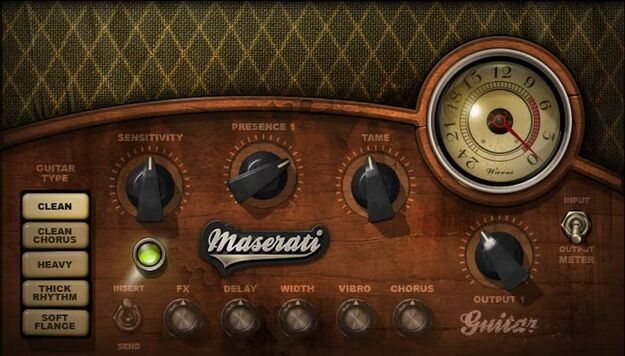
Maserati GTi is a guitar processor made by Waves with mix engineer Tony Maserati. It is described as neither an amp simulator nor a pedalboard, but a toolkit that can go straight into a mix or sit in front of an amp.
It has five characters: Clean, Clean Chorus, Heavy, Thick Rhythm and Soft Flange, and the available effect options differ per character.
Settings cover clean tones, wide chorus, pushing distorted guitars through dense arrangements and livening up rhythm guitar. Classic rotating speaker and vibrato effects are included.
Formats are VST / AU / AAX on Mac and VST / AAX on Windows. It ships with 34 presets.
Key features
Five characters
You choose among Clean, Clean Chorus, Heavy, Thick Rhythm and Soft Flange, deciding the direction first and refining details after.
Clean and Heavy modes
These modes are described as delivering rhythm guitar tones, switched according to the role in the song.
Chorus range
Chorus ranges from subtle to deep, which may suit clean guitars that need width.
Front end for amps and sims
It is presented as a front end that can add realism and feel in front of amps and simulators.
Rotary speaker and vibrato
Classic rotating speaker and vibrato effects are included and can also be tried on other sources.
Tame parameter
Tame controls peaks and thickens the body, which may help with spikes from hard playing.
34 presets
34 presets let you explore what it can do, as an entry point.
Specifications
| Item | Details |
|---|---|
| Maker | Waves |
| Type | Guitar processor |
| Characters | Clean / Clean Chorus / Heavy / Thick Rhythm / Soft Flange |
| Presets | 34 |
| Designed with | Tony Maserati |
| Formats (Mac) | VST / AU / AAX |
| Formats (Windows) | VST / AAX |
What is included and system requirements
- Mac: macOS Monterey 12, Ventura 13, Sonoma 14, Sequoia 15
- Windows: Windows 10 or later
- 34 presets
How to use it
- Install via Waves Central and activate the license.
- Insert it on a guitar track.
- Choose a character.
- Pick a nearby preset.
- Adjust Tame and the effects.
- If you use an amp simulator, place it before the amp and compare.
Where it may come in handy
Adding width to a clean guitar
Clean Chorus may change the impression of an arpeggio.
Making distorted guitar stand out
Trying Heavy lets you check how it sits in a dense arrangement.
Livening up rhythm guitar
Thick Rhythm may change the drive of chord strumming.
Who it may suit
- People who want to shape guitar tone quickly
- People looking for a front end for amp simulators
- People who want to add character to DI guitar
Good to know before you buy
- Waves states that it is not an amp simulator.
- Plugin Boutique showed a time-limited sale (until Nov 01).
How it differs from similar products
We do not pick a winner; the official figures are placed side by side.
CLA Effects
Maserati GTi has five guitar characters; CLA Effects is a general special-effects set with distortion, delay and reverb.
Price
$99 (Plugin Boutique, checked 2026-10-27). Prices can vary by region and promotion, so check the official page before buying.
See Maserati GTi on the product page
More of the same kind
Other introduction articles of the same kind.
- United Plugins FirePreamp
- Mastering The Mix REFERENCE 3
- accentize dxLevel
- Solid State Logic Acoustifier
- W. A. Production BeatQuake
- Karanyi Sounds Cloudmax 3
We have introduced 215 other products from Waves.
- Waves Waves CLA Nx
- Waves C4 Multiband Compressor
- Waves OneKnob Louder
- Waves Waves Tune Real-Time
- Waves Nx Germano Studios New York
See the full list in Product database: Effects.
Sources: pluginboutique.com (checked 2026-10-27)










Comments