
Disclosure: This page may contain affiliate links. Prices were checked on the date shown and may change.
An introduction to Waves TRACT SPL Meter, based on information from the maker and distributors: what it does, how to use it and who it may suit. It is not scored.
The TRACT SPL Meter gives you a simple, immediate way to monitor sound pressure levels directly inside the eMotion LV1 mixer or the SuperRack plugin host.
— Waves official site
What is TRACT SPL Meter?
TRACT SPL Meter is a sound pressure level (SPL) plugin from Waves. It runs inside the eMotion LV1 mixer and the SuperRack plugin host.
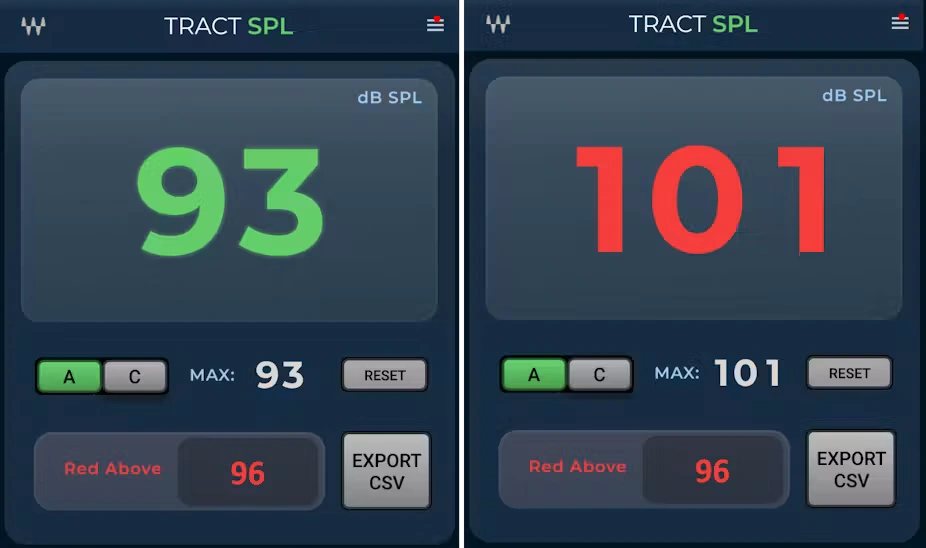
It shows the current SPL as a large readout and holds the maximum level. You can choose A or C weighting and set your own threshold that triggers a warning when exceeded.
SPL measurements can be logged continuously and exported to a CSV file, which may help when reviewing levels after an event.
It is meant for Waves live hosts rather than a typical DAW, letting you watch levels inside the mixing environment without a separate app.
Key features
Large SPL readout
The current sound pressure level is shown as a large readout, which could help during a live mix.
Maximum hold
It holds the highest level reached so you can check peak volume later.
A and C weighting
You can switch between A and C weighting to suit the venue or purpose.
Threshold warning
Set your own threshold and get a clear warning when it is exceeded, useful where a venue has a level limit.
Logging and CSV export
SPL measurements are logged continuously and can be exported as CSV, suited to documentation and review.
Waves live environment
It runs in eMotion LV1 and SuperRack, for those who want to stay inside a live workflow.
Specifications
| Item | Details |
|---|---|
| Type | SPL meter for live use |
| Hosts | eMotion LV1 / SuperRack |
| Weighting | A / C |
| Logging | Continuous logging, CSV export |
| Mac | macOS Monterey 12 / Ventura 13 / Sonoma 14 / Sequoia 15 (VST / AU / AAX) |
| Windows | Windows 10+ (VST / AAX) |
What is included and system requirements
- TRACT SPL Meter plugin
- VST / AU / AAX on Mac, VST / AAX on Windows
- Licence activation via a Waves account
How to use it
- Create and log in to a Waves account.
- Install the purchased licence with Waves Central.
- Launch eMotion LV1 or SuperRack.
- Insert TRACT SPL Meter on the channel or measurement input you want to monitor.
- Choose A or C weighting.
- Set your threshold.
- Record the log as needed and export it to CSV afterwards.
Where it may come in handy
Managing live volume
Set a threshold to the venue limit and notice when it is exceeded.
Recording after a show
Export the log to CSV to review how SPL changed during an event.
Checks during rehearsal
Switch between A and C weighting to see tendencies including low-frequency pressure.
Who it may suit
- Live engineers using eMotion LV1 or SuperRack
- Those who need to log venue volume
- Anyone who wants SPL without a separate app
Good to know before you buy
- It is made for Waves live hosts; check the maker about use in a general DAW.
- Check the maker's specifications for the inputs and equipment needed for measurement.
- Waves often runs sales, so check the price at the time of purchase.
Price
Please check the official page for the price.
See TRACT SPL Meter on the product page
More of the same kind
Other introduction articles of the same kind.
- Sound Particles Density
- Sugar Bytes Looperator
- Mellowmuse Mellowmuse ATA Auto Time Adjuster
- Bogren Digital Ampknob BDM '75
- Baby Audio Super VHS
- United Plugins FireSpacer
We have introduced 215 other products from Waves.
- Waves JJP Strings & Keys
- Waves CLA Bass
- Waves Renaissance Bass
- Waves Curves Resolve
- Waves TRACT System Calibration
See the full list in Product database: Effects.
Sources: pluginboutique.com (checked 2026-10-27)










Comments