
Disclosure: This page may contain affiliate links. Prices were checked on the date shown and may change.
An introduction to FabFilter FabFilter Pro-MB, based on information from the maker and distributors: what it does, how to use it and who it may suit. It is not scored.
Instead of conventionally splitting the entire spectrum with crossovers, Pro-MB enables you to directly create a new band at the frequency range you want to work on.
— FabFilter official site
What is FabFilter Pro-MB?
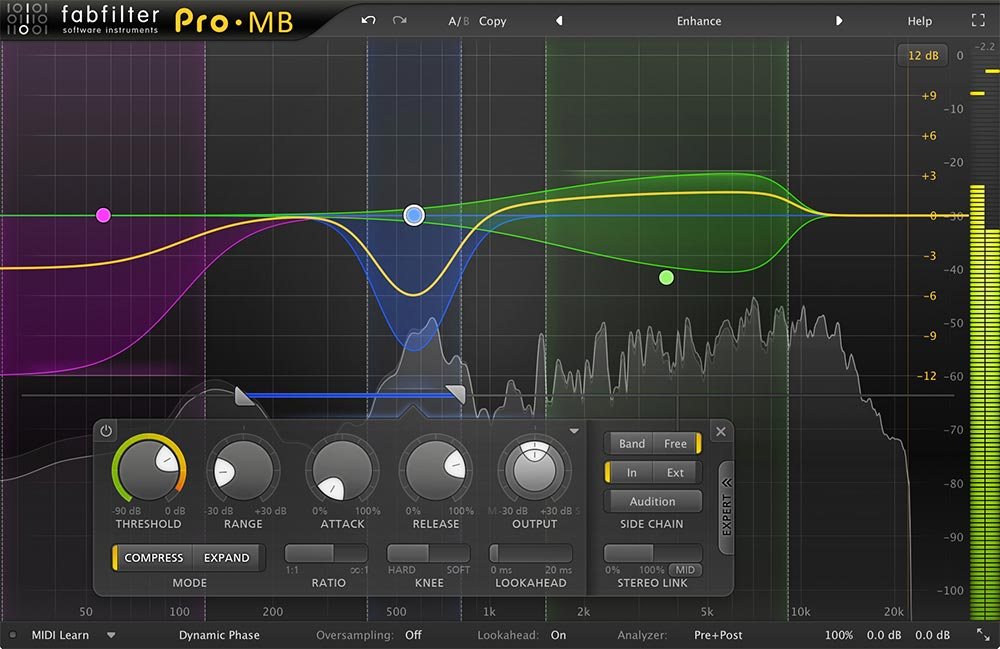
FabFilter Pro-MB is a multiband compression and expansion plug-in. The official page describes it as making multiband dynamics, which can be difficult to set up and control, intuitive to work with.
Rather than splitting the whole spectrum with crossovers, it lets you create a band directly at the frequency range you want to work on. The interactive multiband display shows that the rest of the spectrum stays untouched, and bands can be snapped together to form a traditional crossover system.
It offers three processing modes: Dynamic Phase, Linear Phase and Minimum Phase. Dynamic Phase is described as adding no latency or pre-ringing and introducing only minor phase changes when the gain changes.
Up to six bands can be placed anywhere in the spectrum. The page says it handles dynamics work from transparent compression, limiting and expansion to pumping upward compression and gating.
Key features
Create bands where you need them
Instead of dividing the full range with crossovers, you place a band on the range you want to treat. The display shows the rest is untouched, which may help when you only need to deal with one region.
Three processing modes
Choose Dynamic Phase (no latency or pre-ringing), Linear Phase or Minimum Phase to suit the task and your setup.
Detailed per-band settings
Each band has threshold, range, attack, release, ratio, knee, lookahead (up to 20 ms), stereo linking, mid- or side-only processing, external sidechain and triggering on a separate frequency range.
Adjustable crossover slopes
The steepness of each crossover slope can be set between 6 dB/oct and 48 dB/oct.
Dry/wet 0 to 200%
The global dry/wet mix runs from 0% to 200%, scaling the total effect.
Analyzer and metering
A real-time frequency analyzer with pre- and post-processing views and a freeze feature, plus output metering.
Specifications
| Item | Details |
|---|---|
| Bands | Up to 6 |
| Processing modes | Dynamic Phase / Linear Phase / Minimum Phase |
| Crossover slope | 6 to 48 dB/oct |
| Lookahead | Up to 20 ms |
| Dry/wet | 0 to 200% |
| Plug-in formats | VST, VST3, AU, CLAP, AAX Native, AudioSuite |
| Windows | Windows 11 / 10 / 8 / 7 / Vista (64-bit or 32-bit) |
| Mac | macOS 10.13 or higher (64-bit only, Apple Silicon or Intel) |
What is included and system requirements
- Windows: VST 2/3, CLAP host or Pro Tools
- Mac: AU, VST 2/3, CLAP host or Pro Tools
- Stereo and mono plug-ins
- 30-day trial available (official page)
How to use it
- Get it from the official site or a retailer and install the plug-in.
- Open your DAW and insert Pro-MB on a track or bus.
- Click in the display at the frequency range you want to work on to create a new band.
- Set the threshold and ratio of the band to decide how much compression or expansion is applied.
- Adjust attack and release.
- Choose a processing mode such as Dynamic Phase and adjust the global dry/wet while watching the analyzer.
Where it may come in handy
Treating one range of a vocal
You might place a band on a harsh range and compress only that region.
Band-by-band control on drum or mix buses
It may help when only the lows or only the highs are getting out of hand.
Adjustments before mastering
You could switch between modes such as Linear Phase and check the overall balance.
Mid/side processing
Mid- or side-only band settings could be tried for adjusting stereo image.
Who it may suit
- People who want dynamics processing on specific frequency ranges only
- People who want adjustments between EQ and compression
- People who use other FabFilter plug-ins
Good to know before you buy
- The official page offers a 30-day trial.
- Up to six bands; stereo and mono plug-ins are available.
- Pro-MB is also included in FabFilter's Total, FX and Pro bundles.
- An iPad version is mentioned on the official page.
Price
$199 (Plugin Boutique, checked 2026-10-27). Prices can vary by region and promotion, so check the official page before buying.
See FabFilter Pro-MB on the product page
More of the same kind
We have introduced 85 compressors. Here are some of the others.
- Black Rooster Audio KH-COMP1
- Waves Linear Phase Multiband Compressor
- Antelope Audio Antelope Audio BX3
- Universal Audio API 2500 Bus Compressor
- BLEASS BLEASS Multiband Compressor
- Antelope Audio Liverpool
We have introduced 4 other products from FabFilter.
For a side-by-side comparison scored on the same criteria, see our comparison of compressors.
See the full list in Product database: Effects.
Sources: fabfilter.com pluginboutique.com (checked 2026-10-27)










Comments